Skip to content
  • Categories
Collapse
Solibri Society Forum
  1. Home
  2. General Discussion
  3. Which rule to check that a property value doesn't contain a certain letter?

Which rule to check that a property value doesn't contain a certain letter?

Scheduled Pinned Locked Moved General Discussion
9 Posts 6 Posters 1.9k Views
  • Oldest to Newest
  • Newest to Oldest
  • Most Votes
Log in to reply
This topic has been deleted. Only users with topic management privileges can see it.
  • Mats_KnutssonM Offline
    Mats_KnutssonM Offline
    Mats_Knutsson
    wrote on last edited by Mats_Knutsson
    #1

    I kind of got stuck on this probably super simple thing…
    Mats

    1 Reply Last reply
    0
    • JSNJ Offline
      JSNJ Offline
      JSN
      wrote on last edited by JSN
      #2

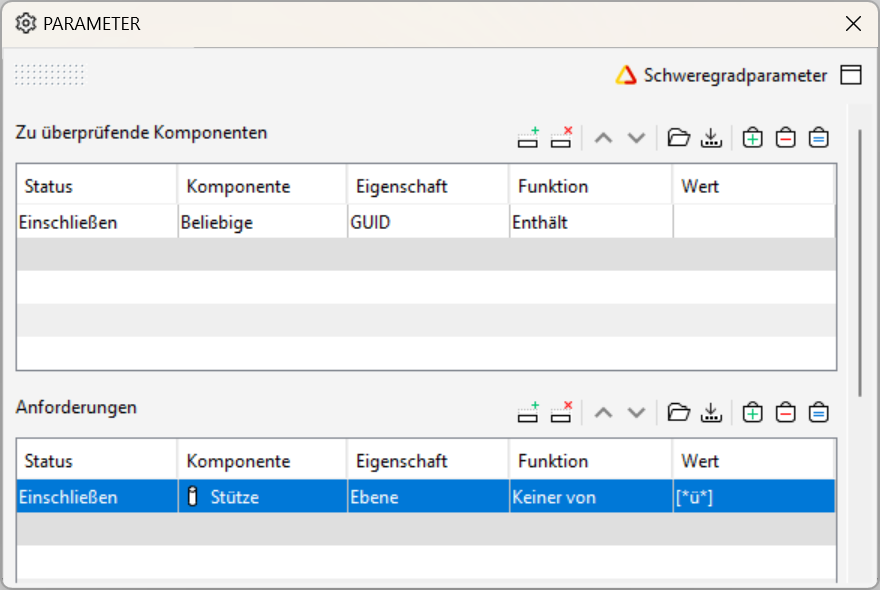
      230?

      51d69d83-5f09-4c4c-8b1c-17a0a9d23f0c-image.png

      There is no “does not contain” so using “None of” should be the way to go.

      However, there is a bug or a feature? Afaik the first time the list entries are created you cannot modify the entries unless you close/open Solibri or the ruleset. Then it should work. @Solibrians are you aware of that?

      Mats_KnutssonM M 2 Replies Last reply
      0
      • paola bronzoP Offline
        paola bronzoP Offline
        paola bronzo
        wrote on last edited by
        #3

        Adding “does not contain” is not a bad idea at all!

        1 Reply Last reply
        0
        • Mats_KnutssonM Offline
          Mats_KnutssonM Offline
          Mats_Knutsson
          replied to JSN on last edited by Mats_Knutsson
          #4

          @JSN said in Which rule to check that a property value doesn’t contain a certain letter?:

          230?

          51d69d83-5f09-4c4c-8b1c-17a0a9d23f0c-image.png

          There is no “does not contain” so using “None of” should be the way to go.

          However, there is a bug or a feature? Afaik the first time the list entries are created you cannot modify the entries unless you close/open Solibri or the ruleset. Then it should work. @Solibrians are you aware of that?

          Aha …must be a bug. I got it working…thanks 🙂

          1 Reply Last reply
          0
          • M Offline
            M Offline
            manuel.furia Solibrians
            replied to JSN on last edited by
            #5

            @JSN Hi, regarding this: “Afaik the first time the list entries are created you cannot modify the entries”. Which version of Solibri were you using? Was is 9.13.5 or earlier?

            JSNJ 1 Reply Last reply
            0
            • JSNJ Offline
              JSNJ Offline
              JSN
              replied to manuel.furia on last edited by
              #6

              @manuel-furia said in Which rule to check that a property value doesn’t contain a certain letter?:

              9.13.5

              Yes, 9.13.5.12

              1 Reply Last reply
              0
              • P Offline
                P Offline
                Pasi Paasiala Solibrians
                wrote on last edited by
                #7

                @JSN Can you tell the exact sequence which does not work when you say “Afaik the first time the list entries are created you cannot modify the entries”?

                At least I can do the following:

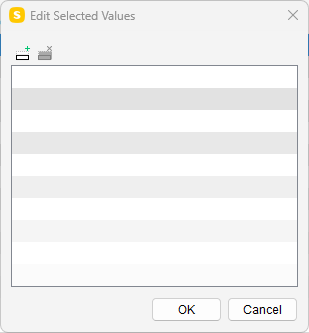
                1. Press add value
                  d43a88ec-ec21-4c93-a25a-e238f2239528-image.png
                2. I need to choose some value from the list to add it to the selected values:
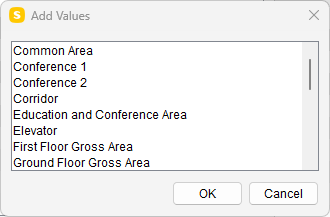
                  30b4ae84-ccca-4ab2-8853-dfdfc2ea7248-image.png
                3. After that I can go and edit the value as I want (need to double-click on it):
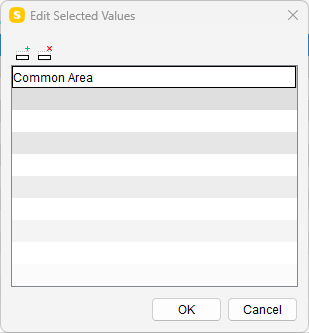
                  871327d6-bb35-4939-ac11-026d94c44086-image.png
                JSNJ 1 Reply Last reply
                0
                • JSNJ Offline
                  JSNJ Offline
                  JSN
                  replied to Pasi Paasiala on last edited by
                  #8

                  @Pasi-Paasiala

                  Sure. What is my mistake?

                  Animation1.gif ,

                  1 Reply Last reply
                  0
                  • jakub.rusinJ Offline
                    jakub.rusinJ Offline
                    jakub.rusin Solibrians
                    wrote on last edited by
                    #9

                    @JSN @Pasi-Paasiala @manuel-furia
                    Seems that some Properties have this problem and other don’t
                    Layer, Building, Discipline, Federated Floor (and possible other) are not editable.
                    Application, Name (and others) are editable.
                    I will create a ticket for this.

                    1 Reply Last reply
                    0

                    Copyright © 2025 Solibri Inc. | Powered by NodeBB

                    • Login

                    • Don't have an account? Register

                    • Login or register to search.
                    • First post
                      Last post
                    0
                    • Categories