Skip to content
  • Categories
Collapse
Solibri Society Forum
  1. Home
  2. General Discussion
  3. Solibri error

Solibri error

Scheduled Pinned Locked Moved General Discussion
8 Posts 5 Posters 1.2k Views
  • Oldest to Newest
  • Newest to Oldest
  • Most Votes
Log in to reply
This topic has been deleted. Only users with topic management privileges can see it.
  • J Offline
    J Offline
    jordiversluis
    wrote on last edited by
    #1

    Hi, when I want to open an issue or just pan, rotate or sectioning a model Solibri stops working en quits.

    I already reinstalled Solibri (latest version) and uninstalled/reinstalled video drivers.

    Any idea how I can fix this? Impossible to work with Solibri this way.

    1 Reply Last reply
    0
    • RicardoR Offline
      RicardoR Offline
      Ricardo
      wrote on last edited by Ricardo
      #2

      Is Solibri actually using your dedicated video card?
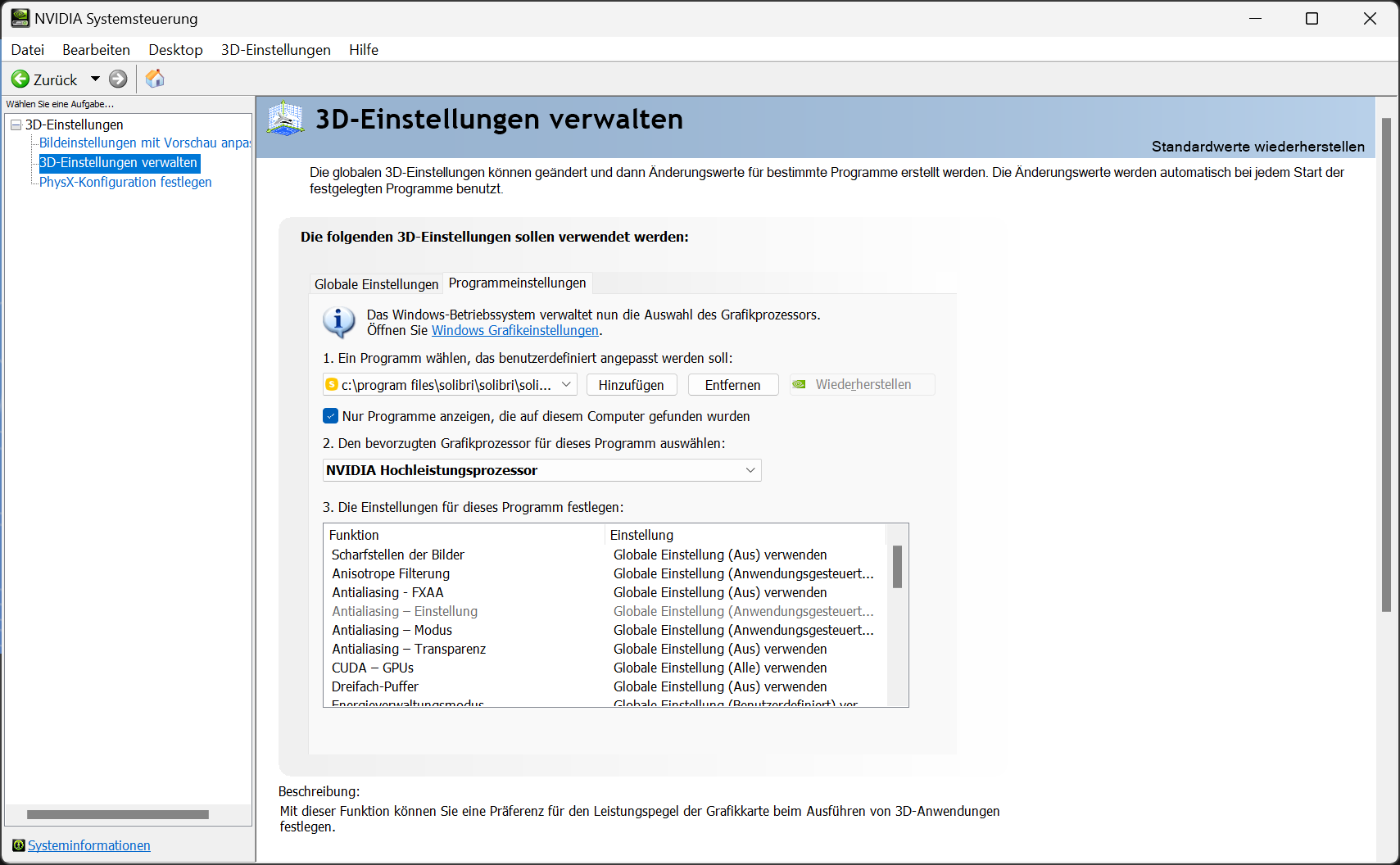
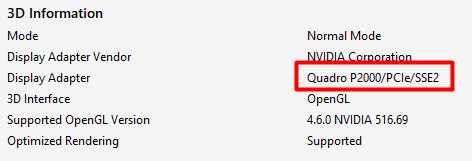
      I had problems with our laptops that Solibri by default would use the integrated video chip, instead of the dedicated Video card. This gave really bad performance. reinstalling didnt solve that, we had to manually adress that Solibri would use the dedicated card in the nvidea control panel.

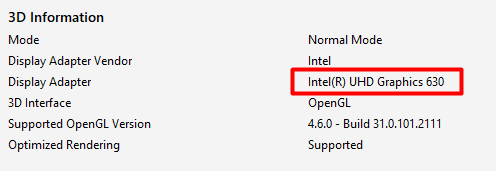
      You can check that in File > Info > Display adapter. (Assuming you have a device with an integrated chip)

      1 Reply Last reply
      0
      • MattiM Offline
        MattiM Offline
        Matti Solibrians
        wrote on last edited by
        #3

        Some tips:

        1. If your PC has multiple GPUs try the other one
          2.Try disabling Show component edge lines in 3D settings
        2. Try disabling Fill sectioned components in Sectioning settings.
        1 Reply Last reply
        0
        • BvanDalsumB Offline
          BvanDalsumB Offline
          BvanDalsum
          wrote on last edited by BvanDalsum
          #4

          How do you switch between the GPU’s?
          i think Solibri uses the wrong one

          afbeelding.png
          afbeelding.png

          1 Reply Last reply
          0
          • JSNJ Offline
            JSNJ Offline
            JSN
            wrote on last edited by JSN
            #5

            @BvanDalsum
            You should be able to change it in the Nvidia Control Panel …

            image.png

            BvanDalsumB 1 Reply Last reply
            1
            • RicardoR Offline
              RicardoR Offline
              Ricardo
              wrote on last edited by
              #6

              @BvanDalsum yes, it is using the wrong one. You can change it via the Nvidia control panel as @JSN posted.
              If you don’t have the control panel, you can install it via the microsoft store.

              @Matti-Kannala , can you make a support ticket for this problem?

              BvanDalsumB 1 Reply Last reply
              0
              • BvanDalsumB Offline
                BvanDalsumB Offline
                BvanDalsum
                replied to JSN on last edited by
                #7

                @JSN

                Thanx a lot i changed it immideatly

                1 Reply Last reply
                0
                • BvanDalsumB Offline
                  BvanDalsumB Offline
                  BvanDalsum
                  replied to Ricardo on last edited by
                  #8

                  @Ricardo
                  thnx
                  9a78c417-1eef-4425-8072-031bd0ab4b10-afbeelding.png

                  1 Reply Last reply
                  2

                  Copyright © 2025 Solibri Inc. | Powered by NodeBB

                  • Login

                  • Don't have an account? Register

                  • Login or register to search.
                  • First post
                    Last post
                  0
                  • Categories