
multiple values
-
Yes, you can use “one of” in filter definition.
Solibri shows you the available values for the property you have chosen. If you need to find the elements whose cell values match exactly the values you are looking for, select them.
If you need to search those cells that contain the values, you can still use “one of”: you should select as many available values as that you are looking for, then edit the available values by double clicking on them and writing the values you are looking for, each in one row, enclosing them with * wildcard character (for example: if you are looking for " wall ", write " wall ". You can also write " wall* " or " *wall " if you want to search respectively the cells that start or end with " wall ").
-
@brinkman Can’t you just add multiple lines?
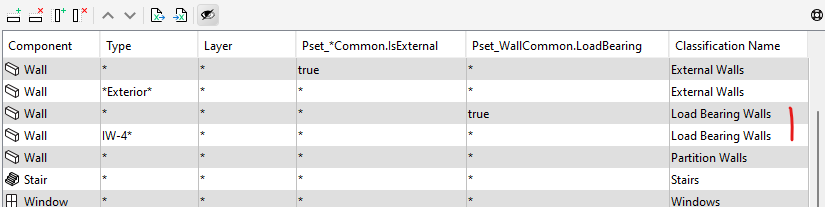
-
@brinkman said in multiple values:
We work from a large externally managed list. We want to keep the link with the original list as intact as possible.
Keep the list as it is and use e.g. Power Query to transform into a new file as needed that can be linked?


Copyright © 2025 Solibri Inc. | Powered by NodeBB