
Rule 226 Free Area in Front of Components - Manage double doors
-
Good day to you,
has anybody here a solution for dealing with double doors in the Rule 226 Free Area in Front of Components, so that I don´t have to check each of those visually.
Example of “incorrect” result with double door:
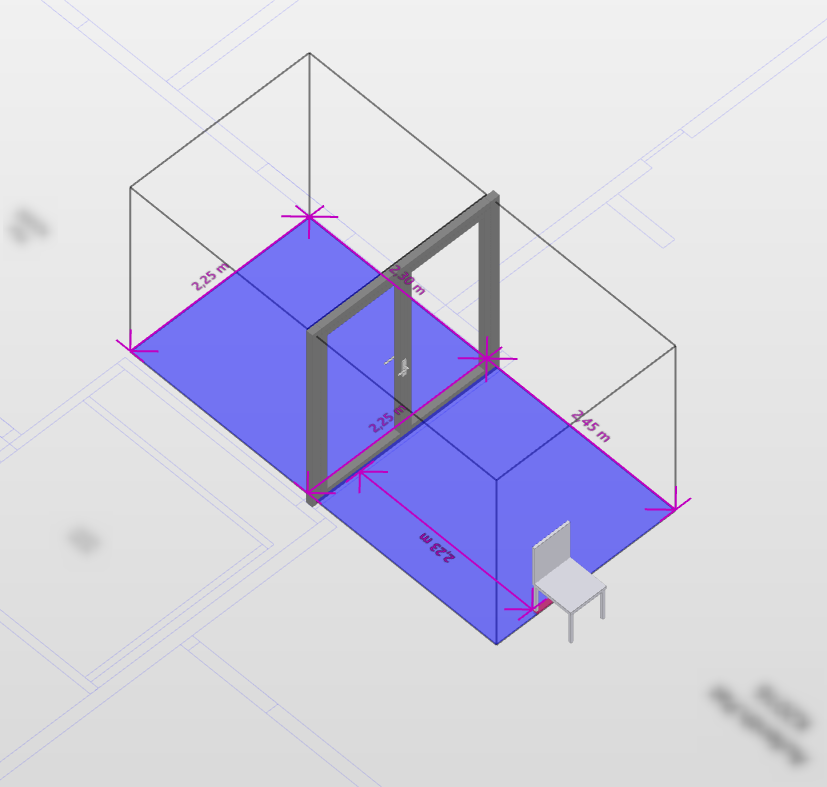
I´m open for any tips and tricks (also for using different rules)
Kind regards
Larissa -
@Solibrians I have a bit more insight into this as it seems to be a problem with the model I’m using. It is not exported “correctly” from allplan so that solibri can understand that this is a double door. A college of mine uses a model from Revit and there solibri uses the real length of the door.
So I guess there’s no solution in solibri if this information is missing or not exported correctly? Do you have any information on what exact parameters solibri needs?
-
@HechtwieFisch One thing you can do is that you create a specific rule for these doors, if you can filter them out separately, and then parameterize the rule according to the dimensions that you measure from the door. This works, if there are a few different kinds of instances of this door.

Copyright © 2025 Solibri Inc. | Powered by NodeBB