Skip to content
  • Categories
Collapse
Solibri Society Forum
  1. Home
  2. General Discussion
  3. Check Type Values are Unique

Check Type Values are Unique

Scheduled Pinned Locked Moved General Discussion
11 Posts 4 Posters 3.0k Views
  • Oldest to Newest
  • Newest to Oldest
  • Most Votes
Log in to reply
This topic has been deleted. Only users with topic management privileges can see it.
  • K Offline
    K Offline
    keithwilkinson
    wrote on last edited by
    #1

    Hi all,

    Can anyone point me in the direction of how to check type values are unique within an IFC? For instance (and please pardon the Revit lingo here) I need to check the Type Marks for all doors of a particular type don’t conflict with other door types. Currently, I only seem to be able to apply checks at an element level, i.e. each individual door which will of course return duplicates.

    Any pointers for this would be gratefully received.

    Cheers

    K.

    1 Reply Last reply
    0
    • K Offline
      K Offline
      keithwilkinson
      wrote on last edited by keithwilkinson
      #2

      Has no-one got any thoughts on this?

      1 Reply Last reply
      0
      • JSNJ Offline
        JSNJ Offline
        JSN
        wrote on last edited by
        #3

        Not sure if your question was precise enough. I have a hard time to understand it.

        1 Reply Last reply
        0
        • K Offline
          K Offline
          keithwilkinson
          wrote on last edited by
          #4

          Ah, okay, let me try and elaborate. In a project, I have instances of 50 blank doors. However, those 50 doors are made up of 3 door types, the only variation is in the width which are 910, 1010, and 1110mm wide. These are labeled with a corresponding Type Code in the format ‘IDTnn’ as shown below.

          910mm wide : IDT_01A
          1010mm wide : IDT_01B
          1110mm wide : IDT_01C

          Currently, I only seem to be able to check data at the instance level, i.e. all 50 individual doors. So I have 25 doors that show IDT_01A, 20 doors as IDT_01B, and 5 doors as IDT_01C. If I run a duplication check I get errors even though the data is valid, i.e. at a type level the values are unique.

          What I want to happen is if the 1010mm wide door was also mistakenly labeled IDT_01A, i.e. it is no longer unique, I want Solibri to flag an error.

          So my basic question is, how do I check data at a Type rather than instance level?

          1 Reply Last reply
          0
          • B Offline
            B Offline
            brinkman
            wrote on last edited by
            #5

            with ruleset 171/1.4
            You can say that if 1 property is the same, a second property must also match.

            Can you do it with that?

            1 Reply Last reply
            0
            • K Offline
              K Offline
              keithwilkinson
              wrote on last edited by
              #6

              I may be missing an angle, but I can’t see how that would work. Every 910mm door would have the same code, so every door would in theory pass that test. What I need to do is check if two different types have the same value…

              1 Reply Last reply
              0
              • Harmen JorritsmaH Offline
                Harmen JorritsmaH Offline
                Harmen Jorritsma
                wrote on last edited by
                #7

                Sometimes a ruleset is the best way to check.
                Maybe you can try to make een ITO to check quickly if the type mark are te same
                Bij grouping the mark colum there would be only 20 IDT_01A with the same bouding box. If the bouding box is different you will see two line with IDT_01a witf different bouding box with
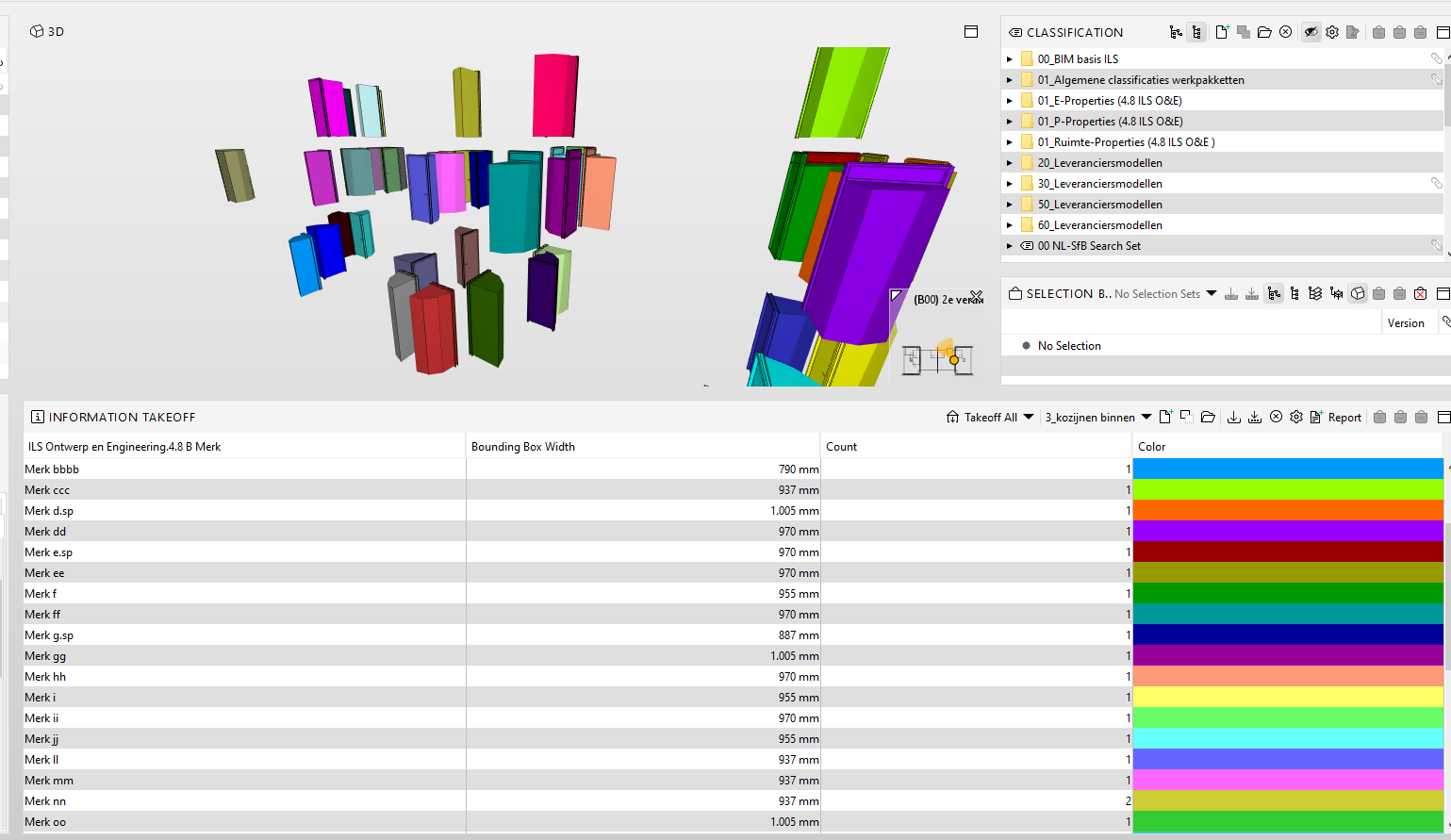
                image.png

                Met vriendelijke groet,
                Harmen Jorritsma

                BIM regisseur Van Wijnen Amsterdam
                Diemerhof 32 | 1112 XN Diemen | KvK 32129744

                020 -36 44 000 | 06-83 15 66 88 | LinkedIn | www.vanwijnen.nl
                Volg ons op Facebook en Twitter

                JSNJ 1 Reply Last reply
                0
                • K Offline
                  K Offline
                  keithwilkinson
                  wrote on last edited by
                  #8

                  Thanks, I could definitely do this, but just so I’m clear and not missing anything, this would effectively need to be a manual check on the values once the rows are grouped? If so, my concern with this is that on a large project, there could be a large number of types to be compared and it would be easy to miss one…

                  One of the things I love about Solibri both with Classifications and Ruleset is that it’s super quick to highlight and report errors without having to worry about human error on the checking side.

                  1 Reply Last reply
                  0
                  • Harmen JorritsmaH Offline
                    Harmen JorritsmaH Offline
                    Harmen Jorritsma
                    wrote on last edited by
                    #9

                    Mayb yoy can try to make a IDS for this. If the doors are good, the rule shows oke, if not you will see it?

                    But 171/1/1.4 wil do the job, as @brinkman says.
                    But you have to create 1 rule per doortype
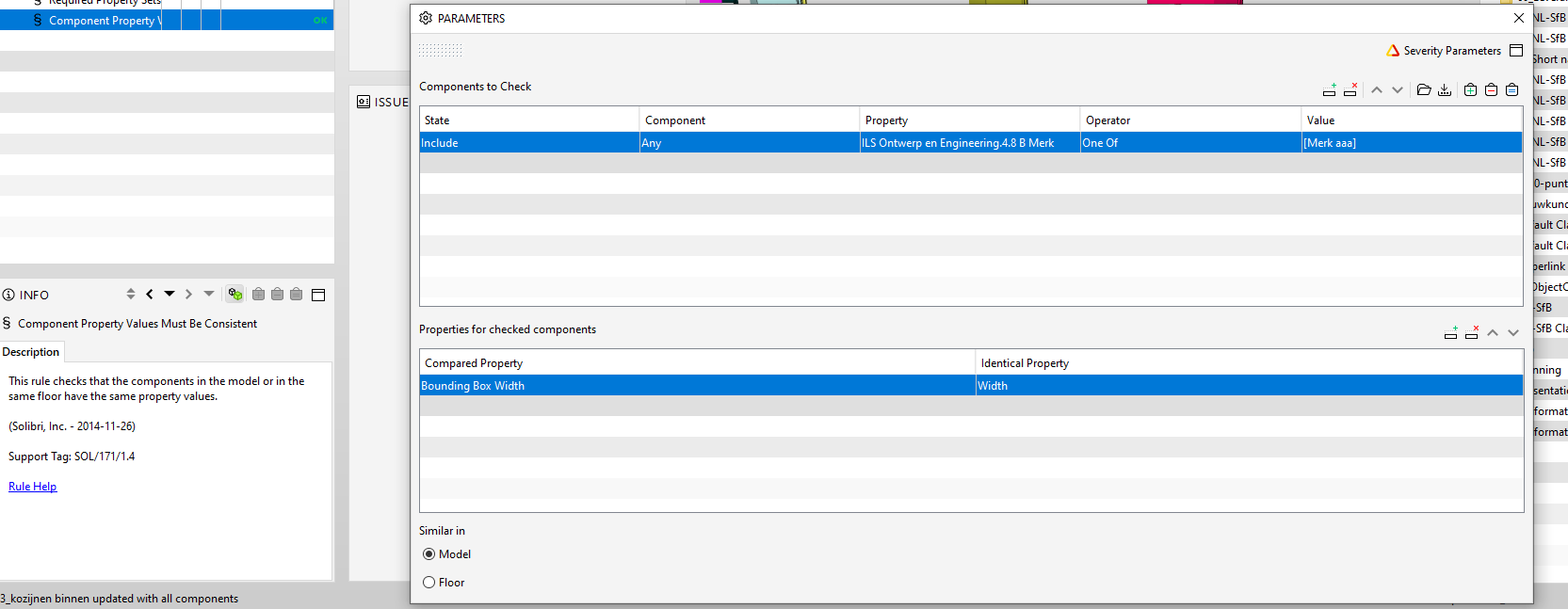
                    image.png

                    Met vriendelijke groet,
                    Harmen Jorritsma

                    BIM regisseur Van Wijnen Amsterdam
                    Diemerhof 32 | 1112 XN Diemen | KvK 32129744

                    020 -36 44 000 | 06-83 15 66 88 | LinkedIn | www.vanwijnen.nl
                    Volg ons op Facebook en Twitter

                    1 Reply Last reply
                    0
                    • K Offline
                      K Offline
                      keithwilkinson
                      wrote on last edited by
                      #10

                      Let me go and have a play around with this and I’ll report back. Thanks all for your help and input thus far, it’s very much appreciated.

                      1 Reply Last reply
                      0
                      • JSNJ Offline
                        JSNJ Offline
                        JSN
                        replied to Harmen Jorritsma on last edited by
                        #11

                        @Harmen-Jorritsma said

                        Bij grouping the mark colum there would be only 20 IDT_01A with the same bouding box. If the bouding box is different you will see two line with IDT_01a witf different bouding box with

                        @keithwilkinson
                        You can try the bounding box but I would not totally rely on those values but rather try to go with the door parameters as much as possible.


                        1 Reply Last reply
                        0

                        Copyright © 2025 Solibri Inc. | Powered by NodeBB

                        • Login

                        • Don't have an account? Register

                        • Login or register to search.
                        • First post
                          Last post
                        0
                        • Categories