Skip to content
  • Categories
Collapse
Solibri Society Forum
  1. Home
  2. General Discussion
  3. Rule 203 can't filter Containers and other consideration about info checks.

Rule 203 can't filter Containers and other consideration about info checks.

Scheduled Pinned Locked Moved General Discussion
7 Posts 2 Posters 1.4k Views
  • Oldest to Newest
  • Newest to Oldest
  • Most Votes
Log in to reply
This topic has been deleted. Only users with topic management privileges can see it.
  • violarenzoniV Offline
    violarenzoniV Offline
    violarenzoni
    wrote on last edited by
    #1

    Hi all,
    I would like to write below some consideratios about the info check rules.

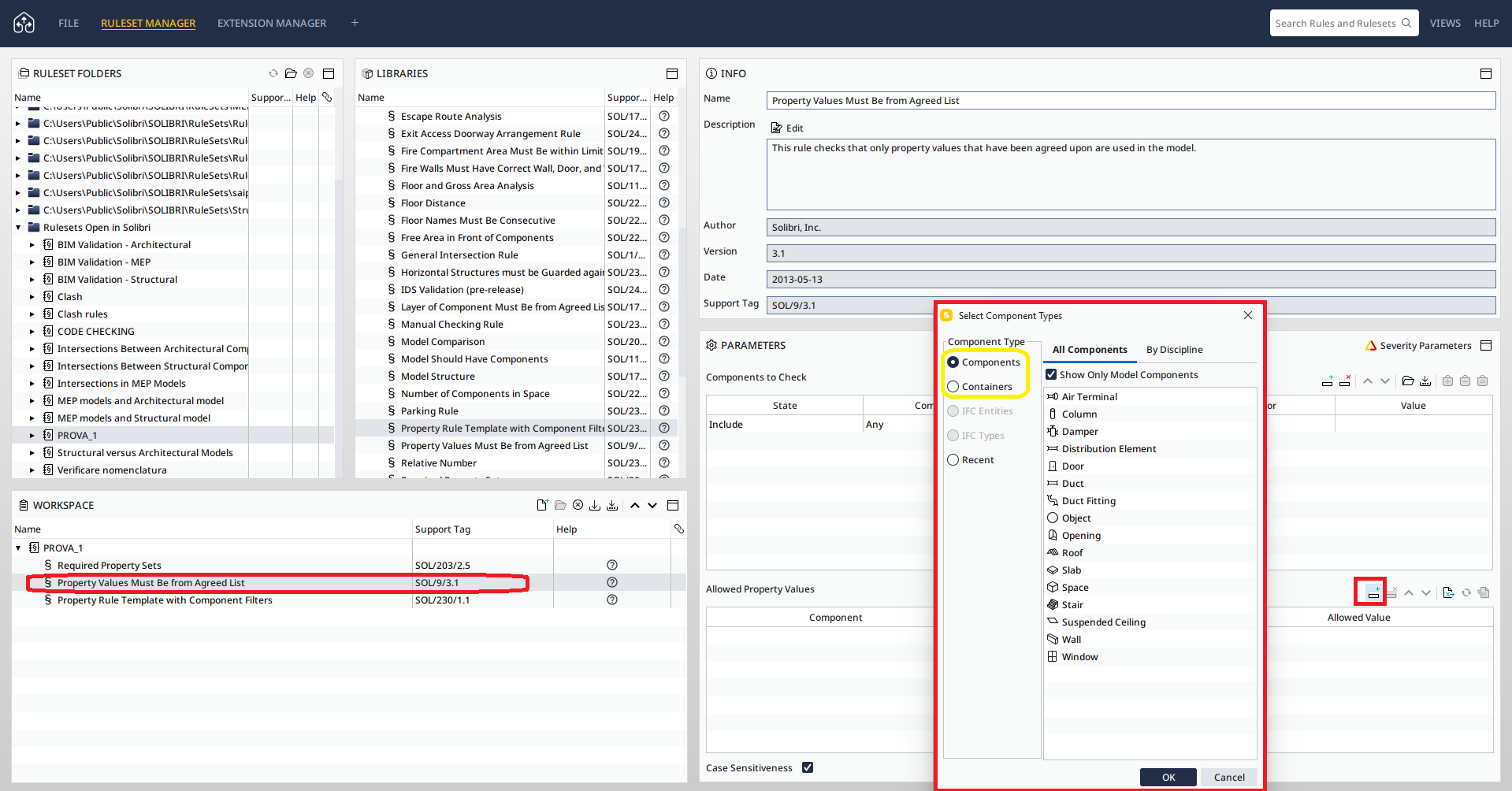
    • In the Rule “203 Required Property Sets”, in the Property Sets tab, the user can’t add manually a Cointainer:

    203 pset.png

    Anyway I have notice that if a Cointainer, for example IfcSite, is added by using an excel sheet, it works (look the screenshot below):
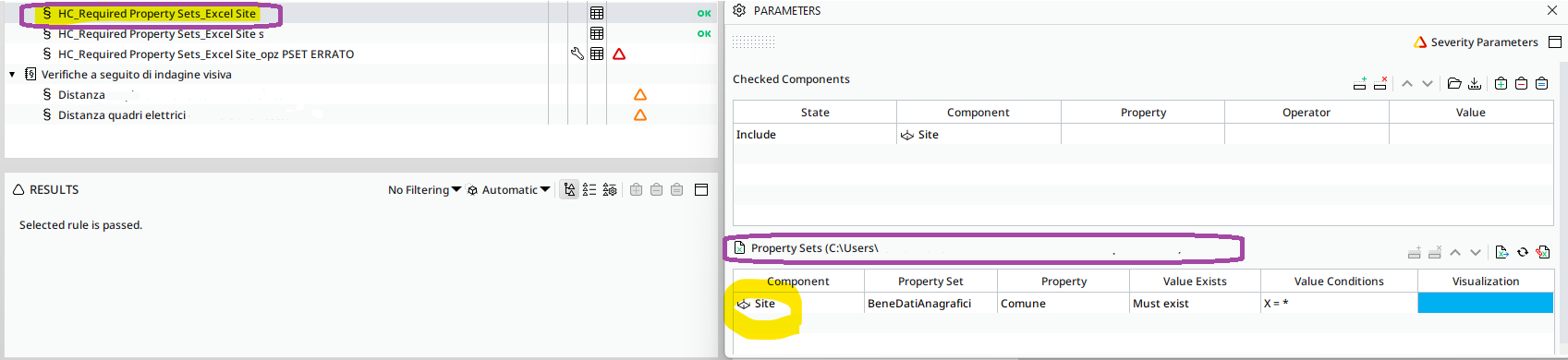
    203-using excel.png

    I ask you if it possible to add Containers in the Component Type list also for the Rule 203 Cointainers, because it is often required by project needs to check the presence of certain Property Sets in IfcProject or IfcSite, for example.

    • For the rules that allow to check properties in the models:
      The Rule “230 Property Rule Template with Component Filters” allows to add all Component Type but the user can’t import an excel sheet. While the Rule "9 Property Values Must Be from Agreed List" allows to add Cointainers and import Excel file but it hasn’t the option to filter Any Components.
      230 property.png
      9 property.png

    Thank you,
    bye,
    Viola

    1 Reply Last reply
    5
    • violarenzoniV Offline
      violarenzoniV Offline
      violarenzoni
      wrote on last edited by
      #2

      Hi @Solibrians, what do you think about this topic?
      It’s useful to check the information in the model in several ways.
      Thank you,
      Viola

      1 Reply Last reply
      1
      • P Offline
        P Offline
        Pasi Paasiala Solibrians
        wrote on last edited by
        #3

        @violarenzoni I tested this and could add containers. Which version of Solibri you are using?

        violarenzoniV 1 Reply Last reply
        1
        • violarenzoniV Offline
          violarenzoniV Offline
          violarenzoni
          replied to Pasi Paasiala on last edited by violarenzoni
          #4

          @Pasi-Paasiala thank you for the reply! I have the latest version: 24.5.0.31.

          1 Reply Last reply
          0
          • P Offline
            P Offline
            Pasi Paasiala Solibrians
            wrote on last edited by
            #5

            @violarenzoni Do you have the “Show only Model Components” ticked?
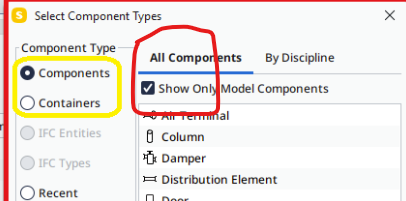
            6db60de4-a966-40ed-b7d9-466c9e5fe755-image.png
            What if you untick that?

            1 Reply Last reply
            0
            • P Offline
              P Offline
              Pasi Paasiala Solibrians
              wrote on last edited by
              #6

              @violarenzoni I think @Paul-Linder found the issue. We’ll add an issue about it.

              1 Reply Last reply
              0
              • violarenzoniV Offline
                violarenzoniV Offline
                violarenzoni
                wrote on last edited by violarenzoni
                #7

                @Pasi-Paasiala Thank you very much! I use the 24.5.0.31 Solibri Version.
                Yes I have unticked that but the condition remains the same:
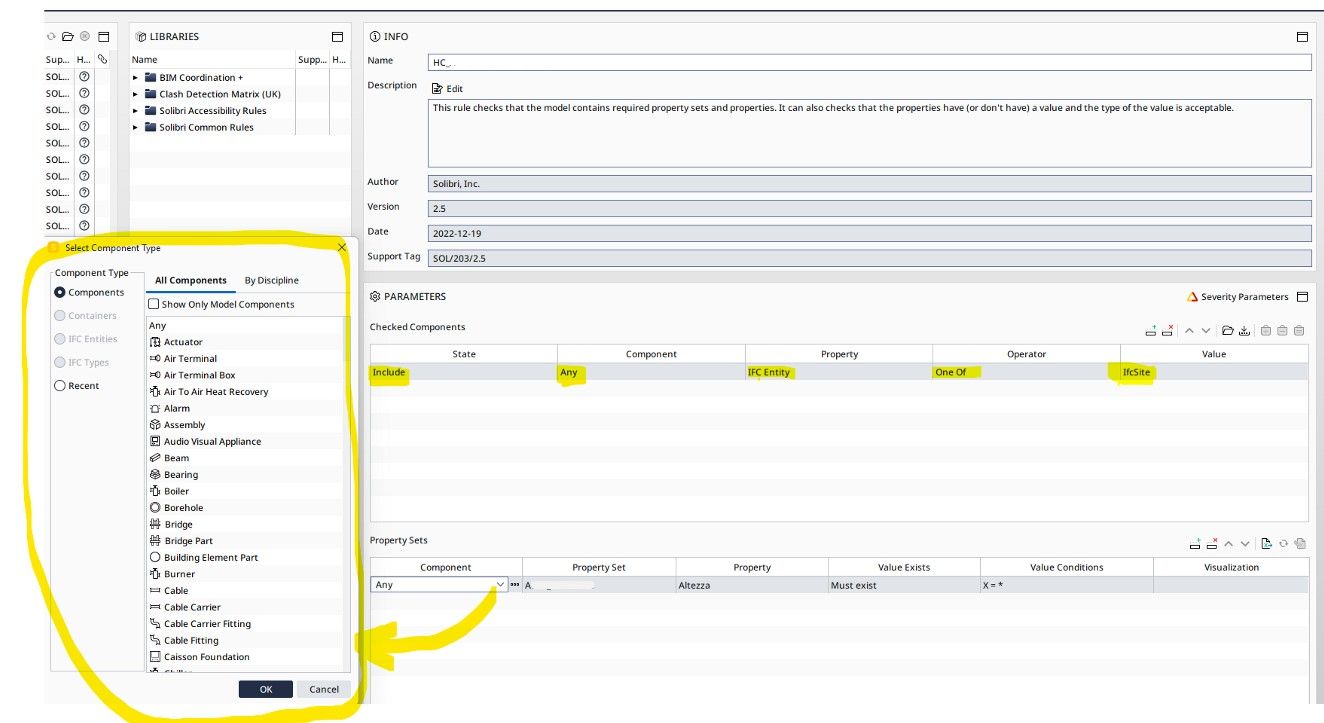
                1.jpg

                Thank you @Pasi-Paasiala and @Paul-Linder for adding the issue!
                Bye,
                Viola

                1 Reply Last reply
                0

                Copyright © 2025 Solibri Inc. | Powered by NodeBB

                • Login

                • Don't have an account? Register

                • Login or register to search.
                • First post
                  Last post
                0
                • Categories