Skip to content
  • Categories
Collapse
Solibri Society Forum
  1. Home
  2. General Discussion
  3. SharePoint Integration connects to wrong project

SharePoint Integration connects to wrong project

Scheduled Pinned Locked Moved General Discussion
14 Posts 5 Posters 2.7k Views
  • Oldest to Newest
  • Newest to Oldest
  • Most Votes
Log in to reply
This topic has been deleted. Only users with topic management privileges can see it.
  • P Offline
    P Offline
    Pasi Paasiala Solibrians
    wrote on last edited by
    #2

    @C-Oldenburg Can you specify what do you mean by project here? Are they different folders in the same SharePoint account or are projects residing in different SharePoint accounts?

    1 Reply Last reply
    0
    • C Offline
      C Offline
      C. Oldenburg
      wrote on last edited by
      #3

      Hi @Pasi-Paasiala
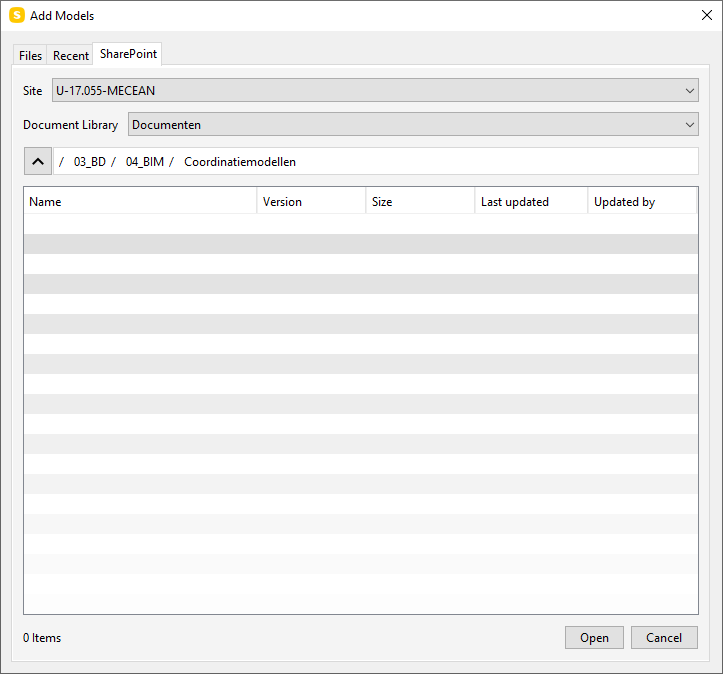
      When you want to add a new model to the coordination file and you click on ‘SharePoint’, the system will automatically connect to a specific project (Site), Document Library and open a specific folder. (see screenshot) It doesn’t matter in which project you are working, it will always send you to this specific folder. This folder is the first folder I have ever connected to the SharePoint environment. It might be a bug in the script behind?
      a0f84404-48fe-4844-a5f0-c7278f299eba-image.png

      Even if you change the path to the correct site, document library and folder of the specific project you are working on, everything is reset to the settings from the screenshot from the moment you click ‘Open’. That means all new updates will not be listed by Solibri because the file path is reset.

      If you select the inserted files and update them manually, the same thing happens after that.

      1 Reply Last reply
      0
      • P Offline
        P Offline
        Pasi Paasiala Solibrians
        wrote on last edited by
        #4

        @C-Oldenburg Which version of Solibri you’re running? If you’re not on the latest, please update and try again.

        1 Reply Last reply
        0
        • C Offline
          C Offline
          C. Oldenburg
          wrote on last edited by
          #5

          @Pasi-Paasiala I’m running version 9.13.8.22 (February 29, 2024)

          1 Reply Last reply
          0
          • M Offline
            M Offline
            Mvandenbrink
            wrote on last edited by Mvandenbrink
            #6

            @C-Oldenburg and @Pasi-Paasiala We notice something similar. Sharepoint connects to the document library and folder last used. When working on multiple projects you really need to look you’re using the right folder.
            When opening a Sharepoint folder from the Recent Model Places window you are always connected to the last used folder instead to the Recent Model Places folder you just tried to open.
            Using 9.13.8.22 too.

            Edit: @Pasi-Paasiala i’ve send you a PM with a screenrecording.

            1 Reply Last reply
            0
            • P Offline
              P Offline
              Pasi Paasiala Solibrians
              wrote on last edited by
              #7

              @Mvandenbrink Thanks for the video. I created an issue about it. Hope we get it duplicated.

              1 Reply Last reply
              0
              • M Offline
                M Offline
                Mvandenbrink
                wrote on last edited by
                #8

                Hi @Pasi-Paasiala did you get it duplicated and would this be fixed in the upcoming release?

                1 Reply Last reply
                0
                • MattiM Offline
                  MattiM Offline
                  Matti Solibrians
                  wrote on last edited by
                  #9

                  We have this already fixed and will be in the next release.

                  M 1 Reply Last reply
                  0
                  • M Offline
                    M Offline
                    Mvandenbrink
                    replied to Matti on last edited by
                    #10

                    @Matti-Kannala Any news on when the next version will be released?

                    1 Reply Last reply
                    0
                    • P Offline
                      P Offline
                      Pasi Paasiala Solibrians
                      wrote on last edited by
                      #11

                      @Mvandenbrink Late September

                      1 Reply Last reply
                      0
                      • jakub.rusinJ Offline
                        jakub.rusinJ Offline
                        jakub.rusin Solibrians
                        wrote on last edited by
                        #12

                        @Mvandenbrink @C-Oldenburg

                        You can already test fix for this in beta version of Solibri 24.9 which was released today. If you are not part of beta programme you can join, instructions in included in release post.

                        https://society.solibri.com/topic/3046/solibri-24-9-0-beta-round-open

                        1 Reply Last reply
                        0
                        • M Offline
                          M Offline
                          Mvandenbrink
                          wrote on last edited by
                          #13

                          @jakub-rusin
                          When using manual update this seems fixed, correct folder is selected automatically. But when using Prompt or Automatic update nothing happens when Sharepoint integration is active. @C-Oldenburg are you experiencing the same?

                          1 Reply Last reply
                          1
                          • C Offline
                            C Offline
                            C. Oldenburg
                            wrote on last edited by
                            #14

                            @jakub-rusin, @Mvandenbrink,

                            We are experiencing the same issue.
                            We did notice that while the link to the SharePoint environment is correct, no notification appears indicating that a new model is available. A manual update also updates the model correctly without any additional settings. You just have to click the bullet under ‘manual’ and click ‘OK’ and the update is done.

                            1 Reply Last reply
                            0

                            Copyright © 2025 Solibri Inc. | Powered by NodeBB

                            • Login

                            • Don't have an account? Register

                            • Login or register to search.
                            • First post
                              Last post
                            0
                            • Categories