Skip to content
  • Categories
Collapse
Solibri Society Forum
  1. Home
  2. General Discussion
  3. Compare room footprints between models

Compare room footprints between models

Scheduled Pinned Locked Moved General Discussion
7 Posts 4 Posters 1.4k Views
  • Oldest to Newest
  • Newest to Oldest
  • Most Votes
Log in to reply
This topic has been deleted. Only users with topic management privileges can see it.
  • Alex.JA Offline
    Alex.JA Offline
    Alex.J
    wrote on last edited by
    #1

    Hi all

    I’d like to compare room footprints from different models (electrical vs architectural).
    I’d like to allow a high tolerance.
    I tried rule 234 but it’s still returning a lot of noise. Hence I want to compare only the room with the same numbers.

    Any idea how I could achieve that? Room numbers are written identically.

    I’d be thankful for any insights…

    1 Reply Last reply
    0
    • MattiM Offline
      MattiM Offline
      Matti Solibrians
      wrote on last edited by
      #2

      If there is not too many rooms in the model: then make a ruleset with rule 234 instances for each room. One rule checks one room number.

      1 Reply Last reply
      0
      • Alex.JA Offline
        Alex.JA Offline
        Alex.J
        wrote on last edited by Alex.J
        #3

        Thanks for your reply @Matti
        unfortunately I have 1400 rooms… so making one rule per room number is not viable (it would also be a pain to maintain it when room numbers are changed)

        1 Reply Last reply
        1
        • marchiM Offline
          marchiM Offline
          marchi
          wrote on last edited by
          #4

          hi alex,
          #234 is a good choice, but have you tried #223/#224 with vertical tolerance?

          1 Reply Last reply
          1
          • Alex.JA Offline
            Alex.JA Offline
            Alex.J
            wrote on last edited by
            #5

            SOL/223 and 224 don’t work. It seems like they ignore rooms.

            1 Reply Last reply
            0
            • john.lippJ Offline
              john.lippJ Offline
              john.lipp
              wrote on last edited by john.lipp
              #6

              You could use Rule 171 to check areas or perimeters of rooms are the same. However, since you need a tolerance, you’ll need a way to analyze the differences.

              You could pin ITO in the Checking Layout, set the selection basket to the failing components and view their areas/perimeters to see their differences. In the ITO set the selection basket to those with large differences, and in the results filter by selected to only create issues for those.

              The out of the box area and perimeter quantities works to eye ball the values, but you can also use the attached javascript ITO that reports variance between footprint and volume of spaces grouped by room number. This should also work with other components (e.g. rectangular columns) that should have similar footprints.
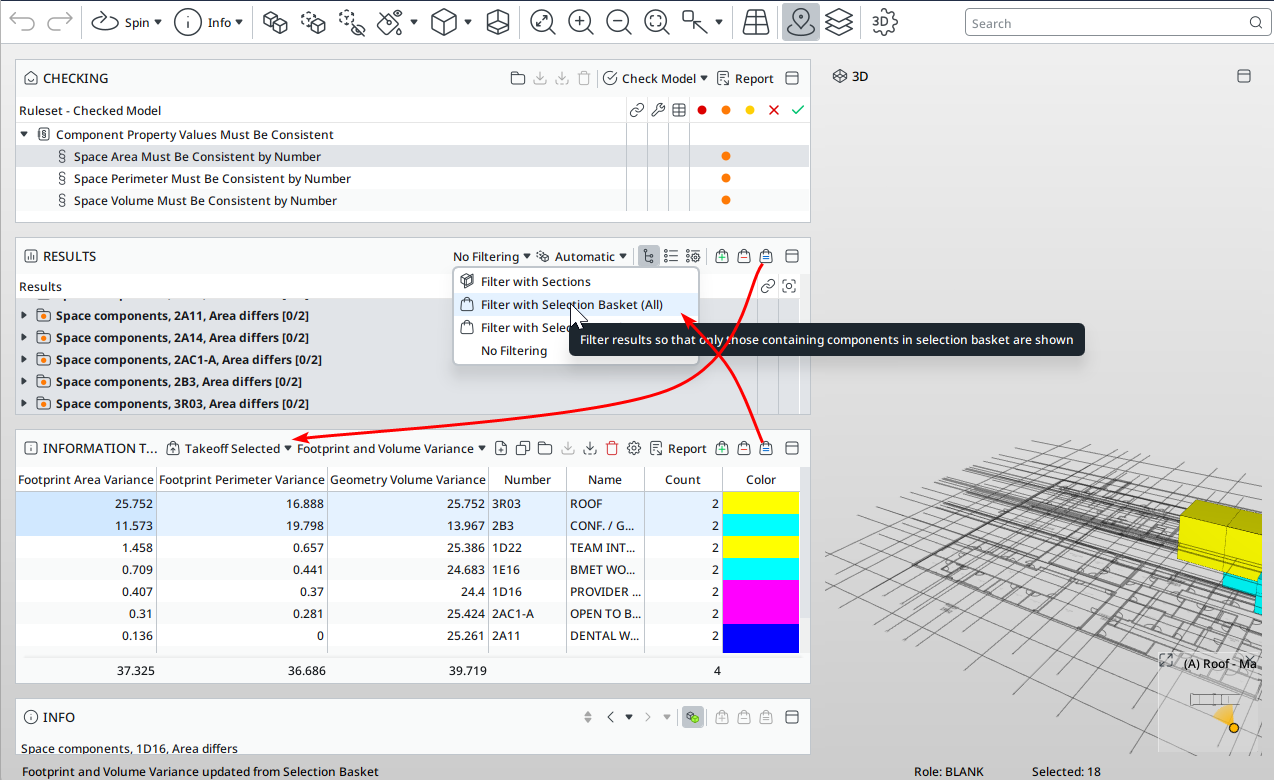
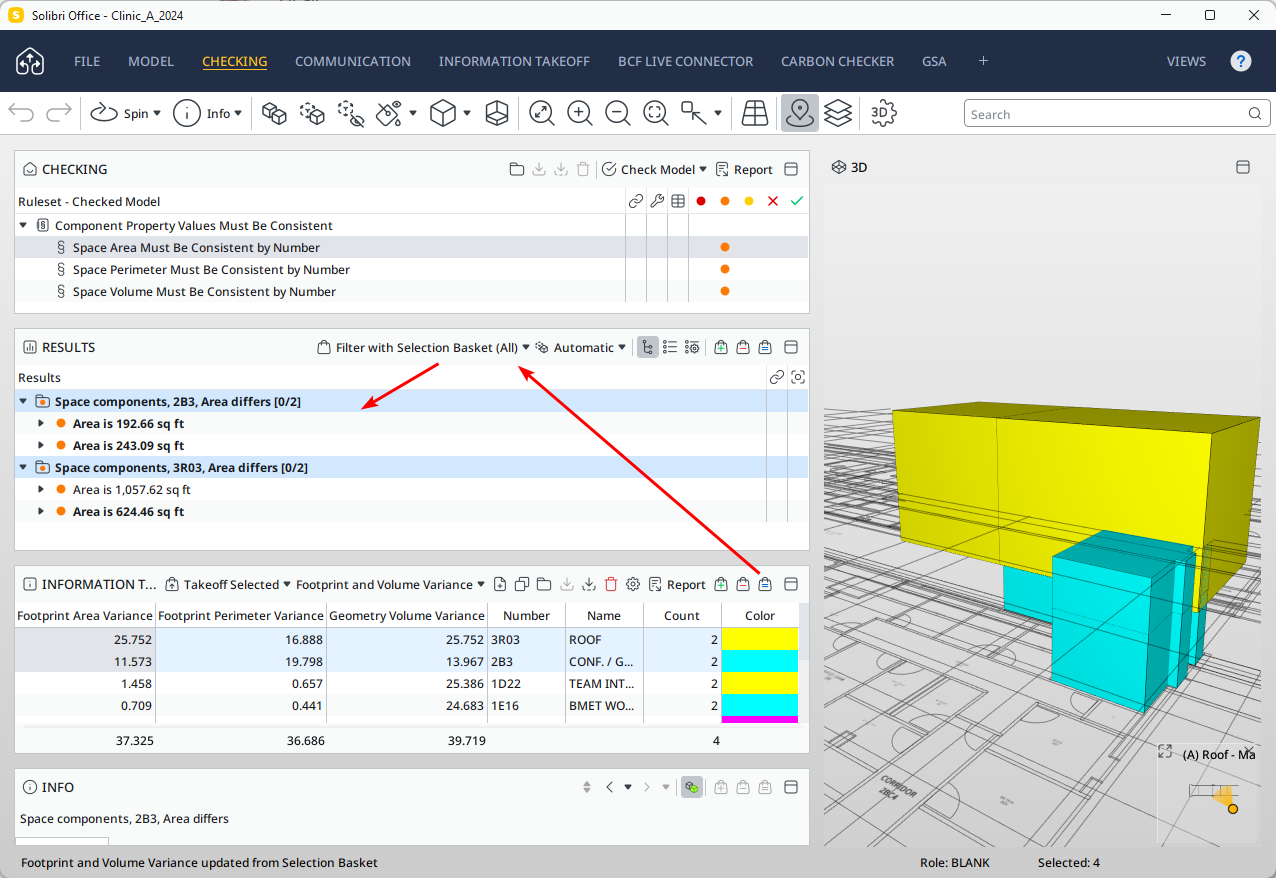
              image.png

              image.png

              Footprint and Volume Variance.ito
              Room Counts by Area and Perimeter.ito
              Component Property Values Must Be Consistent.cset

              1 Reply Last reply
              0
              • Alex.JA Offline
                Alex.JA Offline
                Alex.J
                wrote on last edited by
                #7

                Thanks @john-lipp, that’s an interesting approach.
                For now I will stick to rule 234 and go by floor, this seems to be quick enough. I still have to sort out a lot of false positives but it’s probably easier than juggling back and forth with the ITO.

                I’ll keep in mind this ITO for other use cases though!

                1 Reply Last reply
                0

                Copyright © 2025 Solibri Inc. | Powered by NodeBB

                • Login

                • Don't have an account? Register

                • Login or register to search.
                • First post
                  Last post
                0
                • Categories