Skip to content
  • Categories
Collapse
Solibri Society Forum
  1. Home
  2. General Discussion
  3. 3D not showing in selection Basket, in total model all visible

3D not showing in selection Basket, in total model all visible

Scheduled Pinned Locked Moved General Discussion
2 Posts 2 Posters 470 Views
  • Oldest to Newest
  • Newest to Oldest
  • Most Votes
Log in to reply
This topic has been deleted. Only users with topic management privileges can see it.
  • YvonneHoogenboomY Offline
    YvonneHoogenboomY Offline
    YvonneHoogenboom
    wrote on last edited by
    #1

    I have one IFC model, visible in the total model. But when I use one of the selection tools, the model is not visible anymore. It’s just one specific model. What can be the problem here? It shows just a blank preview.
    The solibri version is not the issue. I’ve tried this in 24.9 and 25.3. The same issue. Even with only opening this specific IFC model. When I select this model for the selection basket, the screen shows nothing.
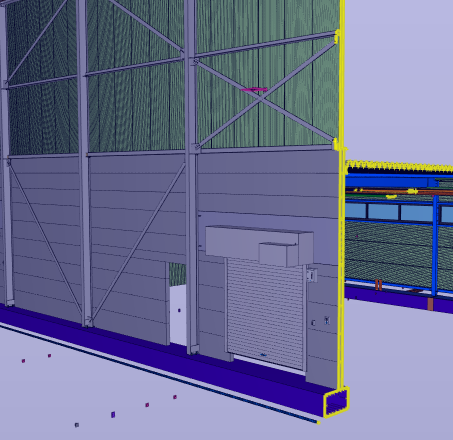

    39c32e06-8e96-4498-9f31-e716c066b83f-image.png

    e106b41a-1d0c-4a4e-a42c-ba622be4448d-image.png

    1 Reply Last reply
    0
    • MattiM Offline
      MattiM Offline
      Matti Solibrians
      wrote on last edited by
      #2

      Make an ITO including the component bounds.
      Might be that there is some components far.
      The default view is optimized to overcome this problem.

      1 Reply Last reply
      0

      Copyright © 2025 Solibri Inc. | Powered by NodeBB

      • Login

      • Don't have an account? Register

      • Login or register to search.
      • First post
        Last post
      0
      • Categories