
Silent Install macOS
-
Hi Everyone
We strugle with silently installing Solibri on macOS (13+). We always get the following message, when trying to install it with the following command from the admin document:
open “/Users/Shared/Filewave/Apps/Solibri/Solibri Installer.app” --args -q overwrite
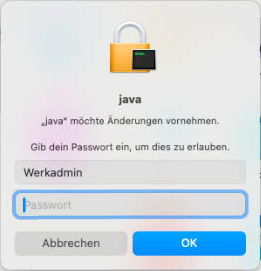
This happens when executing via Filewave (Device Management), or when executing in Terminal locally on the client. With that prompt, no silent install is possible.
Solibri Support doesn’t know anything about this problem, maybe you experienced something like that?
Regards.
-
Hi! Have you asked help from Mac Admins -society? https://macadmins.slack.com/signup#/domain-signup . There are many groups and one is finland group that may have some more knowledge of local software.
-
Have you tried running the command as administrator (sudo)?
Copyright © 2025 Solibri Inc. | Powered by NodeBB