Skip to content
  • Categories
Collapse
Solibri Society Forum
  1. Home
  2. General Discussion
  3. Grid lines comparison check

Grid lines comparison check

Scheduled Pinned Locked Moved General Discussion
5 Posts 2 Posters 995 Views
  • Oldest to Newest
  • Newest to Oldest
  • Most Votes
Log in to reply
This topic has been deleted. Only users with topic management privileges can see it.
  • T Offline
    T Offline
    twosk
    wrote on last edited by
    #1

    Hello,
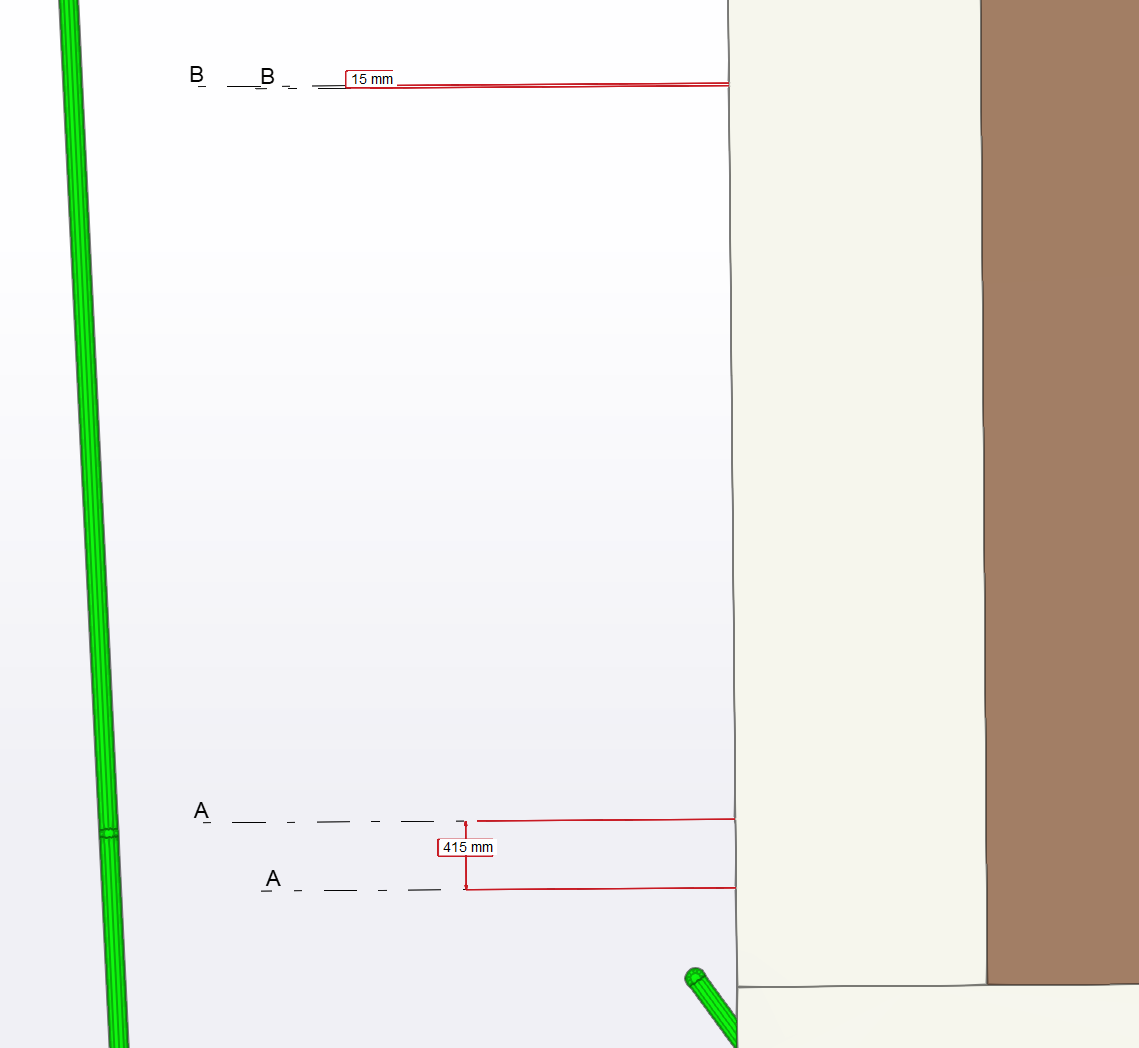
    is there an elegant way to compare/check grid for inconsistencies? I have grid in architectural and structural models.
    Perhaps there is a way to display grid lines in different color based on their model?
    3b8f6179-54ff-426e-8fc1-1815c5fe437c-image.png

    1 Reply Last reply
    1
    • JeroenKoomenJ Offline
      JeroenKoomenJ Offline
      JeroenKoomen
      wrote on last edited by JeroenKoomen
      #2

      If you want to checkt height (Z-value) of building storeys, it is best to check with an ITO the levels of all models.
      Solibri is projecting grids on every building storey (with some exceptions i do not really understand).
      So if you have a model without grids with wrong levels, it will project the grid of another model on that wrong levels.
      It is also possible that you have grids in more models, and that the grids differ from eachother. Solibri will display all grids from all models.
      Best practise is to use a levels and grids model and ask all other parties not to export grids in other IFC’s.

      http://www.linkedin.com/in/koomenjeroen
      https://www.bimloket.nl/BIMbasisILS

      T 1 Reply Last reply
      0
      • JeroenKoomenJ Offline
        JeroenKoomenJ Offline
        JeroenKoomen
        wrote on last edited by
        #3

        See also: https://society.solibri.com/topic/2244/how-grids-work-in-solibri?_=1758095157566

        http://www.linkedin.com/in/koomenjeroen
        https://www.bimloket.nl/BIMbasisILS

        1 Reply Last reply
        0
        • T Offline
          T Offline
          twosk
          replied to JeroenKoomen on last edited by
          #4

          @JeroenKoomen Thank you for your reply.
          I do check levels based on rules.
          My idea is that if architectural and structural models levels are not in the same place, there is no point in checking if architectural and structural elements match.
          I was hoping to stage model checking - first check grid, floors, Site X Y Z and only then - elements.

          1 Reply Last reply
          0
          • JeroenKoomenJ Offline
            JeroenKoomenJ Offline
            JeroenKoomen
            wrote on last edited by
            #5

            OK. Do not think there is a possibility to check if grids are the same in models…
            Would not recommend it either to have a solibri model where all models have grids because of the limitations Solibri has in how grids are projected…
            http://www.linkedin.com/in/koomenjeroen
            https://www.bimloket.nl/BIMbasisILS

            1 Reply Last reply
            0

            Copyright © 2025 Solibri Inc. | Powered by NodeBB

            • Login

            • Don't have an account? Register

            • Login or register to search.
            • First post
              Last post
            0
            • Categories