Skip to content
  • Categories
Collapse
Solibri Society Forum
  1. Home
  2. General Discussion
  3. Error in reading file with the same version of solibri

Error in reading file with the same version of solibri

Scheduled Pinned Locked Moved General Discussion
4 Posts 4 Posters 871 Views
  • Oldest to Newest
  • Newest to Oldest
  • Most Votes
Log in to reply
This topic has been deleted. Only users with topic management privileges can see it.
  • T Offline
    T Offline
    twosk
    wrote on last edited by twosk
    #1

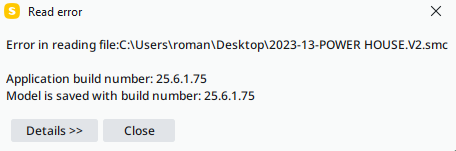
    Hello, is there anything I can do about it?

    File size is 866MB
    File is on the local desktop, so no strange paths.
    I have tried opening it with original and newer solibri version - the message stays the same.
    Some how all backups and cloud versions are one day older 😞
    Screenshot_1.png

    1 Reply Last reply
    0
    • M Offline
      M Offline
      m.lingeman
      wrote on last edited by
      #2

      Hello,

      What does it say when you open de Details button?
      I have had the same problem with a big model where it said i was out of memory
      there is al solution described in the following topic: https://society.solibri.com/topic/1200/opening-a-big-smc-file-failure-of-memory?_=1756966382064

      You have to increase the usable memory in the vmoptions

      1 Reply Last reply
      0
      • L Offline
        L Offline
        lraimo
        wrote on last edited by
        #3

        this happens to me when for some reason save did not work as excepted. Try to use backup

        1 Reply Last reply
        0
        • RicardoR Offline
          RicardoR Offline
          Ricardo
          wrote on last edited by
          #4

          This is most often a corrupted file. That is probably the reason why the backup files are a day older.

          1 Reply Last reply
          0

          Copyright © 2025 Solibri Inc. | Powered by NodeBB

          • Login

          • Don't have an account? Register

          • Login or register to search.
          • First post
            Last post
          0
          • Categories