Skip to content
  • Categories
Collapse
Solibri Society Forum
  1. Home
  2. General Discussion
  3. Which Ruleset should be used to check components hosting to the right level?

Which Ruleset should be used to check components hosting to the right level?

Scheduled Pinned Locked Moved General Discussion
4 Posts 3 Posters 844 Views
  • Oldest to Newest
  • Newest to Oldest
  • Most Votes
Log in to reply
This topic has been deleted. Only users with topic management privileges can see it.
  • I Offline
    I Offline
    Ion Chan
    wrote on last edited by
    #1

    I like to audit the model and find out which component is modeled in a wrong hosting level. I believe Solibri can find out which floor the component is actually located. However, I cannot figure out which rule I can use. Can anyone help me?

    1 Reply Last reply
    0
    • Harmen JorritsmaH Offline
      Harmen JorritsmaH Offline
      Harmen Jorritsma
      wrote on last edited by
      #2

      @Ion-Chan , look at rule SOL/231/1.5 Comparison between property values

      Here a example cheking components witch are 500mm or moren onder te floor/level of de floor thy shoud be.

      e7247e70-2a58-4b88-9180-f56cc141b40b-image.png

      f2d7011f-6faa-4b0c-8303-6959f0dcd50f-image.png

      Met vriendelijke groet,
      Harmen Jorritsma

      BIM regisseur Van Wijnen Amsterdam
      Diemerhof 32 | 1112 XN Diemen | KvK 32129744

      020 -36 44 000 | 06-83 15 66 88 | LinkedIn | www.vanwijnen.nl
      Volg ons op Facebook en Twitter

      1 Reply Last reply
      0
      • I Offline
        I Offline
        Ion Chan
        wrote on last edited by
        #3

        Thanks for the prompt reply, and I have my findings below.

        My testing model is a Revit model, and there should be some errors created intentionally.
        I have tried to apply your rules into my testing model, but there was no found issues.

        What I have found is that, the containment in Solibri will be defined by Solibri instead of following the values from Revit.
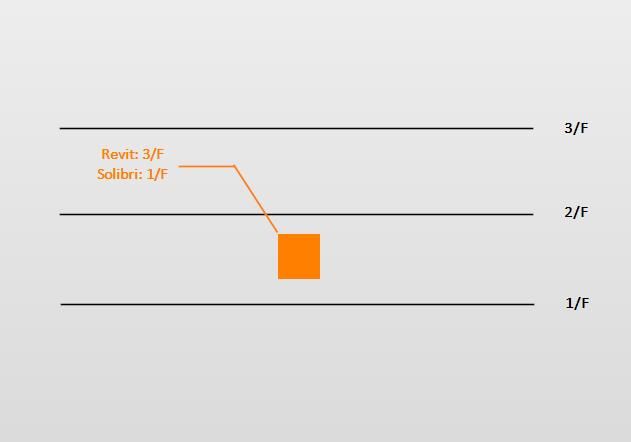
        Taking the below image as an example, the object is hosted on 3/F in Revit, but contained on 1/F in Solibri.
        In that case, if I try to find the global bottom elevation of 1/F and the object, the values match.
        However, I would like to have a rule checking whether the object is related to a correct floor in Revit or not, and I am still struggling with this.
        8d15acd1-15b3-46e6-a17e-3f850745f553.jpg
        I am thinking about checking the bottom elevation and the offset of object, and I am still working on it.

        1 Reply Last reply
        0
        • JeroenKoomenJ Offline
          JeroenKoomenJ Offline
          JeroenKoomen
          wrote on last edited by
          #4

          Hi Ion,

          Be aware that a level in Revit is not allways exported as a building storey in IFC. This has to do with settings in revit and export settings. If an element in Revit is hosted on a level that is not exported to a building storey in IFC… it will be matched to another building storey.
          Hope you understand. Only levels that are marked “building storey” in Revit will be exported to IFC.

          Jeroen

          http://www.linkedin.com/in/koomenjeroen
          https://www.bimloket.nl/BIMbasisILS

          1 Reply Last reply
          0

          Copyright © 2025 Solibri Inc. | Powered by NodeBB

          • Login

          • Don't have an account? Register

          • Login or register to search.
          • First post
            Last post
          0
          • Categories
