
Elements from Archicad are seen as transparent in Solibri
-
Hi all!
I have recieved a few ifc models which are produced from Archicad, and they seem to have similar problems with exterior walls. For example here: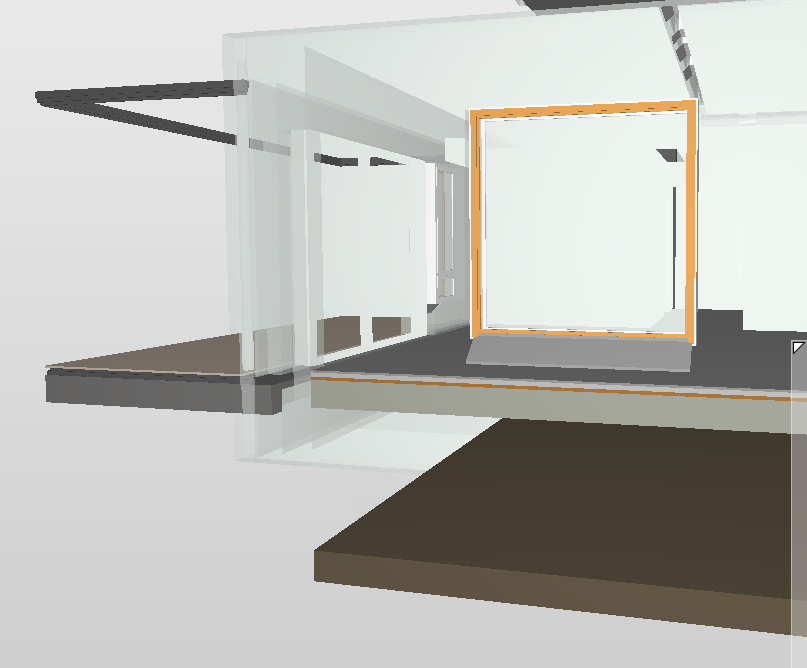
You can clearly see through the exterior walls and I can’t figure out why. They are not transparent in the original model and it seems that it affects only some elements of the same type, not all.What would be the correct way to move forward with an issue like this?
Any help will be much appreciated.
-
@JM_JaniN
I guess it isn’t a setting of Solibri (use the be sure the ugly brown box / show all), so what you can try / ask:- check in another IFC Viewer if it shows the same result
- ask to use another IFC Translator / Check the settings of the used IFC translator in Archicad
- check the settings of these walls in Archicad (special or a Surface overwrite is used)
-
Thank you so much for your answer!
It must have something to do with the ifc exoprt process. I found out that the only walls which are affected with this transparency glitch are walls which have any kind of openings, like doors, windows and hatches.But I still can’t figure out what is the problem with the exportation.
I will try to investigate more and I will report back if I find anything.
-
@JM_JaniN said in Elements from Archicad are seen as transparent in Solibri:
Thank you so much for your answer!
It must have something to do with the ifc exoprt process. I found out that the only walls which are affected with this transparency glitch are walls which have any kind of openings, like doors, windows and hatches.But I still can’t figure out what is the problem with the exportation.
I will try to investigate more and I will report back if I find anything.
Is it exported in IFC 2x3 or IFC4?
IFC4 can still give strange behaviour.And are these walls that you mention, also perhaps assemblies? Maybe you can check if there are differences there.
-
The ifc file was exported in 2x3 schema. The architect just sent me an e-mail where he explained that he adjusted the Archicad export options.
In ifc export translator, in the geometry conversion, he selected the option “Explode all elements to parts”. Now all the objects will have all the correct materials.
I do not know if there are any downsides exporting the ifc with this option, or if this setting is actually the correct way to go to begin with. But it seems to correct this visibility glitch.
-
An old post, but that setting would probably effectively ruin quantity calculation based on IFC model.
-
I encountered this issue only when the wall composite contained building materials with transparent surface materials that were included in the IFC export. In my case, these were air gaps within the exterior wall structure.
When I disabled these building materials from being included in the IFC export, the transparency issue was resolved.
However, this caused another problem: in some roof structures modeled with slabs, where the same air gap building material was used in the composite, the slab edge surface was lost. Instead, all the individual layers of the composite became visible separately including the air gap which made the result look very messy.
To solve this, I created a separate building material for facades where the air gap is not included in the IFC export, and another one for the roof where it is. With this setup, I was able to get the model to look sufficiently clear in Solibri.
EDIT: I use Archicad with Finnish localization so my apologies if I haven’t used the right terms for everything. I don’t know precisely what they are in English.

Copyright © 2025 Solibri Inc. | Powered by NodeBB