
Rule 234 - Comparing structural models
-
Hi everyone,
I’m trying to compare the structural models coming from both the architect and the engineer with rule 234 (this rules checks distance between inner and outer components).
I consider the model from the architect as the outer component.In the small example attached bellow, I have 3 differences between my two models :
- in 2 occurences, inner components are protruding too much from the outer components
- in 1 occurence, an inner component is two far away from the outer components
My problem is that the rule only detects the 2 first differences (the 2 redish slabs on the picture).
The difference in the slab on the left is not detected.
I have to duplicate the rule and reverse the outer and inner models to have a complete result but it creates duplicates in some cases.Is this a bug in the rule or am I doing something wrong?
Thanks!
Johan

-
First you might want to define the ARC slabs as the “outer components”.
And change the “Distance to Outer Component” to Min from Max.

I get all 3 issues when i made these changes to the rule paremeters,
Hopefully this works for you

-
First you might want to define the ARC slabs as the “outer components”.
And change the “Distance to Outer Component” to Min from Max.
I get all 3 issues when i made these changes to the rule paremeters,
Hopefully this works for you
-
Hi @Lauri-Luoma
Thanks for your answer. I made a few more tests and sadly the problem is still there.
For the Min and Max, I tried with the minimum value but it is not detecting the fact that the top of the structural slab is too far away from the architectural slab, only that the bottom of both slabs are too close from one another which is not the goal.I made a more precise Solibri example with only slabs and tried a few different rule setup to compare the results.

In the first rule test, I used only the “any surfaces” check. I was thinking this would detect every single differences (8 in total) but to the contrary it only detects 3 differences.

In the second test I used every possible check of the rule and it yielded 7 differences out of 8. Still 1 missing…
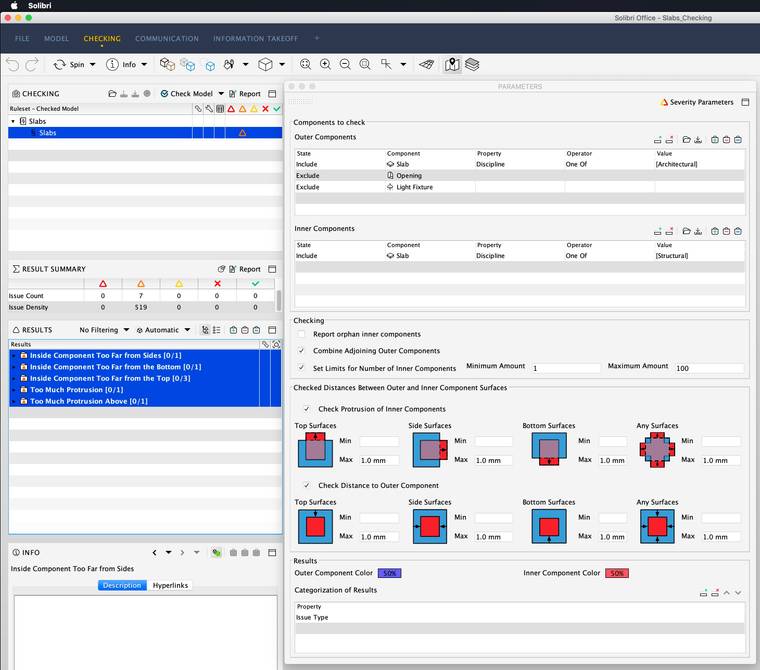
I’m not using the rule in it’s intended goal but I have the feeling that something’s wrong with it and that it should work.
It is almost working. There’s just a few strange behaviors.Here’s the new Solibri file : Slabs_Checking.smc
-
“I’m not using the rule in it’s intended goal but I have the feeling that something’s wrong”
Could you please elaborate a bit what is the intended goal of the check?
The model i downloaded looks a bit different (missing some slabs?) than the one in the picture. Would help also to understand what is the error that is not detected. If you could kindly add manually a presentation to the communication with a slide describing the issue so we can investigate if this is a bug.
Thank you!
-
@Lauri-Luoma, sorry for the delay, it’s been an intense couple of weeks.
I isolated the problem and I have now a much more simple example. The problem (if it is one) comes from the outer elements.

In the example I have 2 times the same inner element with the top side too far away from the top.
The outer elements are combined in the rule. In one case it is simply two slabs that touch each other. In the other one the smaller slab comes into the bigger one and creates a boolean operation (there is no intersection, just a different way of modeling the two volumes).
As you can see in the SMC file atached, the rule cannot detect the problem in the second case.
Let me know it you have any question or information.
Best regards.
Johan
-
Hi @jcosandey,
Maybe your problem is solved by now.
I had some thoughts about this problem too (I need it for a project with some colleagues of yours).My guess is that solibri doesn’t consider your structural slab as inside the one of the two architectural slabs.
Maybe it understands only one protrusion at the time, I don’t know.
Hence no checking.You could have your 3 errors by using the intersection rule (#1).
The strange thing is that this considers the big slabs as inside each other…
Have a look!


What do you think about it?
Best regardsMathieu

Copyright © 2025 Solibri Inc. | Powered by NodeBB