
BIMcollab BCF-API connection now available
-
@tonigyllenberg Thank you. I will try to get some information from Jasper or Christian from BIMCollab myself. If i know more i will post it below.
-
Maybe @André-Schnabel could help us in this case?
On BIMcollabs website did not see any updates or explanations about this release.I tried the new BIMcollab and the only thing that I have noticed is the way you connected the two. The the NEW, you need to authorize the connection via Web Browser.
-
Thank you @agroni , I hope I can help you on this.
With absence of a real international standard the ’old’ connector’ has been built on our former SDK.
In the last months an international accepted protocol on how to transfer BCF information has been improved and accepted. Our BCF Managers have been rebuilt following the BCF API and the connection to BIMcollab Cloud resulted in the ‘Connection API’.
Solibri has now also changed the way of communication to this more modern protocol, based on our Connection API. This is similar to other vendors as Bexel, Formitas etc. The development however is from Solibri and the release notes should be from their side as they developed the connector by using the Connection API.We assisted with intens testing and communication to confirm the better handling and information transfer to maximize our common customer experience.
The new connection is based on the Connection API and not as a single development (as earlier). This means development changes in the future can be faster implemented.
We have changed also our FAQ and support part of our website
The user experience can be summed up that the connection is more stabile and faster. The Sign on procedure is changed in a more modern way of redirecting to known interfaces.
-
@André-Schnabel Thx.
So there are no extra extra features or more “supported fields” to sync?
-
@JeroenKoomen The BCF Connector from SOlibri follows the BCF API standard as Toni already mentioned. The Connection API offers more possibilities regarding the BCF handling. We are happy that the new connection makes the communication more stable and faster.
-
Hi @André-Schnabel
Thank you for your input. It is great to hear that the BIMcollab Team is putting so much effort in improving this communication technology. It is very refreshing when a user reads that something is faster then before.Nonetheless, I and many users are still awaiting the moment when we (solibri Users) will have the same interface that other BIMcollab Plugins are using such as Archicad, Revit, Tekla etc… There have been multiple discussions, phone calls, emails, towards BIMcollab to implement this. If you already have done it for Solibri’s competition (Navisworks)… it is time to level up here I believe

TriPoint GmbH
www.tri-point.at -
@agroni We would like nothing more than to make a BCF Manager for our collective customers. At the moment that is not yet possible, Solibri does not have an API to create this. For now it is therefore the best possible to assist Solibri with their BCF Connector. Regards, Ronald - director customer success KUBUS
-
good to hear from you @degraan and thank you for the explanations from KUBUS side.
This discussion started from my side (also from previous Topics) since I was PingPonged between kubus and solibri of who and how should this brigde be gapped. As a satisfied customer of both products I want to reach here common grounds. In the end of this process it is us… the clients, who are on the frontier line.This request of creating a the same BCF Manager as for other Interfaces has to do purely with improvement of our daily workflows within the SOLIBRI environment with respect to reducing working hours, mistakes and communicating consistent data.
I don’t believe that many of Solibri Users would habe anything against if this brigde between the two Interfaces would be finaly errected.
@Solibrians Open our pathway for our openBIM projects… -
All, please note that in the BIMcollab-Connection-API all needed functionality is available for Solibri to implement these requests. We cannot do anything more here to help. Solibri has to build this functionality into their BCF Connector.
@tonigyllenberg can you explain here if and when this is on Solibri’s roadmap?” -
Hi @tonigyllenberg!
When using the new BIMcollab connection, the ‘Area’ field is not accepted as a filter in the synchronization. All issues present in the BIMcollab project are synchronized to the Solibri presentation, which is of course not the intention. When using the old one, de ‘Area’ field filter works perfect.
-
Hello @mwhdejong,
Thanks for the report. Area is a BIMcollab-specific field, which is not supported in the BCF standard. The BCF-API connection is standard compliant, so no custom fields are currently supported, and thus, cannot be used for filtering. The reason it works for the previous connection, is that Area in BIMcollab is mapped to Location in Solibri.
This is something that we (Solibri) and BIMcollab can propose together to the BCF committee as an addition to the standard.
Kind regards,
Toni on behalf of the Solibri team
-
@tonigyllenberg Thank you Toni!
I think the Area field filter in ‘Filter Imported Issues’ should be unactive (or not visible) in this window in Solibri, so the user can not use this one. The other fields works good, but it’s a kind of strange dat de Area field is visible in the filter possibilities when the BCF connector is used in combination with BIMcollab.
-
@tonigyllenberg said in BIMcollab BCF-API connection now available:
Hello @mwhdejong,
Thanks for the report. Area is a BIMcollab-specific field, which is not supported in the BCF standard. The BCF-API connection is standard compliant, so no custom fields are currently supported, and thus, cannot be used for filtering. The reason it works for the previous connection, is that Area in BIMcollab is mapped to Location in Solibri.
This is something that we (Solibri) and BIMcollab can propose together to the BCF committee as an addition to the standard.
BIMcollab’s Connection API offers Solibri the possibility to support Area including filtering. So it is up to Solibri to offer additional functionality for users in the connection to BIMcollab.
-
Hello again!
The suggestion of an integrated BCF Manager from BIMcollab has been brought up a few times in the past, for example here, and we are aware of the desire. From our perspective, we strive to provide users with standard-compliant solutions, such as the BCF-API connection, which BIMcollab has also recently made public (and this post was to inform our common users of it).
At Solibri, we are currently working on a project to make major improvements to the BCF Connector, as we want to provide a standard-compliant interface which brings value to all of our users, regardless of what issue management system they prefer to use.
As @degraan mentioned above, the implementation of an integrated BCF Manager would be on BIMcollab’s side, however to allow for their implementation we (Solibri) may need to first implement some specific API additions to our SDP (Solibri Developer Platform).
Solibri Developer Platform is intended to allow ThirdParty integrations, and this would be the correct path for an integrated BCF Manager. The work involved with providing the possibility for BIMcollab to integrate a BCF Manager in Solibri is not in the roadmap by itself, nevertheless, with the ongoing improvements of the BCF connector, we are adding to the functionalities which are needed to integrate the BIMcollab SDK. After the next public release, we will be much closer to having this possibility.
Regarding @degraan 's last comment about Area in filtering, the buildingSMART defined BCF-API standard does not support any non-standard compliant fields, such as Area. Solibri supports the BCF-API as defined by the buildingSMART standard. The best way to add new specific customizations would be to bring the matter up in the BCF standard committee, which is something we (Solibri and BIMcollab) can propose together.
Kind regards,
Toni on behalf of the Solibri team
-
We brought up Area and more in the BCF committee already few years ago; and yes we would like to keep doing this together with Solibri. Since this committee is quite slow in following client requirements we decided to move forward. @tonigyllenberg we invite Solibri to do the same, together with us. The standard will follow innovators anyway
-
Regarding the New Bimcollab API, is this the topic where we also could post our feedback?
We are experiencing multiple problems with this new API. Problems that we haven’t experienced before with the old API…-
Data loss. When synchronizing to BIMcollab, sometimes data like added text in the description does not get synchronized. (This is random and not easily reproducible)
-
Synchronization report does not display the real amount of changed/new items. (Almost always)
For example, when 2 issues are edited and then synchronized, the report could say 21 issues changed. This is the case for import and export. -
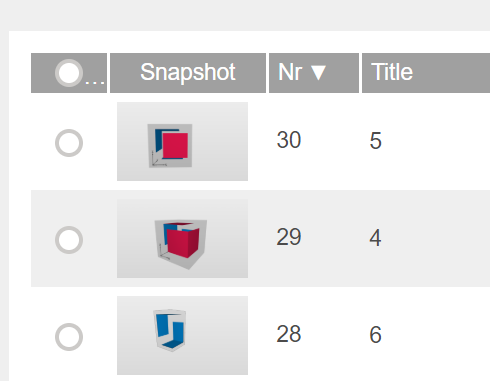
The order of issues in BIMcollab is changed when uploading (Random)
For example the picture below. The issues are made in order of 4-5-6 in Solibri, but in BIMcollab they change in order. After synchronizing back to Solibri, the order changes in Solibri too.
- Sometimes slides don’t get uploaded at all. (Random)

At this moment, we can not use this API because of this poor performance that we experience.
Do other people also experience these kind of problems?
-
-
Dear @Ricardo
thank you for your feedback. If you encounter any problems regarding the connection Solibri-BIMcollab you can always send your email either to Solibri support (for NL you can reach out to KUBUS as your Solibri contact, to Solibri directly or of course to [email protected]). We will then take action regarding your findings, either solve it, inform Solibri of any problems or help you understanding the possibilities of the connection.
I will gladly get involved here with my colleagues from BIMcollab support. -
Hello @Ricardo,
If you have the log files from this specific instance, would you be able to provide those for analysis? If so, could you send them to [email protected].
Log files are available here:
Windows: C:\Program Files\Solibri\SOLIBRI\log
Mac: /Applications/Solibri/logA few things to try in the meantime:
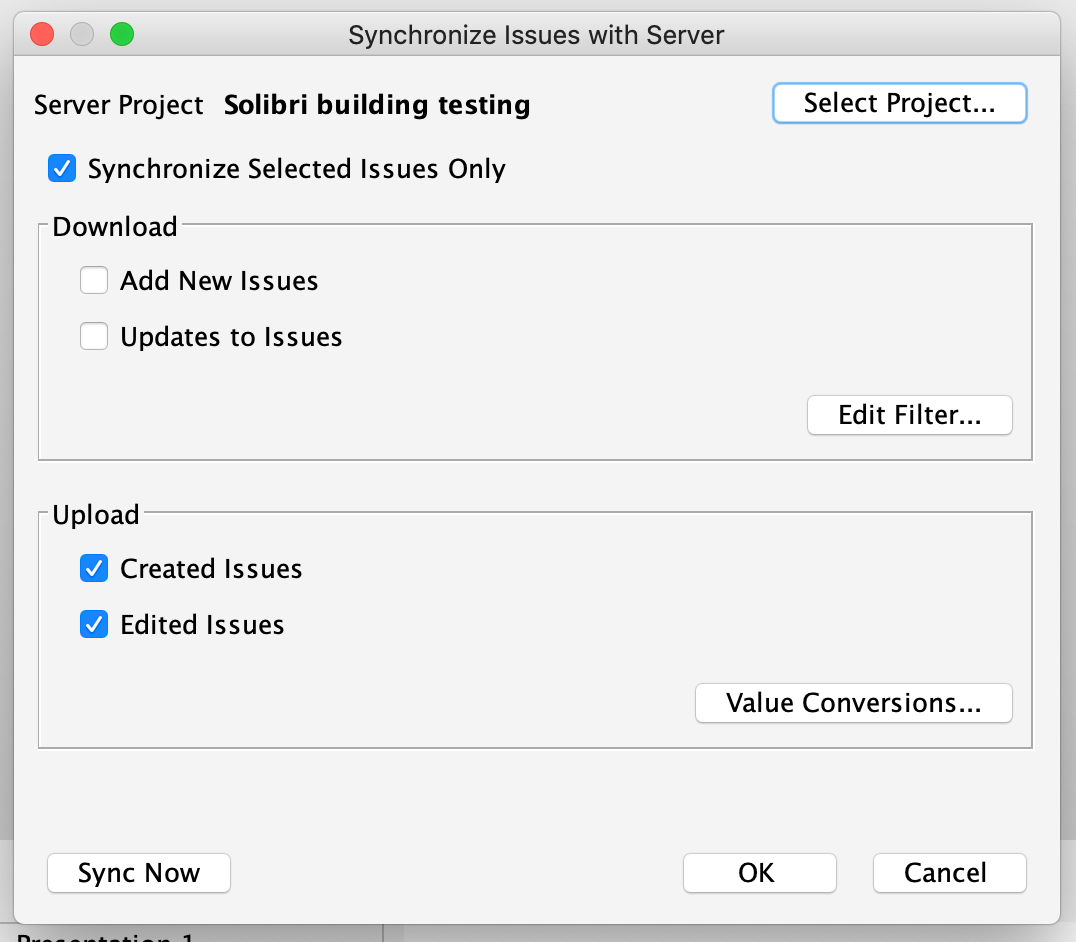
Sync report: If I understood correctly, the problem you are facing is that the sync report indicates that all issues have been edited (either up or down). Unfortunately this is the case (and has been) for the sync report, when synchronizing the entire presentation. The sync report does not check individually which slides are changed, but rather indicates that all slides are pushed (or pulled), even if only 1 or 2 have actual changes. One way to currently avoid this, and to have more control over syncing, is to select the issues you wish to upload (or download changes to) and use the “Synchronize only selected issues” :
Issue order changes: This is due to the fact that during the initial sync, Solibri adopts the server index numbers. This is because we do not want to impose our index numbers on the server, and instead use just one common numbering. After the first sync, this should no longer jumble.
The sync report and issue ordering problems will no longer be visible in the next release (which will contain the improvements to BCF Connector).
If the logs can be provided, we can look into the data loss (and slides not uploading) issue.
Kind regards,
Toni on behalf of the Solibri team
-
Hello All!
As an update on this topic, the old BIMcollab connection has now been removed with the release of Solibri 9.12.0.
To connect to your BIMcollab project, select the BIMcollab New connection from now on, and remember to add your project-specific URL when making the initial connection.
Kind regards,
Toni on behalf of the Solibri team -
@tonigyllenberg
Hi Toni,I can still connect to the “old BIMcollab” API. Will I lose the connection when I restart Solibri?
I am still working with Solibri 9.10, the BIMcollab New API causes some problems in this version.Kind Regards,
Dennis Beeke







Copyright © 2025 Solibri Inc. | Powered by NodeBB