
How do you use Check Selected
-
Hi all,
We’re working on improving the Check Selected feature. The motivation comes from the fact that the current implementation erases issues that don’t come when checking selected. For example, if you are working on a tall building where only one floor is detailed and the design will be copied to the other floors later. A BIM coordinator gets and updated model and wants to run a quick check on components on that one floor. They put components from different discipline in that floor to selection and run check selected. At this point issues related to other parts of the building are removed, since those components were not in the selection basket. Also all viewpoints, comments, etc are gone.
We have an early implementation where this behavior is modified so that issues that are not related to components in the selection are not removed when checking selected. Does anyone see any problems with this approach?
Also it’d be interested to know in which situation and how you use check selected.
-
It sounds a bit like the ‘Check Selected Some’ and ‘Check Selected All’, like filtering the results later in the Result View. I think relating to Select Some and Select All would be great, for us and to instruct others. The difference is that for filtering, everything is already checked, and with these buttons, only issues related to the Selection Basket will be generated and calculated. Or does it have to be two buttons: Check all and Check selected (in a new way)?
Also great to hear that the missing viewpoints and comments will be solved with this approach. -
@RobinKramer I couldn’t quite follow all your thinking. Have you been using the Check Selected functionality:
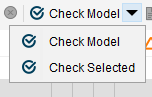
We have these two buttons. From one everything is checked and from the other, only components in Selection Basket.
-
Hi,
In our internal discussions we found out that we should actually disable Check Selected when, a new model is imported, a model is updated, or parameters of a checked rule are changed.
So the main use case for Check Selected would then be when you add a new Ruleset and want to quickly check selected components with that.
-
@Pasi-Paasiala said in How do you use Check Selected:
Hi,
In our internal discussions we found out that we should actually disable Check Selected when, a new model is imported, a model is updated, or parameters of a checked rule are changed.
So the main use case for Check Selected would then be when you add a new Ruleset and want to quickly check selected components with that.Hi @Pasi-Paasiala,
I agree with you in considering this example as the main use of Check Selected functionality.In the past it has happened to us and some of our customers to lose all the checking results, after activating “check selected”… So I think that the important thing in future improvements is to avoid this risk, mainly because there is no “undo” command in the checking.
I add a note: some of our customers thought that this functionality was referred to the rule selected in the checking list … when instead the command refers to the elements selected … so I wondered if it was possible to add an additional specification like “check selection basket”.
Thanks Solibrians!
-
Delivering just one storey of the building for design checking does not make quite sense in my opinion. What do you actually want to check if the rest of the building is missing?! Additionally, this applies to a skyscraper that has multiplications of that same floor, which in our profession is a very small percentage.
This topic reminds of a wish that I had posted some time ago, and it has to do with checking partial models. Whether it is a part of an architectural IFC Model or the whole HVAC, you coud have the possibility with this new option to filter what you actually want to check.
I have also worked with “Check Selected” and must warn you about its performance. If there is a model inlcuded in that ruleset but is not in the selection, then the reseults brings an error, respectively the black minus. This means that the ruleset could not be performed becuase of missing components.
-
@agroni Hi this is actually quite common way to do those project where floors repeat themselves and the solutions for equipment has to be decided with hotel operator, interior designer etc. so checking only sections is relevant case with the selected rule.
According to my experience there is no workflow or project where you could just continuously work on the checking analyses, without interruptions in inquiries during the work in that sense, it is good idea to it so. The behavior of disconnecting and orphaning the issues is serious problem, bigger than the filtering issue from the results. Usage of selection basket must be familiar in order to return reliable results. But, as you said -not usable functionality at the moment. And another topics is the learned and preferred workflow - which is actually one of the amazing things in Solibri, that you can work so may ways to achieve the required result. -
@Pia
As an architect I am well familiarized with working in one storey if there is multiple repetitions. I also used to check only parts of the floor.
And why cannot the user export just the part of the module or instance that needs to be checked? Because from a workflow perspective, the main model does not consisnt of any storeys since they arae working on this one module. -
@agroni since there is so many ways to work and execute the quality assurance, one way - which is proven good and working - should not exclude the other. As a Solibri customer trainer and consult I see various ways of working and seeing the work done, and the need is there.
-
I think that the use of “Check Selected” is for a rapid control where no slides and comunication should follow.
If I had to select some elements of a plan, I would follow filter criteria in the rule -
now that in 9.12 this feature has been added - or changed, here is my thought on it:
I can here agree with:
@Pia “disconnecting and orphaning the issues is a serious problem”
@paola-bronzo “frustrating…some of our customers to lose all the checking results”but I have to admit I have never experienced such a thing, mainly because I use “check Selected” when I am testing and setting up rules and not with a final check - something that @Mauro-Cattaneo and @agroni mentioned.
now that this option is here, I will adapt the workflow to the current possibilities and probably just filter the results.





Copyright © 2025 Solibri Inc. | Powered by NodeBB