
Backup File Does Not Show BAK Extension
-
I’ve had some trouble recently with Solibri crashing while saving a large model, causing the file to be corrupted. Luckily I have other sources to get another copy of the model, but with such a large file it is very time consuming to copy so I try to not have to do it more than I need to.
I know about using the BAK backup file to get a model back, but I’ve never actually used one. What I’ve read is that you just remove the .bak from the file name and open it as usual. The problem is that the file names don’t end in .bak, they end “xxx.smc_org”. In my file explorer it tells me that it’s a BAK file, but there’s nothing for me to remove that will make Solibri see it as an SMC file. Please see the image below of the end of the file name.
Does anyone else have this issue? If you know of something I’m missing please let me know.

-
Hi. You can go to your Control Panel - Appearance and Personalization - File Explorer Options
and turn off “Hide extensions for known file types”. This should stop hiding the “.bak” from the file names.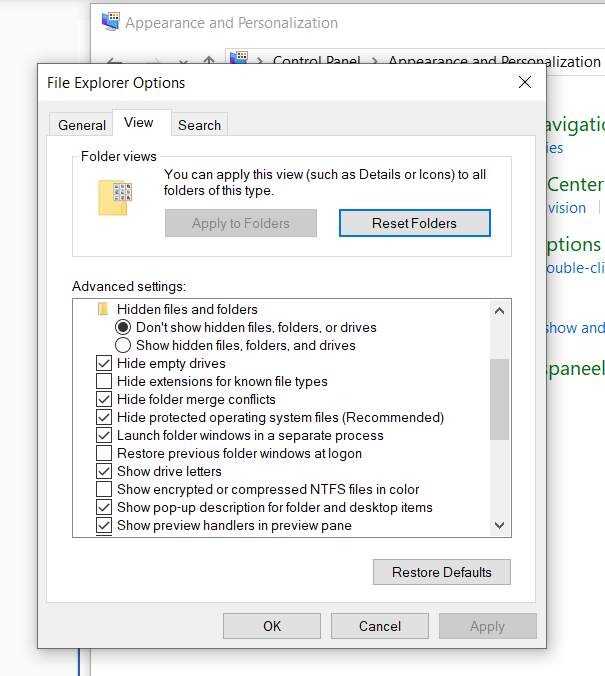
Copyright © 2025 Solibri Inc. | Powered by NodeBB