
Synchronizing Presentations with BCF Server (BIMcollab)
-
Hey,
I am curious about the workflow as the title already gives a hint.on that.
So, my workflow concept is more or less the following:- #Creating a presentation from checking results with the relevant date.
- #Sync, presentation when ready => then UPLOAD to BIMcollab
- #Iterative Issue Management on various plattforms …
- #When there is an updated model a new checking routine is performed
- #Either work with the same presentation or create a new one from checking results but with a different date
- #Sync presentation => now DOWNLOAD from BIMcollab
- #Changes on the presentation are made and => then again UPLOAD to BIMcollab
- #… and so on …
So, as you can see I either upload OR download from a bcf server in one step. However recently I unintentionally did it indeed all at the same time and first I thought it might not be a problem, as the sync is smart enough to automatically detect the last change whether it was in Solibri or on BIMcollab side.
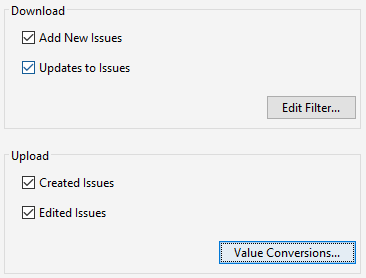
Nevertheless I had to learn that during this process all the “Resolved” status when marked on BIMcollab have been overwritten and they were now “Active” again - in Solibri, but also on BIMcollab. So I was curious and tried it out various times and it was everytime the same result - status is beeing overwritten BUT the other way round it worked. When the latest change was on Solibri side it seemed to be correct.

That’s why now I am asking here if this is a bug, or a feature. Moreover it would be great to hear if anyone is syncing in both ways at the same time, and if this is not the concept how we should use it then I am asking myself why it is even possible to tick all at the same time?
-
Hey @JSN,
With the current version of BCF Connector, we unfortunately discovered these challenges of overwriting or conflicting information in several places and situations. The fundamental reason for this is that the current version relies on the local presentation and its slides in Solibri, which results in having two projects - one locally in Solibri and one in the BCF Server - which need to be synced cumbersome and manually. As it is not clearly specified which system (client or server) holds the relevant, up-to-date information, it can be easily overwritten, e.g. when upload and download are carried out in the wrong, non-intended order. But actually, all this shouldn’t be necessary as a topic (aka slide) should be a single, central data object (hosted on a server), which is updated directly in the central location.
So this is not a direct answer to your question, BUT: all this struggle is why we have been working to replace the BCF Connector by a new, significantly improved version, which is planned to be part of our new release. If you want to learn more about this, you can find my post about how to register for the Beta testing combined with a small hint, that we have something in the pipeline.
Cheers
Cornelius -
Thank you for clarifying that here again. While I am waiting for the Beta approval I am curious how stable this version is already? Are there any major known issues why I really should keep my fingers off this beta version from being used for daily work and not just for sneak preview tests?
-
Hey @JSN ,
as Beta versions are naturally not yet ready for production, I feel obliged to say that it must be handled with care in any case, BUT
- We have tried our best to communicate very clearly what is already working and what is not. You can find the features as well as the known issues in the beta testing section here and here (only accessible when you are registered for beta testing!)
- Our experiences and the testers’ feedback from the current beta round so far already show that we can overcome the fundamental bottlenecks of the current version and that the workflow experience is already much better. Of course, this experience depends on the selected BCF servers (we continuously work on improvements with the different vendors), and of course, this is also a subjective estimation to some extent.
So with all the necessary caution, I can state that for anybody who is interested in the non-file-based BCF workflow and is not happy with the current BCF Connector version, it is definitely worth taking a look! And last but not least it shouldn’t take too long until the public release of this feature (without promising an exact date
 )
)Cheers
Cornelius -
There have been some discussion going on about the workflow between Solibri and BIMcollab. As a BIMcollab user, there are still some obstacles in this process and you need to define the best for you, with hope that nothing goes wrong (like your described case).
In order to keep the issue management working, i try to separate these two worlds. Issues that are found by solibri are going to be sent to BIMcollab the first time. Afterwards everything takes places in BIMcollab such as discussions, new slides, approvals, etc. This then gets sent to Solibri to update the presentation with the slides so I get a feeling what has been actually closed. The team works with issues in the BCF Managers of their prefered BIM authoring tool, since it offers more capabilities.
I rarelly download issues from BIMcollab because there is no tracking from solibri in this case wether there is a fault in the model or not. It is just a plain issue. In addition our strategy: the creator of the issue is responsible for checking and closing it afterwards. This sets my responsibility as a BIM coordinator clear that I am not allowed to mess with issues not created by me… respectively Solibri
TriPoint GmbH
www.tri-point.at -
@agroni said in Synchronizing Presentations with BCF Server (BIMcollab):
I rarelly download issues from BIMcollab because there is no tracking from solibri in this case wether there is a fault in the model or not. It is just a plain issue. In addition our strategy: the creator of the issue is responsible for checking and closing it afterwards. This sets my responsibility as a BIM coordinator clear that I am not allowed to mess with issues not created by me… respectively Solibri
I totally agree, at the moment it indeed seems to be the cleanest strategy to just update your issues in Solibri from the server to keep it kinda seperated and to do the global issue management mainly on BIMCollab side and the corresponding BCF Managers.
Moreover I am with you when it comes to responsibilities, and messing around with others issues - it’s one of those key sentences which should be a commendment: Thou shalt not covet thy neighbor’s wife, nor his cattle, nor his issues he created, nor anything that is thy neighbor’s.
-
@JSN said in Synchronizing Presentations with BCF Server (BIMcollab):
Thou shalt not covet thy neighbor’s wife, nor his cattle, nor his issues he created, nor anything that is thy neighbor’s.
hahahahahaha

This sentence would look very beautiful in a BEP



Copyright © 2025 Solibri Inc. | Powered by NodeBB