Skip to content
  • Categories
Collapse
Solibri Society Forum
  1. Home
  2. General Discussion
  3. Quantities from IFC or Solibri

Quantities from IFC or Solibri

Scheduled Pinned Locked Moved General Discussion
9 Posts 5 Posters 1.9k Views
  • Oldest to Newest
  • Newest to Oldest
  • Most Votes
Log in to reply
This topic has been deleted. Only users with topic management privileges can see it.
  • S Offline
    S Offline
    Sander E
    wrote on last edited by
    #1

    Hi All,

    I don’t know if this post speciality is for Solibri, but maybe someone knows the answer.

    We are working with Solibri and BIMcollabZOOM and I see different quantities in the components.

    For Example:
    When I select a component in Solibri I see in the quantities the bounding box length. In the other tab Dimensions I see the Length. These are different, and I see it is a gross/net quantity.

    But if I look in ZOOM, I see only quantities that are exported in the IFC and that’s only the Length.

    I am shocking to see that, because if I want to make list in ZOOM, I have the wrong lengths.

    So,… my question in this story is:

    • How do I know in Solibri the difference of the IFC dimension or the Solibri dimension.
    • And how can I check that the IFC dimension is correct, without making specific component rules.
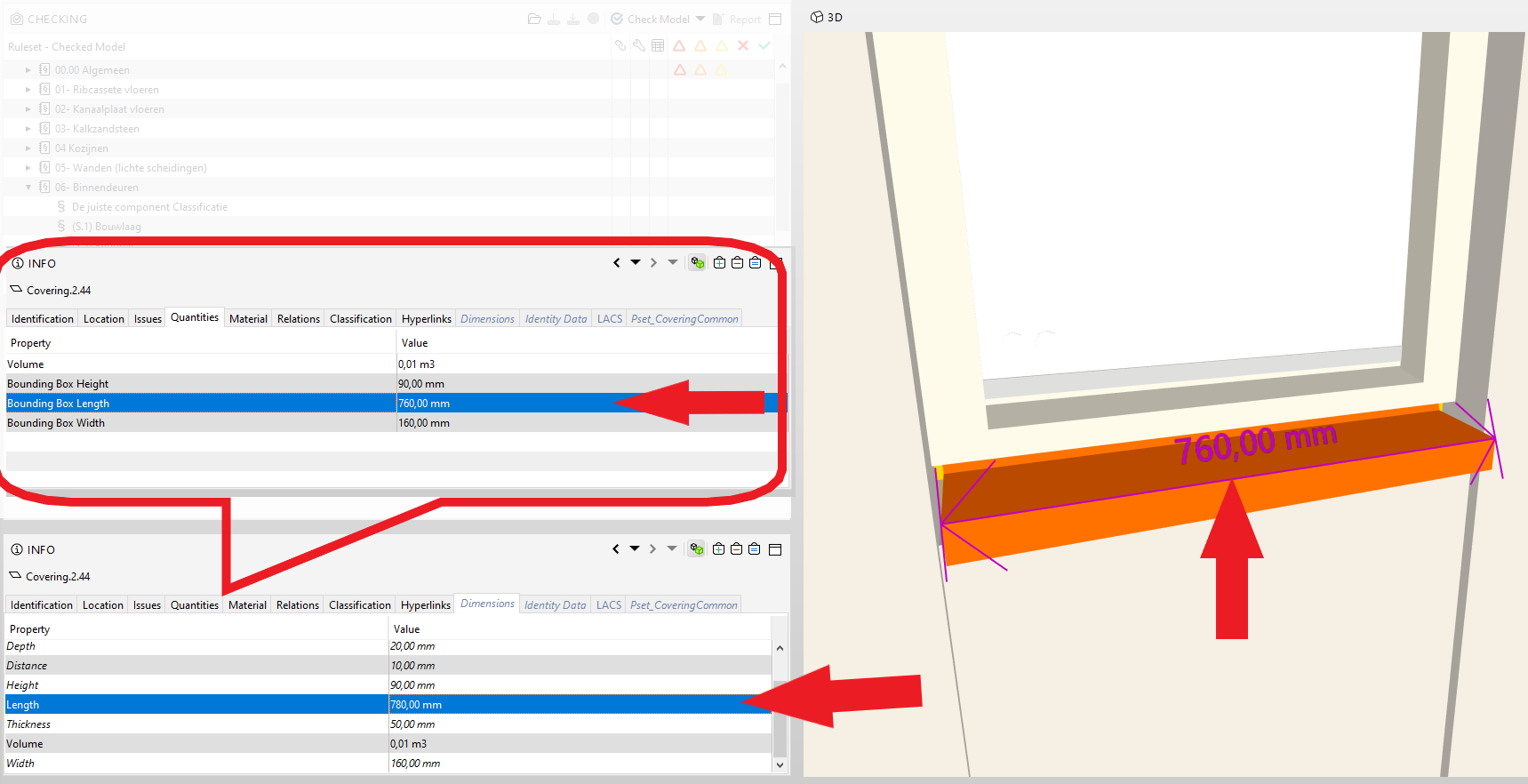
    quantities from IFC.png

    1 Reply Last reply
    1
    • MattiM Offline
      MattiM Offline
      Matti Solibrians
      wrote on last edited by
      #2

      How do I know in Solibri the difference of the IFC dimension or the Solibri dimension.

      • Create an ITO with Solibri and IFC dimesion column. See differences in Excel.
      • Create a rule that compares these two properties. Use rule template #231
      • Keep in mind the bounding box might be correct value in this case but not usable e.g. for areas

      And how can I check that the IFC dimension is correct, without making specific component rules.

      • For bounding box dimensions this could work with checking Any with rule template #231.
      • With quantities you need to use specific component. One workaround could be using classifications for both IFC dimension and the Solibri dimension and compare classifications.
      1 Reply Last reply
      0
      • S Offline
        S Offline
        Sander E
        wrote on last edited by
        #3

        Thanks for your reaction.

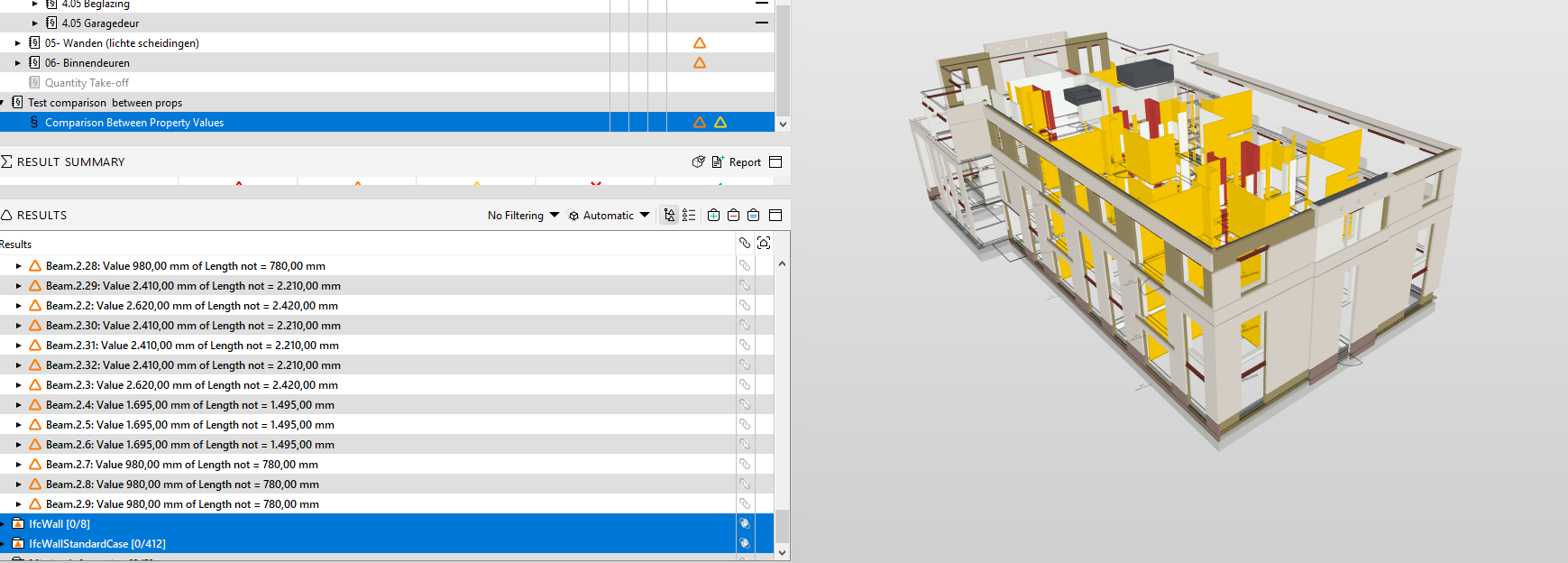
        But,… WOW! I see huges of problems now.
        9e4ea867-bcf7-4500-a252-a05ed5fe7a5c-image.png

        I think I am not the only one with this?

        1 Reply Last reply
        0
        • JeroenKoomenJ Offline
          JeroenKoomenJ Offline
          JeroenKoomen
          wrote on last edited by JeroenKoomen
          #4

          Propertysets that are black (for examples Quantities) are calculated by Solibri using the IFC geometry.
          Propertysets that are grey/lightblue and italic contain information exported by the modelling software. In this case the propertyset Dimensions.
          Both are not allways correct… so we put them side by side in a ITO. If there is a big difference then you know you have to investigate further…

          http://www.linkedin.com/in/koomenjeroen
          https://www.bimloket.nl/BIMbasisILS

          1 Reply Last reply
          0
          • chrisC Offline
            chrisC Offline
            chris
            wrote on last edited by
            #5

            My advise is, to compare always the different quantities. The ones from Ifc, Solibri and maybe also the one from the autoring tool.
            I would check this quantities for every element!

            1 Reply Last reply
            1
            • S Offline
              S Offline
              Sander E
              wrote on last edited by
              #6

              Thanks for the answers.
              I have a lot of work to do i see.

              What is the leading dimension? I think the dimension in the ifc is leading?

              1 Reply Last reply
              0
              • chrisC Offline
                chrisC Offline
                chris
                wrote on last edited by
                #7

                you have to verify and check for every component group. at one group is the IfcQuantity at the other is better to take the ones from Solibri…

                1 Reply Last reply
                0
                • marchiM Offline
                  marchiM Offline
                  marchi
                  wrote on last edited by
                  #8

                  https://society.solibri.com/topic/356/scary-solibri-halloween-story?_=1607011055404

                  had the same problem a while ago - spaces had a huge difference between solibri calculated and native ifc properties. since then I always try to check the “blue”/native properties.

                  1 Reply Last reply
                  3
                  • S Offline
                    S Offline
                    Sander E
                    wrote on last edited by
                    #9

                    Thanks Marchi.

                    Good to see I am not the only one with this shocking result.

                    I know what to do.

                    #topic can be closed.

                    1 Reply Last reply
                    0

                    Copyright © 2025 Solibri Inc. | Powered by NodeBB

                    • Login

                    • Don't have an account? Register

                    • Login or register to search.
                    • First post
                      Last post
                    0
                    • Categories
