
Checked results, "special" rejected mark?
-
Hello, sorry if this is something simple, I’m pretty new to solibri and haven’t ran across this before. Could not find any info elsewhere. Also, first post, hoping this is the right section for this topic.
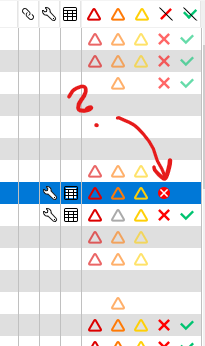
I have a rule that when checked, shows a “special” rejected mark in the rejected column, after checking. I can’t figure out what that means? It’s the basic rule checking collisions between architectural and hvac/ele/sprinkler etc… I’ve modified it before this to not take into account provisions for void, which i’ve added as a classification. It was working fine a while ago, this special mark appeared just recently and I can’t think of a reason why.
A side-effect of this is that the Checked components view is strangely inactive when selecting this rule. Meaning that all the “Show ___” -options are grayed out and number of elements is zero for them all.
The results are however listed (as far as I can tell) normally in the Results view and Results summary.
-
Solving my own question. According to this, it’s a symbol for error, and it means that the rule is being “blocked” because some of the preconditions for the rule did not pass. Now I got something to work out…
BTW - I skimmed that page searching for answers, too, but I was looking for picture of the symbol on the page. The problem was that the pictures are rendered super tiny on my system when viewing with edge. There’s just miniscule “points” visible next to the list… Maybe something to fix on the linked page?
Copyright © 2025 Solibri Inc. | Powered by NodeBB