
Checking only horizontal/vertical pipes
-
Hi,
Has anyone a good solution for how to limit a check to only horizontal (or sloped pipes) or vertical?
-
Hi, put a parameter inside the pipes, I think it’s the only way. I use this trick to isolate pipes through slabs
-
Hi. There is some help in the developer forums on how to calculate a slope of an object (https://society.solibri.com/topic/953/vertical-angle-of-a-wall)
If someone is ready to implement this as a custom information for pipes, it could be used to filter vertical or horizontal pipes or even based on the angle. -
One way could be using classification. If you have the pipe diameter available in some property set, you can use that as one condition and then use the bounding box height as follows:
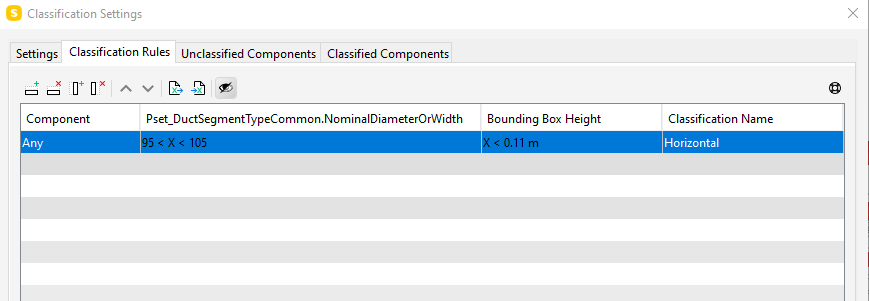
Here the diameter is given in millimeters as plain number. This works, for example in the First_Floor_Vent.ifc sample model.
The similar way you can use bounding box length for determining the vertical pipes.
-
Another method if the data is from Revit, simply export the constraints Start and End offset properties, then use the #231 Comparison between property values rule template.
Configuration example can be seen below. In the example below for ducts if the two properties are equal to each other, they are horizontal, failures show anything other than horizontal. Just change this to pipes instead and then you can pass these elements to your particular rule using the subrule options.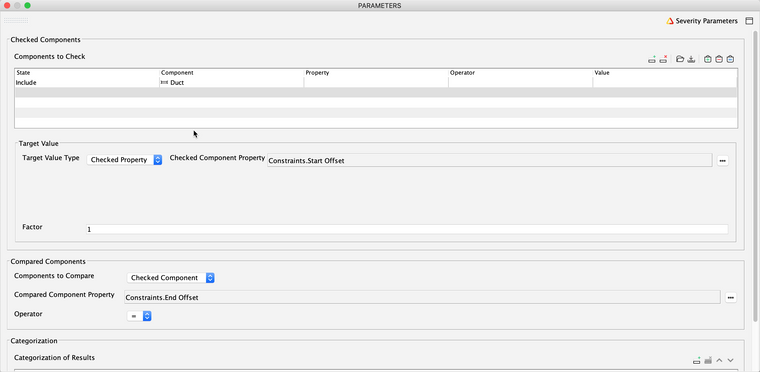
-
@simon-gilbert Thanks, I also define “horizontal” inclinations of the pipes for a few degrees (example drainage pipes). In these case I think that the rule doesn’t work
-
Thanks guys, I can see there are some possible workarounds here. I would probably prefer an alternative that is not dependent on parameters (or as least dependent as possible), both because our files are rather large already and as a general rule I prefer to avoid it if possible. Would be great if there was a built in feature for this, so you can make a rule to only include horizontal and sloped pipes for instance. It would make it a lot easier to make rules that give more meaningful results in many cases.
But maybe a parameter based classification is the easiest way to go, that would work for all pipe sizes I guess. Using the bounding box reduces the need for adding new parameters as the diameter already is defined, but then the setup needs to include all possible sizes. The main key for me at least is simplicity, so maybe the parameter approach is the simplest at this point. But would be great if regular filters also can be used on “properties that at not defined properties” but still can be read directly from the model if was a native feature of Solibri

Copyright © 2025 Solibri Inc. | Powered by NodeBB