
Investigating visibility features 🕵️♂️
-
Hello Society members!
We are looking to learn more about how you use different visibility options in Solibri and whether these features could be improved. In particular, we are looking at the following buttons:
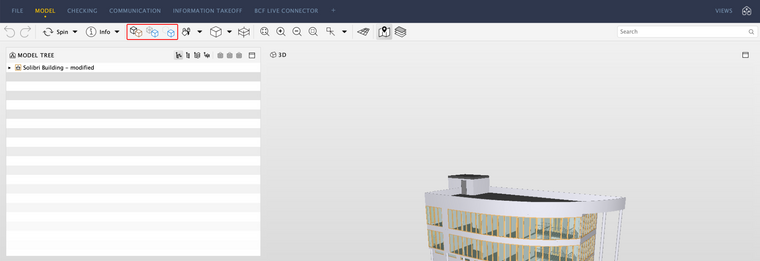
We would like to involve you, our users, to better understand how to make your workflow in Solibri easier and faster. It would extremely helpful if you could answer the following questions:
- How do you use the visibility functionality in Solibri?
- How does this functionality help you?
- Is there anything you would improve regarding this functionality?
Any freeform feedback and thoughts on the visibility functionality are also welcome!
Kind regards,
Elizabeth
on behalf of the Solibri team -
Hi Elizabeth,
In general is mainly use the “show all” button if I want to keep by selection baset but show the whole model and not just the selection basket. The transparency one I use the least because it often shows too much and you will loose the focus on the selected components.
I think the “show all” and " show transparent" can become more powerful in combination with a section box around checking result components. To enable even beter and easier viewpoint creation.
With kind regards,
Hilde -
I use 90% of the time the “show all” button. This happens when I mostly work with cutting planes and insted of deleting them, I simply show all. In addition I use this button when I review an issue, where there is a single component and I have no idea where it is located. So I get close to it, and click the show all.
10% of the time I use the show selected objects. Simply I select the necessary and isolate them from the rest. This happens if I am selecting not from the results.
The middle option I don’t use at all because it is too confusing for me with all the components set to transparent. For the same reason I also don’t create issues with it. Maybe I did not find a correct use case for this tool.regards,
agron -
I would like to add a scenario with might be improved by a redevelopment of the visibility options.:
- During a model check was discoed that a certain component was mission. For example, a foundation beam in the model of the structural engineer.
- An issue was created with a viewpoint that shows the current foundation and an annotation of the spot which is missing a beam.
- After correction by the structural engineer the model was updated.
- When opening the issue, the original viewpoint is shown with all foundation beams that were previously present. The newly added beam however is not visible.
- The 3D view should be “updated” by making all the foundation components from the new model visible. After which a new viewpoints can be added to the issue to show the new status.
When having a full understanding of how viewpoints work this behaviour makes sense and will be easy/natural review the situation after updating the model.
However, for (new) user with a less clear understanding of viewpoints it would be a great help to easily be able to see the current situation of a specific area/issue viewpoint.Thanks.
-
Hi…again from my side…

one option that I am missing with the visibility of the models in connection to the cutting planes:
When I am performing a cut plane for the whole project, sometimes I want to isolate on IFC from the others for further inspection.
Everything so far is ok, but the diffictuly appears the moment I want to bring all other models back into game while keeping the same cutting plane.
I cannot click on the “Show alle”, becuase I will loose the cutting plane. So my workaround is to manually select all IFC Models and click the equel “=” sign. But then again I get also the Spaces for which I have to also click them away.So maybe a shorter way of bringing all the models into the existing cutting plane would be in my opinion an improvement.
-
-
shortcut or button ‘delete all sectionplanes’
-
Only filter the unhandeld/undefined issues in the checking results.
In this example i only want to see the 696 open issues between Wall and Window.

-



Copyright © 2025 Solibri Inc. | Powered by NodeBB