Skip to content
  • Categories
Collapse
Solibri Society Forum
  1. Home
  2. General Discussion
  3. How do you calculate the volume in Solibri?

How do you calculate the volume in Solibri?

Scheduled Pinned Locked Moved General Discussion
3 Posts 3 Posters 906 Views
  • Oldest to Newest
  • Newest to Oldest
  • Most Votes
Log in to reply
This topic has been deleted. Only users with topic management privileges can see it.
  • Y Offline
    Y Offline
    Yumi Yogi
    wrote on last edited by
    #1

    Hi,

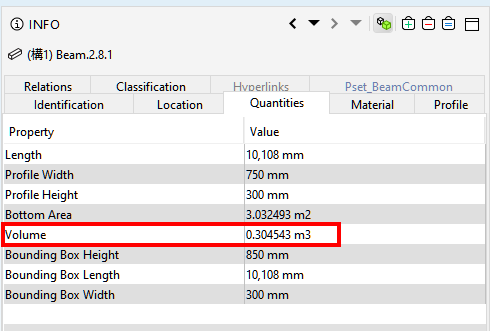
    When I open an IFC in Solibri, I can see the volume value in the quantities of the INFO view.
    But when I open the IFC as text, the volume value is nowhere to be found.

    How do you calculate the volume in Solibri?
    What or which information is it calculated from?
    d2348d83-5a41-4b2d-be7c-82af2ee331b8-image.png
    Thanks for your help.
    Best regards,

    1 Reply Last reply
    0
    • T Offline
      T Offline
      TheoR
      wrote on last edited by
      #2

      In my experience with Solibri, you don’t want to use the Quantities tab.
      Rather let your CAD software export the quantities (in a Qto_ElementBaseQuantities). Those are much more accurate and better!

      1 Reply Last reply
      2
      • L Offline
        L Offline
        lasse.lindqvist
        wrote on last edited by
        #3

        Hi. Solibri calculates the quantities from the geometry information. Sometimes it might be different from what the modeling software has. If such occurrences happen, we can log a bug and improve the calculation algorithms.

        1 Reply Last reply
        1

        Copyright © 2025 Solibri Inc. | Powered by NodeBB

        • Login

        • Don't have an account? Register

        • Login or register to search.
        • First post
          Last post
        0
        • Categories