
Interpreting the Checking Summary Report Stats
-
I was the oppinion that …
Checked Components = Passed + Failed Components
and
Failed Components = Accepted Components + Rejected Components + Components Without Decision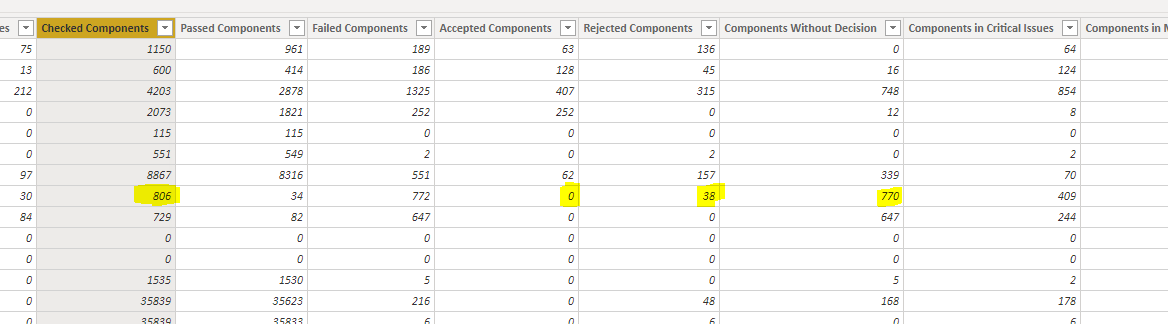
… but now on a closer look on the report I discovered that I have e.g. 806 checked components but (38+770=) 808 failed components for the same rule which makes me doubt that what I used to believe is correct. Escpecially as there lots of other examples where numbers simply don’t match.
Can somebody explain if this is just an advanced mathematical logic which I do not understand or if those numbers are simply not reliable (as components are probably counted multiple times?) which then again would rise a few other questions.
-
Well,
The math is indeed
Checked = Passed + Failed, which seems to be correct there as it is 806 = 34 + 772.But for Failed components and Rejections, Acceptances and Non-Decisions it is somewhat more complex.
As one component can fail in multiple rules it can be accepted for one rule, but rejected for another.
This makes it so that it is counted only once in “Failed”, but once in “Rejected” and also once in “Accepted” causing the math to no longer work out. Same with the non-decision. If the component fails in multiple rules and you only reject it in some, you get it to occur in both Rejected and in Components Without Decision. -
@lasse-lindqvist said in Interpreting the Checking Summary Report Stats:
As one component can fail in multiple rules it can be accepted for one rule, but rejected for another.
Ok, but within one rule the sum should then be 0 again … or could it be that if there are e.g. different objects intersecting with the same let’s say wall component and you accept it in one issue, but reject it in another one, then this wall gets counted twice - one for rejected, one for accepted but also just one fore failed components?
I have the problem that even on a single rule basis the component status can’t be visualized clearly as the numbers are often not summing up to 100%. I have now now calculated it by myself by giving different priorities (Rejected > Undecided > Accepted) as from my point of view a component should have only one (the most critical given) status. Especially as there is no real component link in the summary reports from which you could derive more information about a more detailed individual component status (e.g. how many passed/failed/rejected/…).
-
It is also possible that a single rule creates multiple results for one component. For example the Door Rule checks height and width. So the same door can have a result about the height and another about the width.
-
@lasse-lindqvist said in Interpreting the Checking Summary Report Stats:
It is also possible that a single rule creates multiple results for one component. For example the Door Rule checks height and width. So the same door can have a result about the height and another about the width.
So, it’s
Checked | Passed | Failed
1 | 0 | 1which is correct, but at the same time for one Failed Component have the following values
Accepted | Rejected | Undecided
0 | 1 | 1That explains why I have 100% passed and failed at the same time for just one component.
Wouldn’t it make more sense that if any of the checks on a single component is rejected than the whole component status is rejected as it can have just one value here?
Actually at the moment Accepted, Rececte and Undecided is not reported on component level but on issue level and therefore labeled misleading.
-
It is definitely possible to change it so that Rejected trumps Undecided/Accepted and Undecided trumps Accepted. That would make the math always match.
Changing it is also really easy, so it is just a question of do we want to actually change it. Is there compatibility considerations for some users if numbers start to mean something else now? Do some users prefer the current way of calculating the numbers?
-
@lasse-lindqvist said in Interpreting the Checking Summary Report Stats:
It is definitely possible to change it so that Rejected trumps Undecided/Accepted and Undecided trumps Accepted. That would make the math always match.
Exactly
Is there compatibility considerations for some users if numbers start to mean something else now? Do some users prefer the current way of calculating the numbers?
True, and if you ask me it would make the most sense if there would ideally be both to satisfy all kind of needs. Meaning that as already pointed out there should be Accepted/Rejected/Undecided Components reflecting the truly failed components and Accepted/Rejected/Undecided Component issues reflecting the absolute number as it already does to deliever the the big picture. As it makes a difference if a component has an overall e.g. Rejected status because it failes in 10/10 or just in 1/10 cases.

Copyright © 2025 Solibri Inc. | Powered by NodeBB