Skip to content
  • Categories
Collapse
Solibri Society Forum
  1. Home
  2. General Discussion
  3. Rule 206 false positives

Rule 206 false positives

Scheduled Pinned Locked Moved General Discussion
2 Posts 2 Posters 526 Views
  • Oldest to Newest
  • Newest to Oldest
  • Most Votes
Log in to reply
This topic has been deleted. Only users with topic management privileges can see it.
  • _c__ Offline
    _c__ Offline
    _c_
    wrote on last edited by
    #1

    Hello,

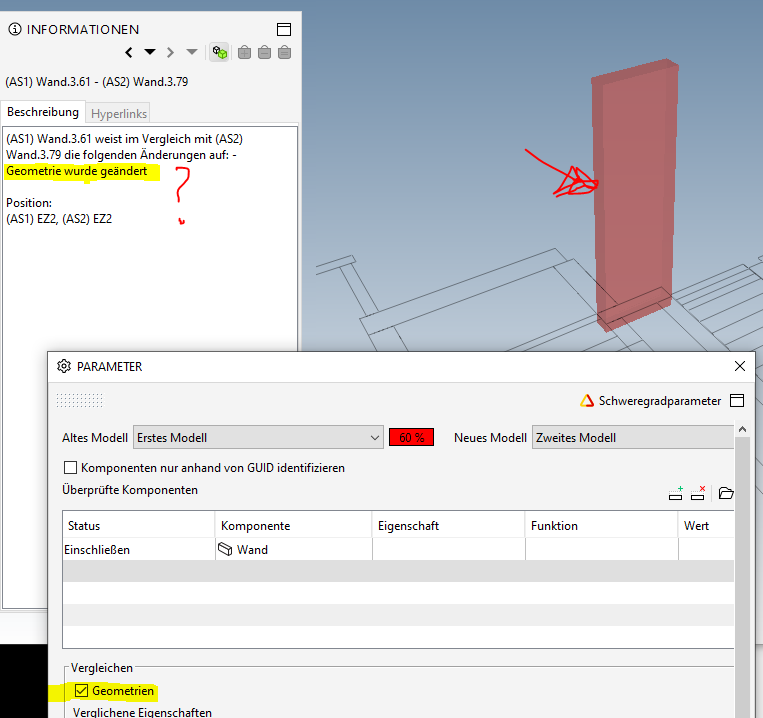
    I am using the rule 206 for checking model differences. If I enable “geometry” I have a lot of false positives where I don’t see any change. The report states only “geometry changed”, but doesn’t say what exactly.

    How can I exclude these? They ruin Autorun’s efficiency.
    56d4a1e4-1996-4c56-8b2d-df0ce024e019-image.png

    c

    Harmen JorritsmaH 1 Reply Last reply
    1
    • Harmen JorritsmaH Offline
      Harmen JorritsmaH Offline
      Harmen Jorritsma
      replied to _c_ on last edited by
      #2

      @_c_
      In the rule you can also define the report.
      There stand Component/Type/Location ‘on’.
      So the geometry isn’t changed, but for example the type

      Met vriendelijke groet,
      Harmen Jorritsma

      BIM regisseur Van Wijnen Amsterdam
      Diemerhof 32 | 1112 XN Diemen | KvK 32129744

      020 -36 44 000 | 06-83 15 66 88 | LinkedIn | www.vanwijnen.nl
      Volg ons op Facebook en Twitter

      1 Reply Last reply
      0

      Copyright © 2025 Solibri Inc. | Powered by NodeBB

      • Login

      • Don't have an account? Register

      • Login or register to search.
      • First post
        Last post
      0
      • Categories
