Skip to content
  • Categories
Collapse
Solibri Society Forum
  1. Home
  2. General Discussion
  3. Property comparison

Property comparison

Scheduled Pinned Locked Moved General Discussion
3 Posts 2 Posters 734 Views
  • Oldest to Newest
  • Newest to Oldest
  • Most Votes
Log in to reply
This topic has been deleted. Only users with topic management privileges can see it.
  • J Offline
    J Offline
    Jimin
    wrote on last edited by
    #1

    Hello everyone, I have tried to check the forum for property verification or “match” without any results and hope you guys could guide me 🙂

    What I am trying to accomplish is to check if information in nr 1, 2, 3 is in nr 4.
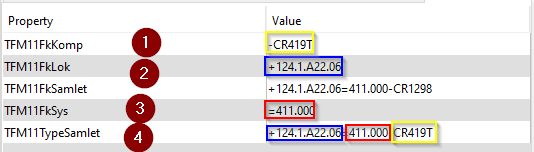
    f071cf2c-0608-4d46-abb1-c562feb3014a-image.png

    The only rule that I have found is #231 but I am struggling to configure that one and dont know whether I am in the right direction or do you guys have any other recommendation? 🙂

    Lauri LuomaL 1 Reply Last reply
    0
    • Lauri LuomaL Offline
      Lauri LuomaL Offline
      Lauri Luoma Solibrians
      replied to Jimin on last edited by
      #2

      hello @Jimin

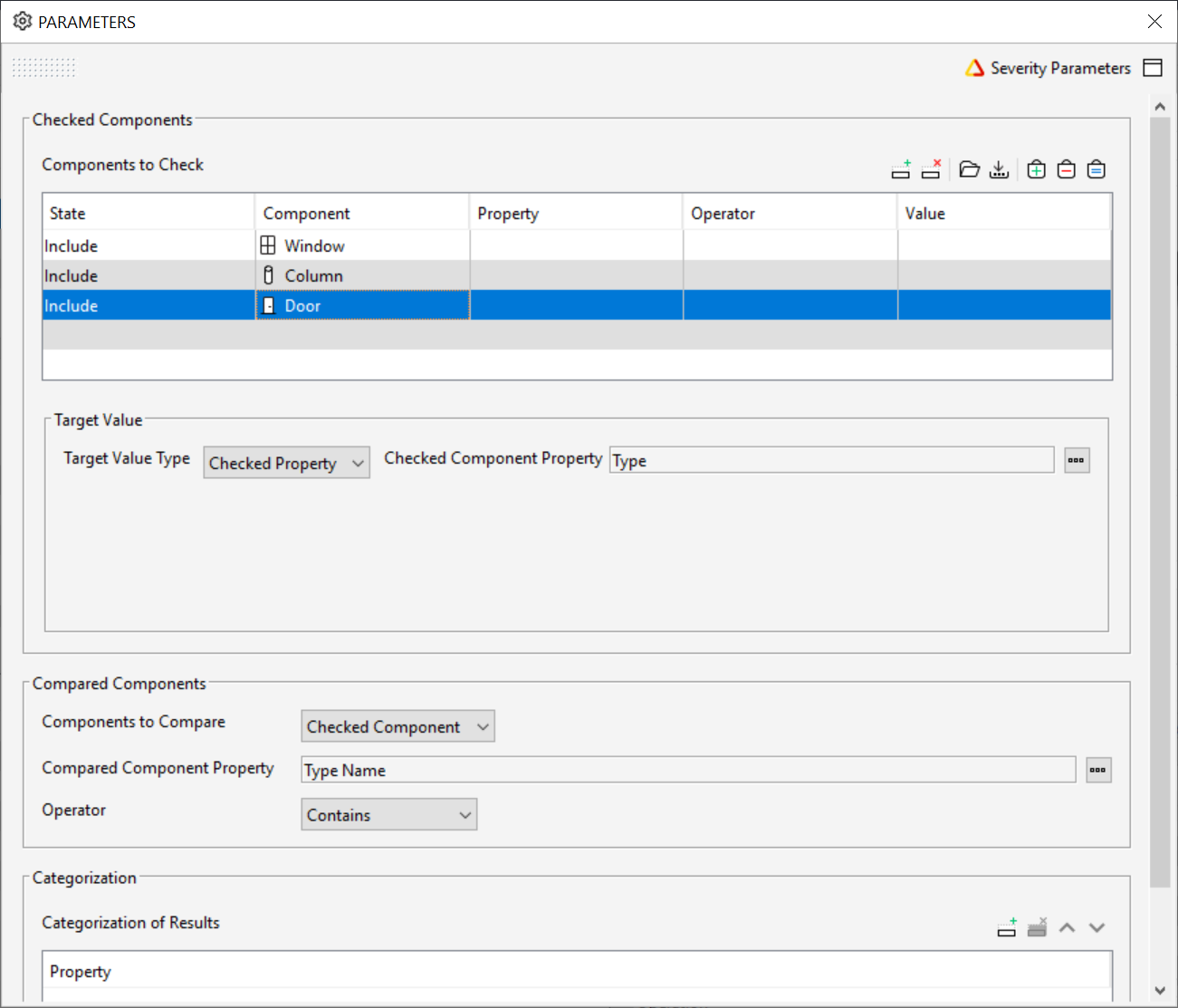
      You could try with rule #231:
      208eef14-16f4-4c4b-a226-c1b78a8511e8-image.png

      Add the compared properties in the “target value” and “compared component property”. make the rule for each 1,2 and 3 properties.

      Hope this helps 🙂

      1 Reply Last reply
      1
      • J Offline
        J Offline
        Jimin
        wrote on last edited by
        #3

        Thanks for the reply @Lauri-Luoma ! 🙂

        Oh you mean that I should have 3 rules of #231 where components to check should be “Any” (as I would like to check the whole model) and “Target Value” is my nr 4 while “compared components” should be respectively 1, 2 and 3? 🙂

        1 Reply Last reply
        2

        Copyright © 2025 Solibri Inc. | Powered by NodeBB

        • Login

        • Don't have an account? Register

        • Login or register to search.
        • First post
          Last post
        0
        • Categories