
Understanding Model locations
-
Hello solibrians,
I have been looking for the source of model locations information, I want to understand the logic behind, I am sure it is not the model base point neither the topologie point.
Is there any solibrian developper who can explain this to me ?
Also, I can’t find the model locations below on the screen in the IFC txt., how de we get it ?
@Lauri-Luoma
@Matti-Kannala
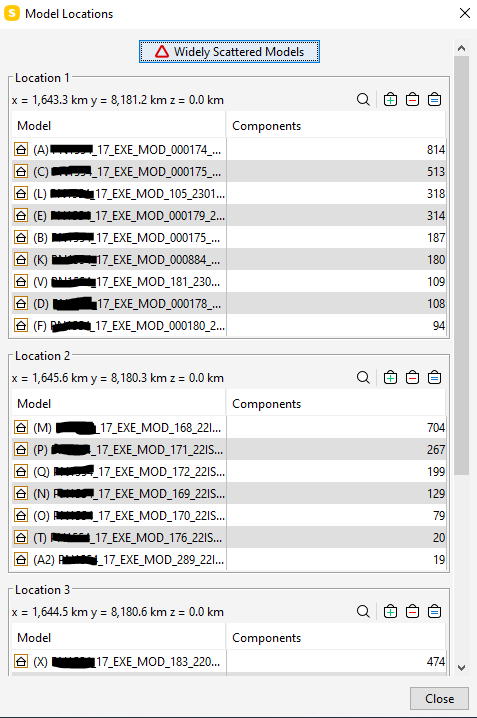
Regards, -
Here is a short article on Widely Scattered Models:
https://help.solibri.com/hc/en-us/articles/1500004052902-Widely-Scattered-ModelsFrom the looks of it, you have some models that have different shared coordinates. I assume this is a Revit project? You can try acquiring or publishing coordinates and then re-exporting using the default option of share coordinates in the IFC exporter.
You can use the zoom to tool (magnifying glass icon) or set compoennts to the selection basket to isolate them in the 3D view.
Check and see if the survey and project base point are in the same locations by using the Reveal Hidden Elements button. Maybe you published/acquired two those groupings, but for example maybe Model ‘A’ and model ‘M’ didn’t’ have their coordinates published/acquired from each other.
I did some experimentation to further understand how these locations are reported in the dialogue, and it seems Solibri creates these “scattered” locations in a sort of 1000m X 1000m grid. I created a matrix of 20 X 20 walls spaced 100m apart, and the widely scattered dialogue created 4 separate locations grouping 100 of the walls into each.
Scattered Walls.zipI thought that maybe if you had a wall 990m and a wall 1000m from the 0,0,0 origin, Solibri would consider that 1 single location, but the Widely Scattered dialogue will still warn you if you open the 990m and 1000m wall test files with two locations.
-
@john-lipp said in Understanding Model locations:
I did some experimentation to further understand how these locations are reported in the dialogue, and it seems Solibri creates these “scattered” locations in a sort of 1000m X 1000m grid. I created a matrix of 20 X 20 walls spaced 100m apart, and the widely scattered dialogue created 4 separate locations grouping 100 of the walls into each.
I thought that maybe if you had a wall 990m and a wall 1000m from the 0,0,0 origin, Solibri would consider that 1 single location, but the Widely Scattered dialogue will still warn you if you open the 990m and 1000m wall test files with two locations.
I guess that basically sums up the observation I made some time ago too.
https://society.solibri.com/topic/1625/scattered-model-treshold?_=1643222400268
Fun fact is that it happens within the same model.


Copyright © 2025 Solibri Inc. | Powered by NodeBB