
BCF Live Connector | Sync-problem with BIM collab Zoom
-
Hello everyone,
I have a little big problem with the BCF Live Connector and couldn´t find an answer in this forum yet. Maybe you can help me.
The situation:
My colleague created an Issue in Solibri with BCF-Live-Connector to a BIM Collab Zoom-project. That worked fine. The structural engineer got the issues and made some comments in BIMcollabZoom. That worked fine, too. So now I opened Solibri, connected to the Project with BCF Live Connector and found the issue with the comments. So far so good.
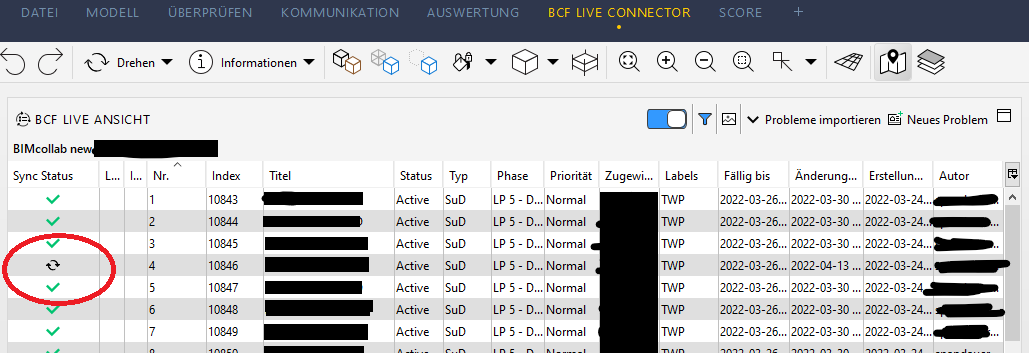
After changes from me in this issue (added a screenshot, changed the description, made a new comment) Solibri or the BCF Live Connector changed the symbol in the column “sync status” to the classic double arrows. Now I worked with alle the mentioned issues and wanted to sync now.The problem:
The “Sync-Symbol” doesn’t change. I still see the double-arrows and unfortunately the issues won’t sync… and additionally I’m not able to use the filter anymore. The filter is still active, but after clicking on it the window won’t pop up.What I tried:
Automatic sync was activated from the beginning. So I unchecked this automatic and made a manual sync with “mark as ready”. The button for this was blue and could be clicked. Unfortunately this does’nt solve the problem - the double arrow is still there.
So I tried to create a new issue. The creation was okay, but this new issue won’t sync.What I need:
Maybe someone has an idea how to get the sync done. If not --> am I able to export an BCF from my changed issues?Kind regards
-
@8schrank8 , I have noticed that BIMCollb does not like special symbols in the title of the issue, I had a similar problem some time ago (I do not remember the character it was) but I removed all the " * - +` /%& etc. and then it worked. A bit hard to see if that is the case here, but since you have tried to make a new issue with the same information, it leads me to believe that there might be some information in the issue that causes the sync problem.
-
Hi. You should also check your log files to see whats kind of error is logged there.
-
@8schrank8 , You should get in contact with BIMcollab themselves I presume. FYI: they also have a limitation as to how many characters are allowed in for example the title/comments/description parameter. I don’t know how many though.
-
Good morning everyone,
I’m all in all new to solibri and happy to see, that the forum is very active
 So let’s answer your replies. Thanks for your answers!
@a-alhayek
Syncing did work again after the restart. But I have to say that I worked with the last Solibri-Version. So before the new start of solibri I installed the newest update. But imo it was about the restart itself and not about the update.@Seba
That’s a nice little tip. I will try that the next time I get in this situation again. Actually there were " / " - signs and it’s good to know that sometimes it’s about this special symbols. But I agree with you that this shouldn’t be the problem, because I created a new issue that wouldn’t be synced as well.@lasse-lindqvist
Thanks for this tip. I didn’t know that there are log files. Could you tell me the path where the files are saved? Otherwise I will google it But thanks for this information!
@YasmineD
Thank you for the tip. I will get in contact with BIMcollab and try to find out how many characters are allowed. Unfortunately I don’t think that this is the cause of the problem I had, because after the restart (and update) the syncing worked again.I appreciate your help. I hope that someone in the future takes benefit from this post.
Kind regards
Steve -
Hi. Log files can be found from C:\Program Files\Solibri\SOLIBRI\log.
Copyright © 2025 Solibri Inc. | Powered by NodeBB