
How to check minimum total area of spaces including every floor?
-
Hello!
I am trying to check if the total area of interior spaces satisfies a minimum given value.
The project is a two story house: Ground floor and Mansard.I tryed using the rule nr. “37/1.4 Total Space Area on Each Building Floor” but the results are divided by each floor and summarizes by floors.
I want to check the total area disregarding the number of floors in the project.Do you have any suggestion what rule I should use to check this?
-
-
@Ilona-C-T thank you for the suggestion. I tried with that rule also, but the problem is that this rules uses tolerances. I want to report only if the minimum values are not reached, but not interested if the values are higher then what is configured. The rule 36/4.0 gives me false positive results because it is using target area and tolerances.
-
It would help if I could filter the severity paramters. If the required area is not reached to be red and if higher then to be yellow triangle, but I can’t do that.
-
I would suggest trying the Comparison Between Property Rule 231 by checking the total area of the space in the architectural building that has the contains relation to the spaces.
You’d need to create a rule for each classification of space you want to check the minimum area for.
Also, the description of the issue results would say state something like : “Sum 157.91 m2 of the “Area” fails to meet the required value 160.00 m2 with operator ≥”
If you want something more descriptive, you can make 231 it a gatekeeper with a manual rule underneath with your own description returning the spaces of that category:
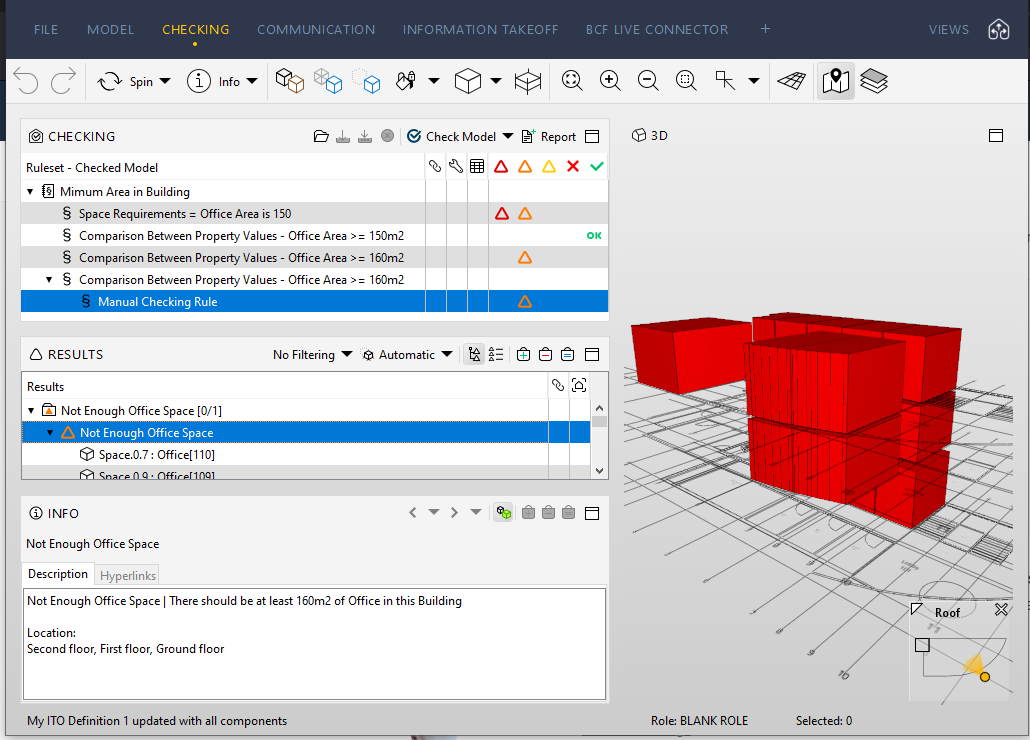
Here is an example of the Solibri Building checking for at least 160m2 of office space:
Solibri Building - Minimum Area in Entire Building.smcI’d recommend posting an enhancement request for rule 36 to have an across entire building or floors parameter and for rule 37 to add optional min/max area parameters in addition to a tolerance: https://society.solibri.com/category/18/feature-requests
-
@john-lipp thank you for helping me out.

This solution is working fine for this situation, altough it is a bit difficult for me to understand the exact behaviour of this complex rule nr. 231, but it is a verry powerful one and I think I will use for other complex checkings also.
Also thank you for the nice tip for manual checking results, wich gives a more user friendly description to the issue.
Have a great day!



Copyright © 2025 Solibri Inc. | Powered by NodeBB