Skip to content
  • Categories
Collapse
Solibri Society Forum
  1. Home
  2. General Discussion
  3. BCF Live Connector - Clash 3D Overviews

BCF Live Connector - Clash 3D Overviews

Scheduled Pinned Locked Moved General Discussion
5 Posts 4 Posters 987 Views
  • Oldest to Newest
  • Newest to Oldest
  • Most Votes
Log in to reply
This topic has been deleted. Only users with topic management privileges can see it.
  • Maxime SabbaghM Offline
    Maxime SabbaghM Offline
    Maxime Sabbagh
    wrote on last edited by Maxime Sabbagh
    #1

    Hello,
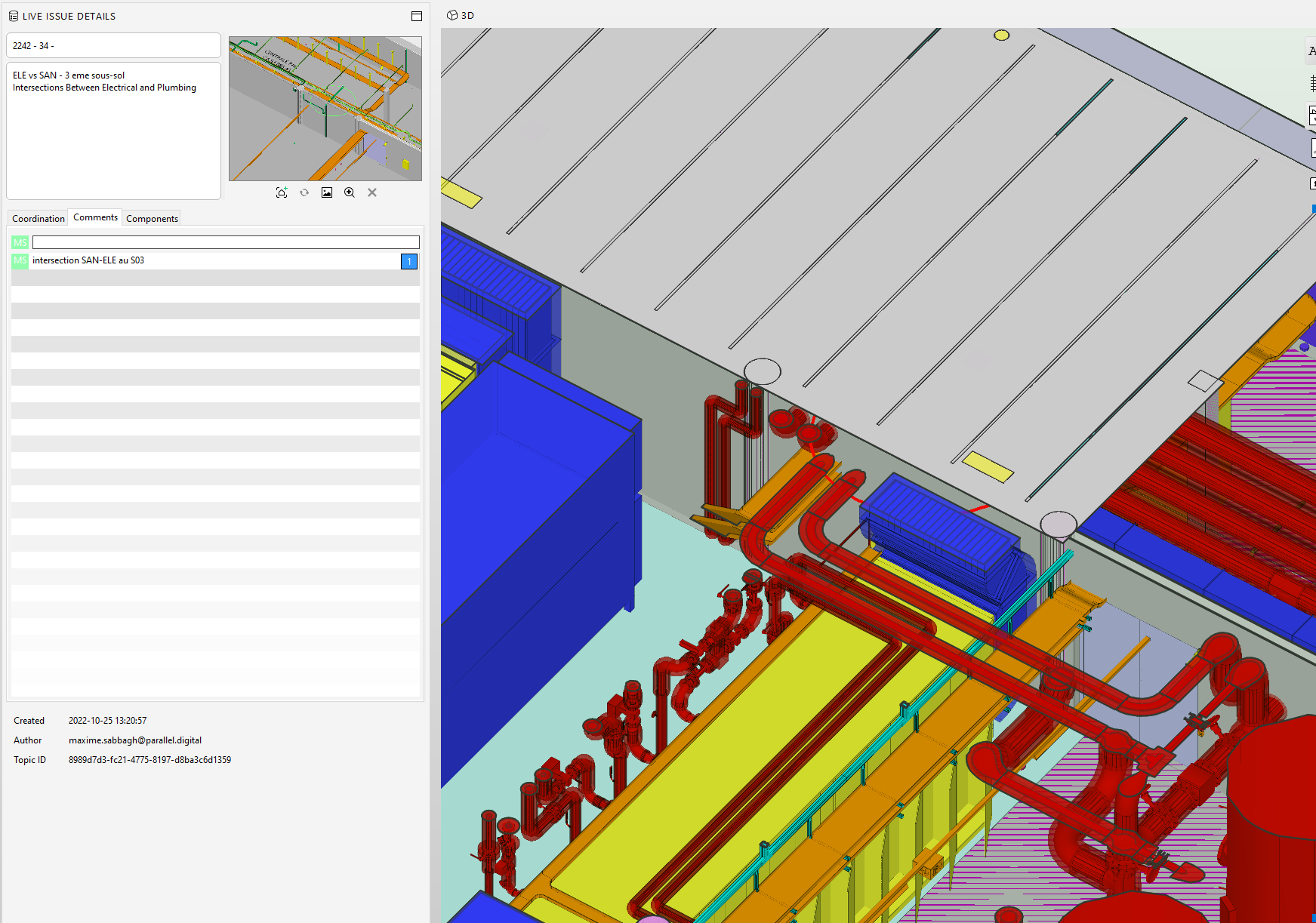
    I have a problem in the BCFLiveConnector. When I click on an issue, the image that appears in the 3D view is different from the one captured in the issue slide. All the models are on
    For example : a clash between Architecture and Electrical. So I turned off all the other model when creating the slide.
    And this is what appears in the 3D view when I selected the issue in BCFLive View:
    All models are on…

    Thank you for your precious help

    https://www.parallel.digital/

    jakub.rusinJ 1 Reply Last reply
    1
    • jakub.rusinJ Offline
      jakub.rusinJ Offline
      jakub.rusin Solibrians
      replied to Maxime Sabbagh on last edited by
      #2

      @Maxime-Sabbagh said in BCF Live Connector - Clash 3D Overviews:

      And this is what appears in the 3D view when I selected the issue in BCFLive View:

      Did you mean to attach a screenshot?

      1 Reply Last reply
      0
      • MattiM Offline
        MattiM Offline
        Matti Solibrians
        wrote on last edited by
        #3

        Did you sync with a server and if yes which one?
        How many components were visible in the slide? Some servers have limit for component count.

        1 Reply Last reply
        0
        • Harmen JorritsmaH Offline
          Harmen JorritsmaH Offline
          Harmen Jorritsma
          wrote on last edited by
          #4

          @Maxime-Sabbagh ,
          Click on Select(6) Go to the 3D Vieuw.
          Press the left mouse button a few seconds.
          A square is apear.
          Keep pressing de left button and select the components.
          Go to Show the select only button right at the slect button.
          Now create a issue.
          Only the componts witch ar showed are in the isseu, this way you don’t reach the limit.
          After that you can use slect again to at thise components in the issue to make it smater(those componets ar showed in the modeling software of the other party)

          Met vriendelijke groet,
          Harmen Jorritsma

          BIM regisseur Van Wijnen Amsterdam
          Diemerhof 32 | 1112 XN Diemen | KvK 32129744

          020 -36 44 000 | 06-83 15 66 88 | LinkedIn | www.vanwijnen.nl
          Volg ons op Facebook en Twitter

          1 Reply Last reply
          0
          • Maxime SabbaghM Offline
            Maxime SabbaghM Offline
            Maxime Sabbagh
            wrote on last edited by
            #5

            As you can see on the screenshot when I select an issue in the BCFLiveView, the issue snapshot is different from the 3D overview…

            @Harmen-Jorritsma Yes this is what I did when creating the issue…
            5f8124c6-4006-4e98-b7f7-29dff0b670dd-image.png

            https://www.parallel.digital/

            1 Reply Last reply
            0

            Copyright © 2025 Solibri Inc. | Powered by NodeBB

            • Login

            • Don't have an account? Register

            • Login or register to search.
            • First post
              Last post
            0
            • Categories