Skip to content
  • Categories
Collapse
Solibri Society Forum
  1. Home
  2. General Discussion
  3. Losing link with connected slides and results

Losing link with connected slides and results

Scheduled Pinned Locked Moved General Discussion
13 Posts 5 Posters 2.0k Views
  • Oldest to Newest
  • Newest to Oldest
  • Most Votes
Log in to reply
This topic has been deleted. Only users with topic management privileges can see it.
  • MattiM Offline
    MattiM Offline
    Matti Solibrians
    replied to SanneVertommen on last edited by
    #4

    @SanneVertommen

    But when i make slide base on 1 issue and the is resolved or changed into an issues but maybe smaller, then the link with the result will stay?

    Could test once more if the count of the results affects on the link breaking?
    a) single result <-> 1 slide
    b) multiple results <-> 1 slide

    1 Reply Last reply
    0
    • Harmen JorritsmaH Offline
      Harmen JorritsmaH Offline
      Harmen Jorritsma
      wrote on last edited by
      #5

      @SanneVertommen,
      recently i had contact with @Solibrians.
      They told me there is no connection between de BCF lIve Vieuw and the ruleset.

      There looks like it when you import the isseus in the BCF Live connector.
      But when you close the conenction and reopen it again(most lickly when you go home) the connection is gone.

      The viewpoint of Solibri the BCF servers is the sourch of the single truth.

      By re-run the check the issue is now undifined in SOlibri(so it is resolved, so you can set the issue to closed.)

      When you import those isseu again it will overwrite the issues form/in BIm Collab and the status is closed

      Met vriendelijke groet,
      Harmen Jorritsma

      BIM regisseur Van Wijnen Amsterdam
      Diemerhof 32 | 1112 XN Diemen | KvK 32129744

      020 -36 44 000 | 06-83 15 66 88 | LinkedIn | www.vanwijnen.nl
      Volg ons op Facebook en Twitter

      S 1 Reply Last reply
      0
      • S Offline
        S Offline
        SanneVertommen
        replied to Harmen Jorritsma on last edited by
        #6

        @Harmen-Jorritsma
        Hi, thank you for your response.
        What do you mean that he loses the connection between the ruleset and BCF live connector?
        When I update some issues stil have the ‘triangle’ behind that indicates that there is still a connection with the results or in the results you see the circle with the arrows behind it.
        Sometimes I lose the connection but I’ll test what @Matti-Kannala suggested.

        1 Reply Last reply
        0
        • Harmen JorritsmaH Offline
          Harmen JorritsmaH Offline
          Harmen Jorritsma
          wrote on last edited by
          #7

          @SanneVertommen

          It is true that your triangle remains and when you click on it you go to the relevant line.
          Only the values ​​in the issue(status / comment) in the ruleset do not match with values ​​in BCF live view.
          There is no connection between them after closing solibri.
          So you cannot rely on these values ​​and you really have to look at the BCF live view for this

          Met vriendelijke groet,
          Harmen Jorritsma

          BIM regisseur Van Wijnen Amsterdam
          Diemerhof 32 | 1112 XN Diemen | KvK 32129744

          020 -36 44 000 | 06-83 15 66 88 | LinkedIn | www.vanwijnen.nl
          Volg ons op Facebook en Twitter

          1 Reply Last reply
          0
          • P Offline
            P Offline
            Pasi Paasiala Solibrians
            wrote on last edited by
            #8

            @Harmen-Jorritsma @SanneVertommen The connection between BCF issues and presentation/checking results is stored in the Solibri model. You just need to save the model after the issues are exported from Solibri to BCF. If the model is not saved, the link will be lost.

            1 Reply Last reply
            0
            • Harmen JorritsmaH Offline
              Harmen JorritsmaH Offline
              Harmen Jorritsma
              wrote on last edited by
              #9

              @SanneVertommen @Pasi-Paasiala ,

              The ONLY connection from the BCF Live Vieuw and the ruleset is the triangle.
              When you click on the triangle you go to the issue in the ruleset.

              You’re right up to here.

              But the adjustment of the status or the addition of comments to the issue is not reflected in the ruleset (issue detail).

              Issue in ruleset, this is exported to Bim Collab
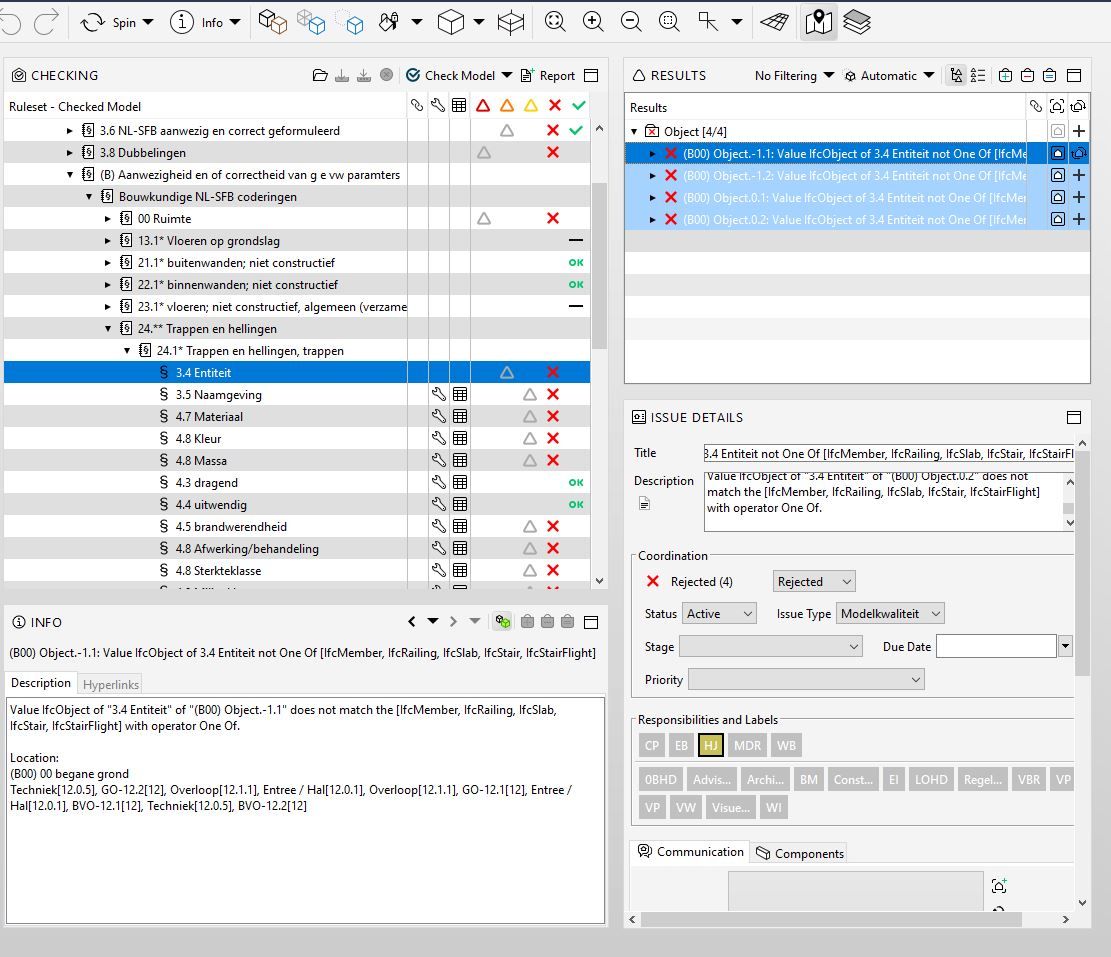
              ruleset sync to bc.JPG

              I saved the SMC, closed the conenction and Solibri.
              After theat i open Solibri, the smc and activate the BCF Live Vieuw again.
              In the BCF live vieuw you see the stauts resolved.
              When i click on the triangle i go to the ruleset
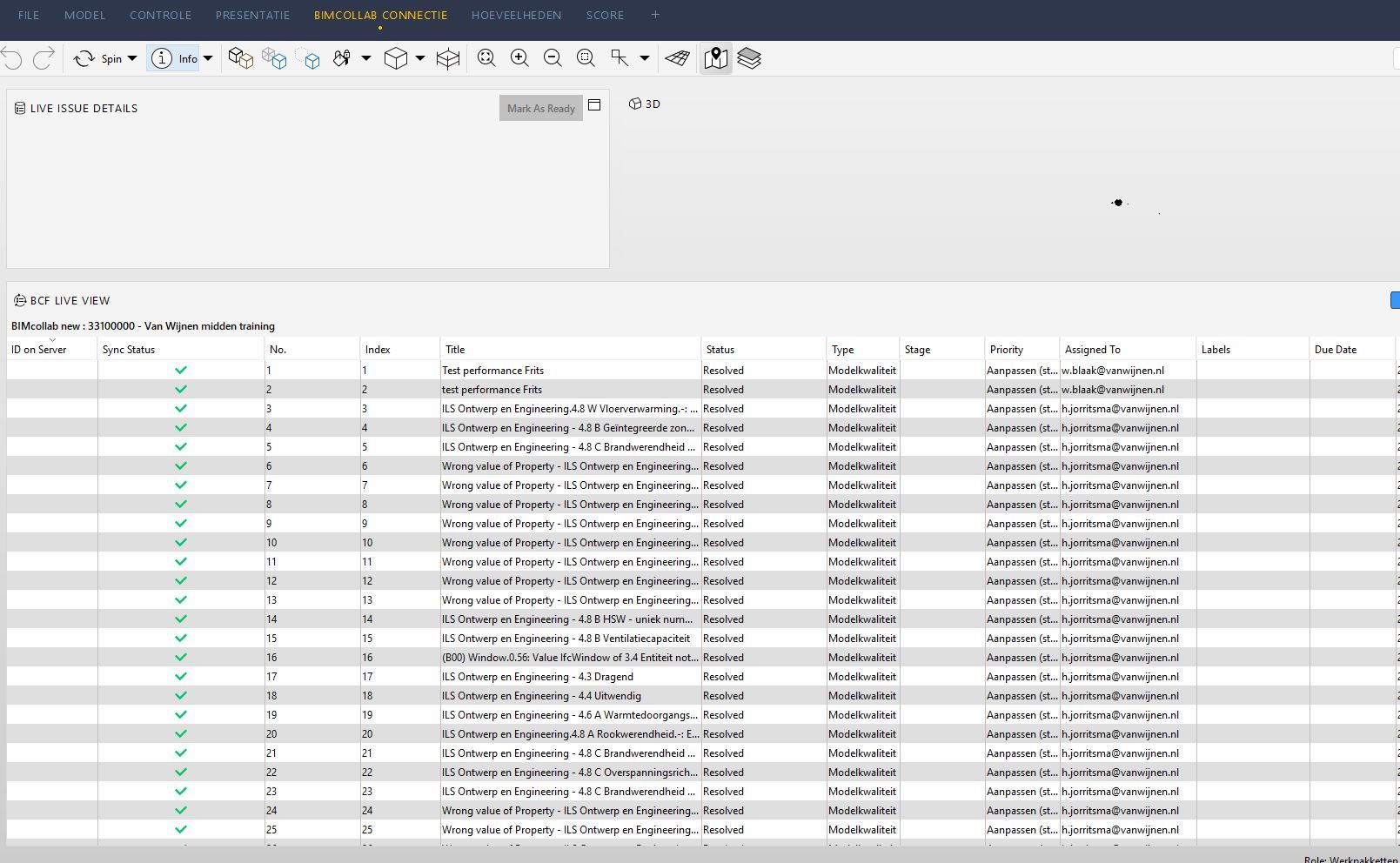
              resolved in BCFLV.JPG

              You can see in the ruleset vieuw in the Issue detail of the issue the rulset the status is active.
              But the issue in BCF live vieuw is status resolved.
              This is what i mean.
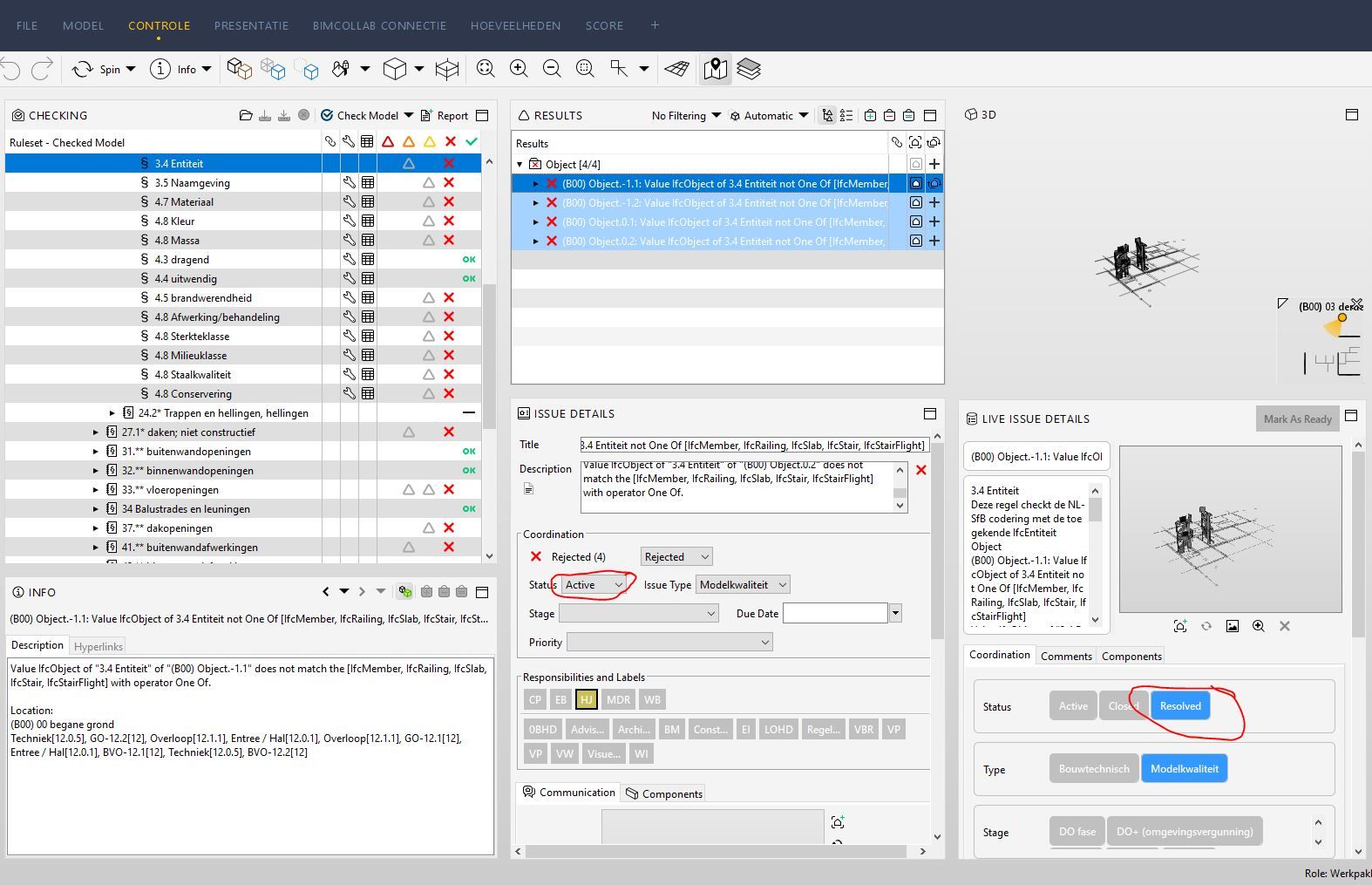
              rulset na update.JPG

              Met vriendelijke groet,
              Harmen Jorritsma

              BIM regisseur Van Wijnen Amsterdam
              Diemerhof 32 | 1112 XN Diemen | KvK 32129744

              020 -36 44 000 | 06-83 15 66 88 | LinkedIn | www.vanwijnen.nl
              Volg ons op Facebook en Twitter

              1 Reply Last reply
              0
              • JeroenKoomenJ Offline
                JeroenKoomenJ Offline
                JeroenKoomen
                wrote on last edited by
                #10

                @Ruben-Trouborst

                http://www.linkedin.com/in/koomenjeroen
                https://www.bimloket.nl/BIMbasisILS

                1 Reply Last reply
                0
                • P Offline
                  P Offline
                  Pasi Paasiala Solibrians
                  wrote on last edited by
                  #11

                  @Harmen-Jorritsma Attached is a video how it works when I tried it. I tested with the latest beta 9.13.1-SNAPSHOT, but this should work the same way in older versions as well.
                  Status sync.zip

                  1 Reply Last reply
                  0
                  • Harmen JorritsmaH Offline
                    Harmen JorritsmaH Offline
                    Harmen Jorritsma
                    wrote on last edited by
                    #12

                    @Pasi-Paasiala,

                    Try the same you did in the video after you close the BCF live connection, close/save the smc close solibri.
                    This is what people do when they go to home.

                    When they come to work the next day:
                    Open Solibri again, open the smc and activate the BCF live connection.
                    Try agian what you did in the video.
                    Likely it doesn’t work as you show in the video and looks like my snapshot. ( no connection anymore 😞 )

                    I can show it to you in a teams meeting ( [email protected] )

                    Met vriendelijke groet,
                    Harmen Jorritsma

                    BIM regisseur Van Wijnen Amsterdam
                    Diemerhof 32 | 1112 XN Diemen | KvK 32129744

                    020 -36 44 000 | 06-83 15 66 88 | LinkedIn | www.vanwijnen.nl
                    Volg ons op Facebook en Twitter

                    1 Reply Last reply
                    0
                    • P Offline
                      P Offline
                      Pasi Paasiala Solibrians
                      wrote on last edited by
                      #13

                      @Harmen-Jorritsma I did exactly that. Maybe there’s something broken in your model. Could you do the following:

                      1. Turn off Solibri if you’re running it
                      2. Open the Solibri.vmoptions file in a text editor (e.g. Notepad) that you find in the installation directory of Solibri
                      3. Add the following line to the vmoptions file:
                        -Dlogging_level=DEBUG
                      4. Save the vmoptions file
                      5. Open Solibri
                      6. Duplicate the problem
                      7. Zip the log folder in Solibri installation directory and send it over

                      This might give us a hint what’s going on. Thanks for your efforts.

                      1 Reply Last reply
                      0

                      Copyright © 2025 Solibri Inc. | Powered by NodeBB

                      • Login

                      • Don't have an account? Register

                      • Login or register to search.
                      • First post
                        Last post
                      0
                      • Categories
