
SOL 230 Integer Problems
-
I want to check the following Integer type value of a property, let’s say the following one …

However, I have problems with SOL 230 as if I make my selection …
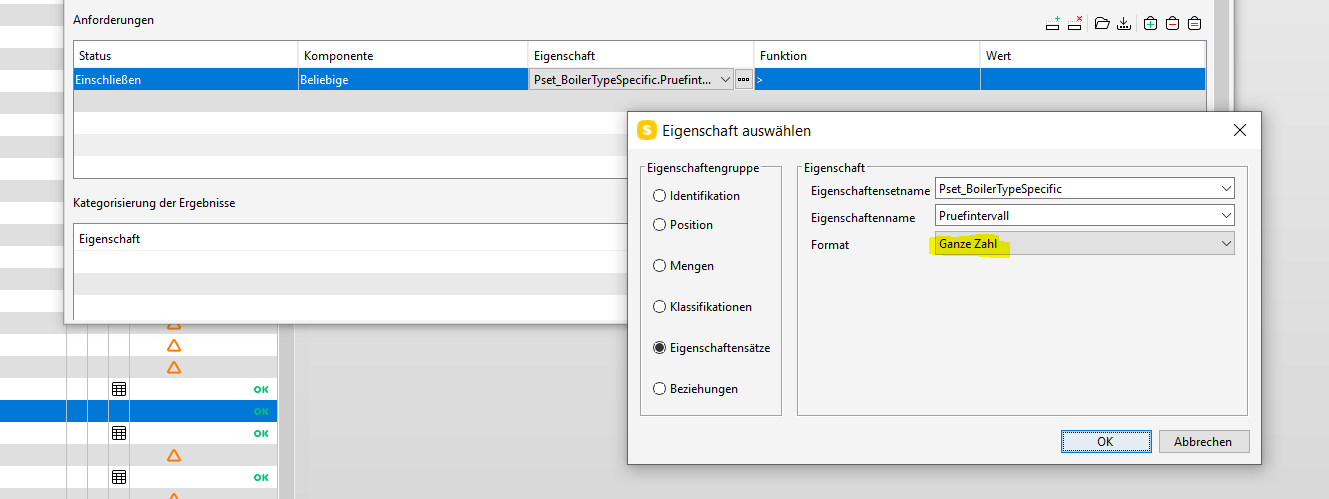
… it simply does not allow me to confirm the desired values e.g." > 0".


So it gets stuck and if I close and reopen there is no value (!) which leads to a completion of the rule without any hint (!) or it simply jumps back to an old value. What is going on here?
-
I once had similar problems with the classification of some system generated pipe elbows.
The software (mh-BIM) didn’t write the diameter value, so they were added manually - unfortunately as string instead of number.
Classification rules like “greater than 50” refused to work.–
Stefan -
@stefan-l said in SOL 230 Integer Problems:
unfortunately as string instead of number.
Here it is definitely an Integer type.
Anyhow I try to avoid 230 as 203 is the much better way to follow if you want to have a working rule. Plus, changes can be applied more userfriendly as it does not delete the entire line if you change something …
Although I still do not know what is the secret symbol for a numeric no unit comparison import … https://society.solibri.com/topic/1116/import-excel-worksheet-rule-203/12?_=1619534106834
Maybe one day Solibri will tell us or even publish some cheatsheets …
-
Pretty sure this is some sort of bug.
Also working in German and hte integer doesn’t seem to be recognized.
Will try exporting as a double to see if it is recognized
-
Well, it is as I expected…
For some reason, the integers are not working. Maybe this has something to do with the German version?
For the time being, I simply used a text to get what I needed to work (working with variables of 0, 1 and 2.)
I didn’t play around with length that much…but I suppose that would be the only other possible option to use operators. “Real” Numbers also didn’t seem to work.

Copyright © 2025 Solibri Inc. | Powered by NodeBB