
export clash result
-
Hi,
If you can add it in the ITO, you can export it. But be aware: the Solibri ID’s will not be recognised in other software. You need de IFC-ID’s
But more easy is to create issues of the clashes and communicate by BCF format with other partners. And even more easy is to use a connection with a BCF server.
-
@Anne said in export clash result:
he ITO, you can e
Hi Anne,
thanks for your reply.
i have tried to get the ITO from clash result but i was only able to get one wall.
my purpose is exporting the BATID to excel then use those id’s to transfer data between intersected elements in Revit via Dynamo (BATID in solibri == element id in revit) and also for other programming purposes.
in Dynamo there are some ways to clash elements but it is not so accurate because it doesn’t work good with families that contains shared nested families.
solibri does clash elements using the ifc so the geometry you see is the one you clash which is not always the situation in dynamo…
i have attached my smc sample hopefully there are some trick to do it via solibri… -
Hello,
If you only want to have components that have issues in the ITO, you can do the following:
- In Checking select the rule, whose results you want to report and then in Results select all lines and add them to Selection Basket
- In Information Takeoff, press the small triangle next to Takeoff All and choose Takeoff Selected
You can also put components to the Selection Basket straight in the Checking. Select one or more rows, right click and look at the Select sub-menu in the popup menu.
Hope this helps,
Pasi
-
@Pasi-Paasiala said in export clash result:
formation Takeoff, press the small triangle next to Takeoff All and choose Takeoff Selected
Hi Pasi,
thanks for your reply,
i have them as you described but how do i see which wall does intersect with which element?
the information take off resorts all selected elements.
i have attached an SMC file in my previous reply. you can take a look at it.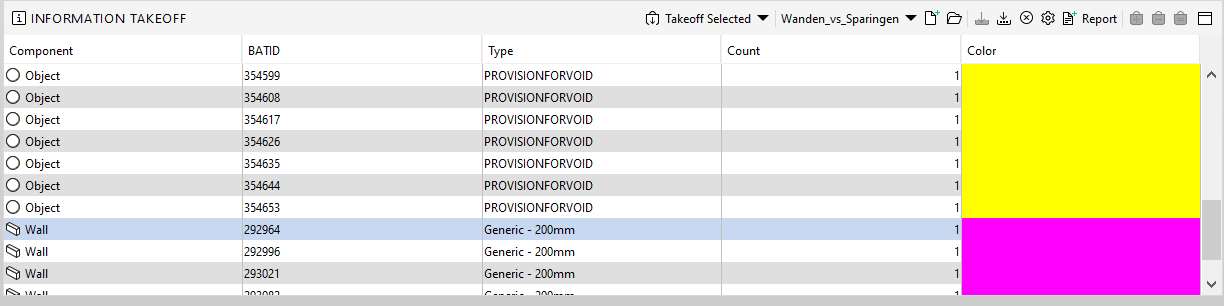
-
Hey there @mjkayali
I can’t think of a solution about this now as well, i’m sorry.
But maybe it would be an idea to use the “issues”-tab for this?So when those components clash, the information about which elements are involved will be displayed there.
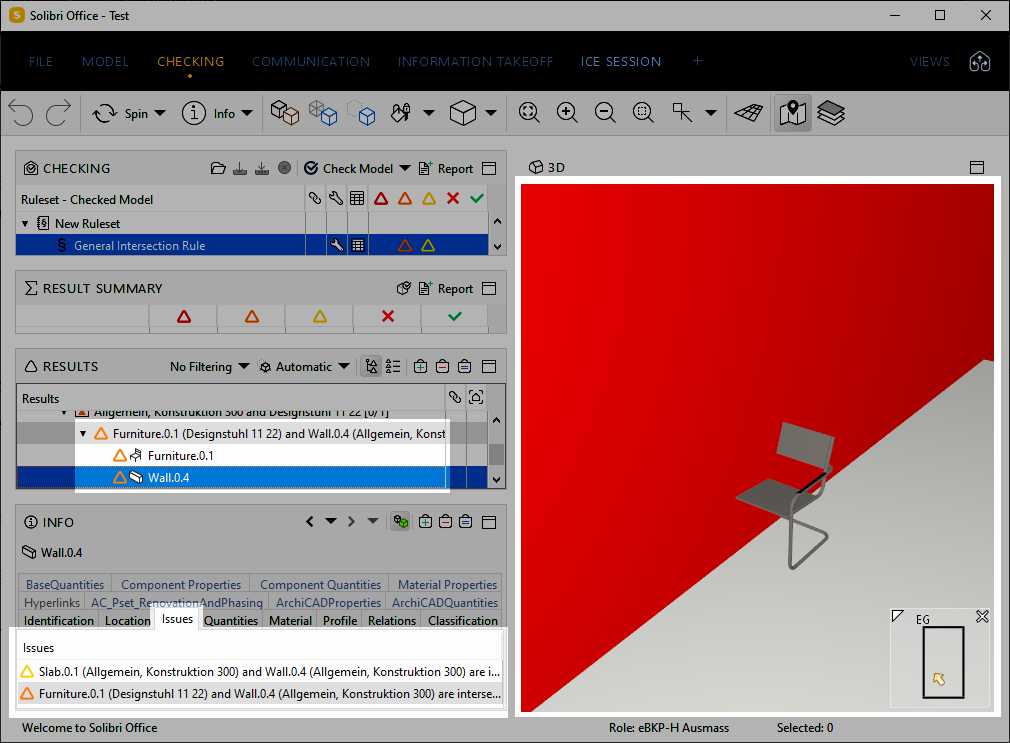 image url)
So if you would be able to get this information into the ITO you could use the BATID column a second time.
–> |COMPONENT| |BATID| |ISSUES| |BATID|
–> |SLAB| |123456| |WALL| |654321|Maybe this could serve as a solution for this?
But i’m pretty sure it’s not possible at the time
@Pasi-Paasiala what do you think about this possibility?
-
Hi @Nicola-Tessarolo and @mjkayali ,
Issues are not available in ITO at the moment. Another possibility could be to use BCF. For that you’d need to go through the issues and add slides to them and then create a presentation from the results and a BCF report from the presentation. BCF report is actually quite a simple format. It is a zip containing a folder for each issue. You can get more information about this from here.
This process can be automated by Autorun.
Hope this helps.
Pasi
-
Hey @mjkayali

One thing you could also try:
- Go to settings -> presentation -> Components -> choose at least the BATID as one property.
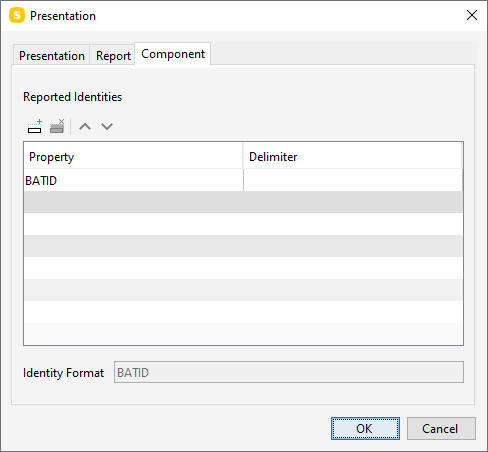
- Create slide from each issue (this could be automated with autorun)
- Create a presentation from checking results. ( choose one of the slides and you will see under the Components tab in that the BATID is the reported identity)
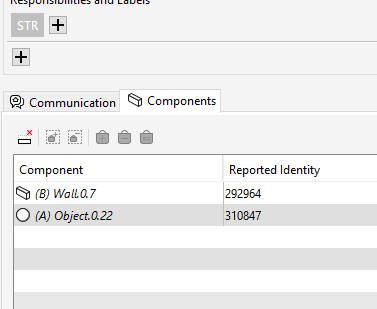
- report the presentation to Excel with a template.
You can start by modifying the DetailedReportTemplate, the BATID and what you have chosen in the presentation settings will be reported to the column with tag <SLIDE_COMPONENTS>.
Note that you might want to add another reported identity so that you will know which BATId is for wall and provision voids.
I hope this helps!
-Lauri
- Go to settings -> presentation -> Components -> choose at least the BATID as one property.
-
-
@mjkayali Sorry I was referring to a post that is not yet published
 While waiting for it, please study @Lauri-Luoma 's response.
Pasi
-
@Pasi-Paasiala said in export clash result:
The way of @Lauri-Luoma looks useful, but it depends also on the hidden (“Autorun”).
if i can not automate creating issues per clash it wont work. -
@mjkayali While the Autorun section in the society is not yet public, i can give you a demo how the issues could be generated automatically with the Autorun. I’ve sent you a message in the chat.
-
@pasi-paasiala said in export clash result:
Issues are not available in ITO at the moment.
As noting has changed here in the meantime I would also like to hear if there is maybe a way to achive this - reporting all the connected issues of a components and their ids. Probably using the API but I am open to any helpful suggestion!
-
Here’s the link to Autorun help pages.
-
@pasi-paasiala said in export clash result:
@JSN At the moment Solibri API doesn’t give access from components to issues.
Have you tried creating BCF with Autorun?
Of course, it depends what you want to do.Yes directly from Component to Result is not possible. But it is possible to iterate all the results, build a mapping from Component back to the Result using Result.getInvolvedComponents and Result.getRelatedComponents().
-
@pasi-paasiala said in export clash result:
Have you tried creating BCF with Autorun?
Hi, yes I was considering Autorun for exporting the CoordinationReport as xls as this is the closest I could get atm. However it would be more convenient if this kind of “ITO” would be achievable on a different approach as well.
Some thoughts to Autorun and the Reports here …
-
First of all I think it is not possible to also export the Result Summary xls, that would be a nice feature too.
-
Second I wanted to ask if there is a possibility to define that the latest (just via autorun created) presentation is exported as I think this is not the case atm - does it always take the first or did I do sth wrong?
-
Regarding Report Templates I also wanted to know if there is any chance that fields with formulas can be used anytime in the future as currently they are not usable.
-
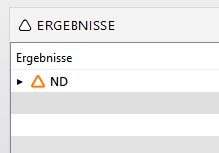
Then there is this discrepancy how the Titles of the slides depending on different rules are created - SOL 230 or 203 are fine but SOL 9 is just giving the wrong Value back - and also in the Description it is a bit different which makes it harder to filter it out later on - I am refering to the attached image … is this on purpose?
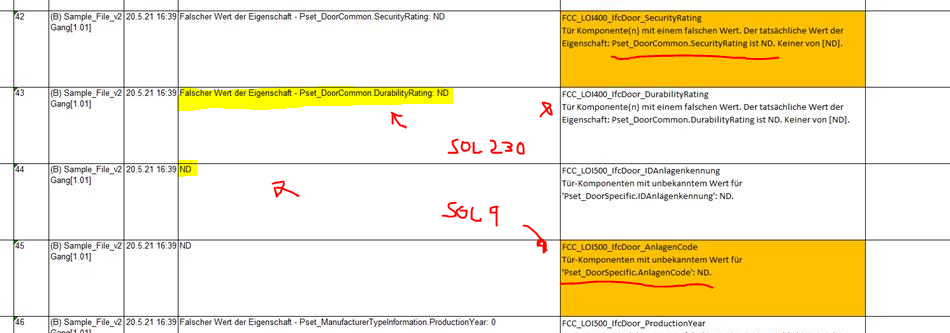
I mean it has also always been showing up like this in the results but in this context it is definitely a problem. Moreover the information about the rule is not exported so I cannot just say if SOL9 take this part of the description and else use that … I am not saying it is impossible, but it makes things harder.
@lasse-lindqvist thx for this hint I will note it and look into it when time for that comes.
In the meantime I am happy to hear your thoughts on the remarks I just made.
-
-
@lasse-lindqvist said in export clash result:
Yes directly from Component to Result is not possible. But it is possible to iterate all the results, build a mapping from Component back to the Result using Result.getInvolvedComponents and Result.getRelatedComponents().
As also mentioned in another post due to the limited amount of information which can be stored in an excel cell (which limits the total number of attached components) it seems like that the above suggested autorun method is not really eligible for achieving the desired result.
As long as there is no better option to export checking results, and/or ITO is not able to access component related issues aka checking results, I guess the API is the only solution at the moment …
-
@lasse-lindqvist said in export clash result:
Yes directly from Component to Result is not possible. But it is possible to iterate all the results, build a mapping from Component back to the Result using Result.getInvolvedComponents and Result.getRelatedComponents().
Could you elaborate this a bit more? Moreover I am curious how the solution might look for a custom information which returns a boolean value if a component has been checked at all or if if was missed out. So not just if the element is causing troubles and therefore has issues, but also if it is does not hava any issues but was taken into consideration for the checking routine.




Copyright © 2025 Solibri Inc. | Powered by NodeBB