Skip to content
  • Categories
Collapse
Solibri Society Forum
  1. Home
  2. General Discussion
  3. Model Revision Comparison

Model Revision Comparison

Scheduled Pinned Locked Moved General Discussion
10 Posts 5 Posters 2.1k Views
  • Oldest to Newest
  • Newest to Oldest
  • Most Votes
Log in to reply
This topic has been deleted. Only users with topic management privileges can see it.
  • S Offline
    S Offline
    Sverre
    wrote on last edited by
    #1

    Hi. I have a new revision where there is 1 new object and 1 object that`s been moved/modified. The ruleset finds the new object (Added 1) But not the one modified. It detects all the objects in the model as modified. Anyone that has experienced this?

    Regards

    Flem

    1 Reply Last reply
    0
    • Y Offline
      Y Offline
      YUSOF
      wrote on last edited by
      #2

      Hi @Sverre. I have encountered the same thing too last 2-3 months. I have forwarded this issue to Solibri and they are fixing it, not sure when exactly it will be resolved.

      1 Reply Last reply
      0
      • P Offline
        P Offline
        Pasi Paasiala Solibrians
        wrote on last edited by
        #3

        @YUSOF did you provide test files as well? Did you contact Solibri, or did you report it here in Society? I couldn’t find the latter, if you did.

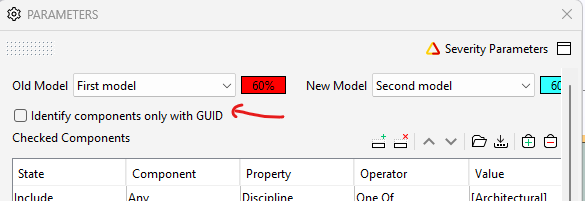
        @Sverre @YUSOF have you tried ticking/unticking the “Identify components only with GUID” option? How does it affect the results?

        2b8bd75f-aa92-4d31-9c86-53b0127124fc-image.png

        1 Reply Last reply
        0
        • Y Offline
          Y Offline
          YUSOF
          wrote on last edited by
          #4

          @Pasi-Paasiala yes we have provided the test files to Solibri and we are in contact directly with the support team. Indeed I did not create this issue in the Society.

          1 Reply Last reply
          0
          • paola bronzoP Offline
            paola bronzoP Offline
            paola bronzo
            wrote on last edited by
            #5

            Hi @Solibrians,
            I use this post already open because I would like to ask for explanations on the behavior of the rule “Model Comparison”.
            My goal is to compare two models, without using the GUID, but only the geometry/location. If “the identify components only with GUID” checkbox is not active, I would expect to find the “distribution element” objects within the “Modified” category result.
            However this does not happen.
            Why do I find them in the “Added” category result? I suspect that the rule always considers the GUID, even if the checkbox is not active. If this were the case it would be useless to have put the option. Are there any improvement plans on this rule?
            Thanks

            model comparison.JPG

            Here the model Demo_Solibri Office_Model Comparison+Clashes.smc

            1 Reply Last reply
            1
            • MattiM Offline
              MattiM Offline
              Matti Solibrians
              wrote on last edited by Matti
              #6

              “I suspect that the rule always considers the GUID” this is true.

              “the identify components only with GUID”

              • ON: the rule uses only GUIDs to find the peer components
              • OF: the rule uses GUIDs AND other ways (location, geometry, etc…) to find the peer components
              paola bronzoP 1 Reply Last reply
              0
              • paola bronzoP Offline
                paola bronzoP Offline
                paola bronzo
                replied to Matti on last edited by
                #7

                Hi @Matti-Kannala,

                thanks for your reply.
                I also noticed that although the GUID is different, if the geometry and location of the two objects are almost the same, I get the “Modified” category in the results. So I was wondering what the geometric tolerance is set within the rule for which the element is recognized as modified and not removed/added.

                1 Reply Last reply
                0
                • MattiM Offline
                  MattiM Offline
                  Matti Solibrians
                  wrote on last edited by
                  #8

                  Location tolerance is 1cm.
                  There are also other means for finding the peer component.

                  paola bronzoP 1 Reply Last reply
                  0
                  • paola bronzoP Offline
                    paola bronzoP Offline
                    paola bronzo
                    replied to Matti on last edited by
                    #9

                    @Matti-Kannala other means? what are you referring to?

                    MattiM 1 Reply Last reply
                    0
                    • MattiM Offline
                      MattiM Offline
                      Matti Solibrians
                      replied to paola bronzo on last edited by
                      #10

                      @paola-bronzo said in Model Revision Comparison:

                      @Matti-Kannala other means? what are you referring to?

                      The rule uses many other ways (if allowed) than GUID to find the peer component for modified cases e.g:

                      • The components are having exactly the same geometry
                      • the doors/windows filling the same opening
                      • the components are clashing mostly
                      1 Reply Last reply
                      0

                      Copyright © 2025 Solibri Inc. | Powered by NodeBB

                      • Login

                      • Don't have an account? Register

                      • Login or register to search.
                      • First post
                        Last post
                      0
                      • Categories