Skip to content
  • Categories
Collapse
Solibri Society Forum
  1. Home
  2. General Discussion
  3. Why are issues created when rules are fulfilled?

Why are issues created when rules are fulfilled?

Scheduled Pinned Locked Moved Solved General Discussion
5 Posts 3 Posters 1.2k Views
  • Oldest to Newest
  • Newest to Oldest
  • Most Votes
Log in to reply
This topic has been deleted. Only users with topic management privileges can see it.
  • A Offline
    A Offline
    amh_Caspar
    wrote on last edited by
    #1

    Here is an example of a rule (SOL/203/2.5) that I am using;

    e80b6681-0f95-4e14-9e21-b06ba35872de-image.png

    it is checking that walls have the property “Referenz Nachweis Wärmeschutz” under Propertyset “e+k_Pset_Baukonstruktion”

    All the walls in the project have this property under the correct property set.

    However Solibri creates the following Issue
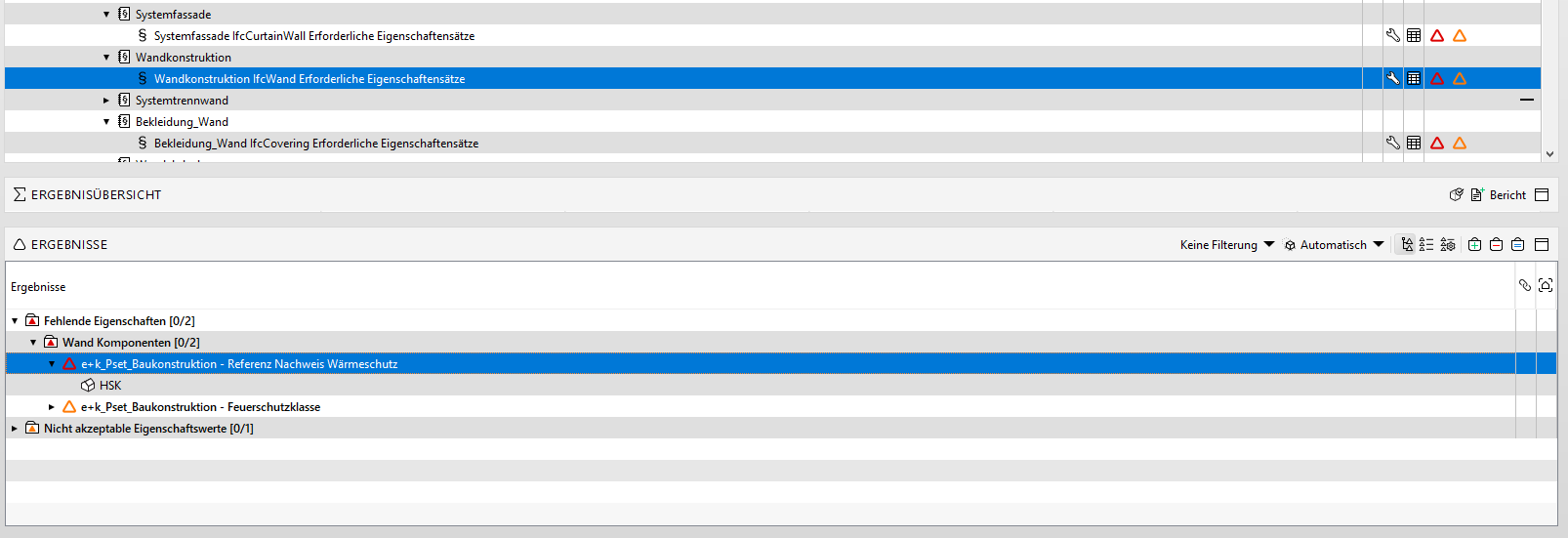
    bd39a2de-6e6c-462d-88f0-f3b4df21434b-image.png

    How can this be? I have checked the spelling matches, so that is not the reason. The Property is the same name, the PSet is the same name. The rule is checking the correct components “ifcWall”.

    What else could be wrong, other than spelling of the Property and PSet or the wrong components are being filtered?

    1 Reply Last reply
    0
    • A Offline
      A Offline
      amh_Caspar
      wrote on last edited by
      #2

      Update: my guess is that this is a bug generated by use of special characters / Umlauts / Accents (ÄÖÜßé) etc, as all the rules where the Property includes one of these special charcters, Solibri is generating an Issue even though there is none. Are these characters coded in the .IFC differently perhaps?

      JSNJ 1 Reply Last reply
      1
      • JSNJ Offline
        JSNJ Offline
        JSN
        replied to amh_Caspar on last edited by
        #3

        @amh_Caspar

        Have a look here:
        https://society.solibri.com/topic/2405/solibri-9-13-4-has-been-released/11?_=1689078829846
        https://society.solibri.com/topic/2413/special-symbols-in-classification-does-not-show-up/9
        and referenced topics

        tl;dr -> change IFC-Import Options and reload your models or switch back to the legacy IFC Interpreter which was replaced in the latest release by a new buggy one

        A 1 Reply Last reply
        2
        • A Offline
          A Offline
          amh_Caspar
          replied to JSN on last edited by
          #4

          @JSN Thanks, this solved my problem. I changed to UTF-8 and now there are no problems. Previously it was using windows-1252

          1 Reply Last reply
          1
          • M Offline
            M Offline
            manuel.furia Solibrians
            wrote on last edited by
            #5

            The new version will use UTF-8 by default. 🙂

            1 Reply Last reply
            1
            • jakub.rusinJ jakub.rusin marked this topic as a question on
            • jakub.rusinJ jakub.rusin has marked this topic as solved on

            Copyright © 2025 Solibri Inc. | Powered by NodeBB

            • Login

            • Don't have an account? Register

            • Login or register to search.
            • First post
              Last post
            0
            • Categories