
change Issue's active Slide
-
Hi all,
How to change the active slide in an issue?
Old slides become outdated over the time, because of changes in the model(s).
Also sometimes the issue is not created very well. (i.e. too much elements, without section box)
Therfore I wish to change the active slide image from the issue, so when directing through the issues Solibri will run smoother andfaster.When adding a second slide to the issue, the active slide image will set back to the oldest slide when synchronise between BIMcollab.
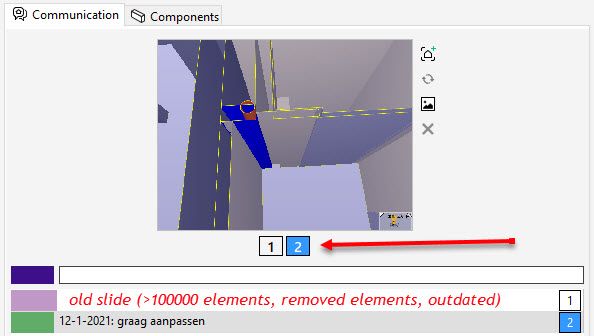
-
… as Noushed explains:
(…) According to the BCF API, viewpoint is immutable. which means after a viewpoint gets exported, it can not be updated. You can always add your updates as new Viewpoint. Or another possibility is to uncheck the “Use automatic synchronization” from BCF Live Connector settings in Settings menu. it will show a button “Mark as ready” in Live issue details view, which will allow you to choose whenever you want to export the issue after you are done with all the modifications in your issue/viewpoints. (…)
Edit: In BimCollab (Web) you can indeed set which screenshot should be taken as the Preview Picture.
-
BCF API doesn’t support “default” viewpoint. When loading issues from a BCF Server like BIMcollab the server returns a list of viewpoints. Solibri shows the first as default in BCF Live View.
https://github.com/buildingSMART/BCF-API#451-get-viewpoints-service


Copyright © 2025 Solibri Inc. | Powered by NodeBB