
SOL 9/3.1 - "Any components" not supported?
-
Just curious why isn’t it possible here to select “any” component here?
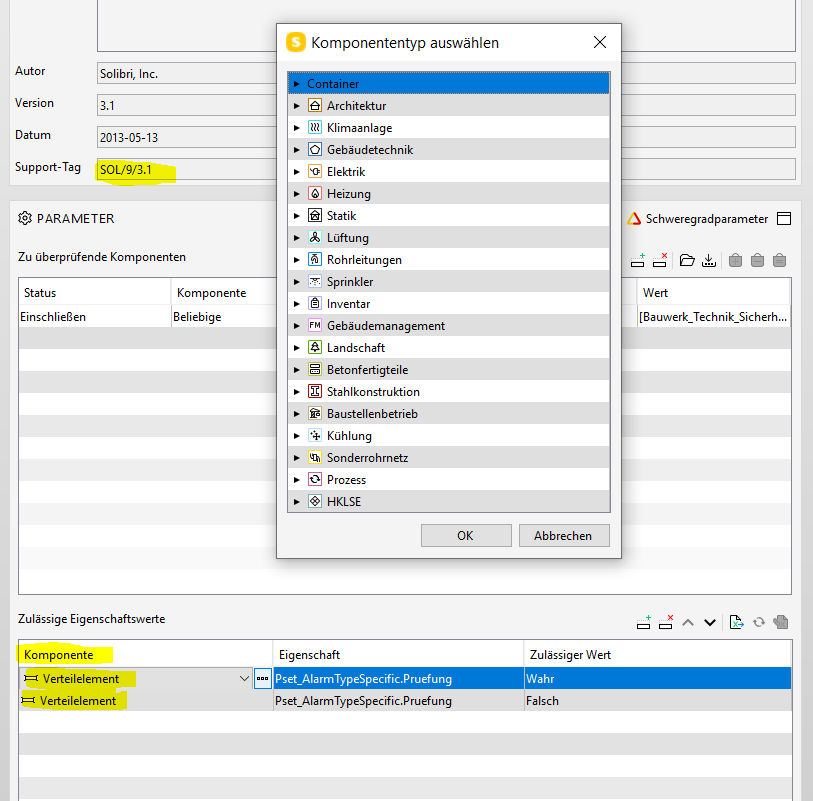
Sure I can simply replicate the rows in Excel and import it then again to speed up this task but that should not be necessary, so is there a special reason for it?
And btw, why can I only import Excel here and not export?
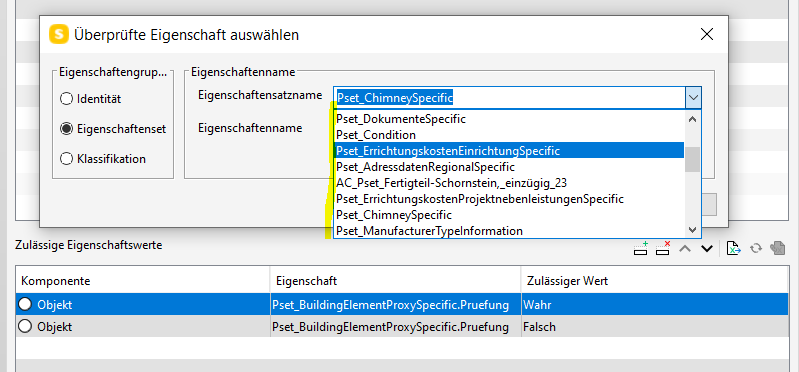
Edit: And as I am already raising the attention of this rule I am adding another point: Why are the property sets in the dropdown list not sorted from A-Z?
-
@Solibrians Any news on this one? Any Components would be really useful.
-
@jsn said in SOL 9/3.1 - "Any components" not supported?:
Sure I can simply replicate the rows in Excel and import it then again to speed up this task but that should not be necessary, so is there a special reason for it?
And btw, why can I only import Excel here and not export?
Edit: And as I am already raising the attention of this rule I am adding another point: Why are the property sets in the dropdown list not sorted from A-Z?@chris You could use the rule 203. With this rule you can select the component with “any”. But yes, I could have used this option and it is a mystery to me why this is not possible with this rule.
-
@mario said in SOL 9/3.1 - "Any components" not supported?:
@jsn said in SOL 9/3.1 - "Any components" not supported?:
Sure I can simply replicate the rows in Excel and import it then again to speed up this task but that should not be necessary, so is there a special reason for it?
And btw, why can I only import Excel here and not export?
Edit: And as I am already raising the attention of this rule I am adding another point: Why are the property sets in the dropdown list not sorted from A-Z?@chris You could use the rule 203. With this rule you can select the component with “any”. But yes, I could have used this option and it is a mystery to me why this is not possible with this rule.
203 only checks custom psets, not natives.
-
@bim1337 said in SOL 9/3.1 - "Any components" not supported?:
203 only checks custom psets, not natives.
One nice feature is that you can copy #9 and change the fields e.g. the propertyset or the component type without losing the values in the other fields (e.g. the allowed values) which speeds up the workflow tremendously when you have to make changes.
So with #9 it is relatively easy to copy and modify settings while it gives good result descriptions which unfortunately 203 and 230 not allways do in case of missing properties.
https://society.solibri.com/topic/1304/view-of-the-components-that-are-missing-properties-sol-203-2-4/4However it would even be faster if you could simply select any component in the requirements whilst the filter is the place to modify and define the components. Anyhow since #203 was fixed this is the better choice as afaik it behaves similiar, but it lacks however when it comes to missing psets and properties.
To sum it up, we have basically three ways to check for properties, but none is really perfect.
-
 J JSN referenced this topic on
-
@JSN thanks for the topic, we will have a look into it



Copyright © 2025 Solibri Inc. | Powered by NodeBB