Skip to content
  • Categories
Collapse
Solibri Society Forum
  1. Home
  2. General Discussion
  3. Transparency BUG

Transparency BUG

Scheduled Pinned Locked Moved General Discussion
5 Posts 4 Posters 1.1k Views
  • Oldest to Newest
  • Newest to Oldest
  • Most Votes
Log in to reply
This topic has been deleted. Only users with topic management privileges can see it.
  • M Offline
    M Offline
    MAN-BV
    wrote on last edited by
    #1

    We want to use the transparency option in Solibri. It is very important to see the 3D objects in the other objects (e.g. fixtures or rebars). Our Solibri currently looks like this:Screenshot Transparency.JPG
    Is Solibri having significant issues with the transparency option? Or am I wrong? I am grateful for any reply …

    XavierX 1 Reply Last reply
    1
    • XavierX Offline
      XavierX Offline
      Xavier
      replied to MAN-BV on last edited by
      #2

      Hi @man-bv ,

      There is a request about it.

      https://society.solibri.com/topic/1031/improve-3d-representation-transparency-and-edges/9

      RicardoR 1 Reply Last reply
      1
      • RicardoR Offline
        RicardoR Offline
        Ricardo
        replied to Xavier on last edited by
        #3

        @xavier said in Transparency BUG:

        Hi @man-bv ,

        There is a request about it.

        https://society.solibri.com/topic/1031/improve-3d-representation-transparency-and-edges/9

        That is a request about some of the functionality, but to me this looks like a bug. The beams appear to be partly hidden when the transparency is applied, which is offcourse not right.

        1 Reply Last reply
        2
        • MattiM Offline
          MattiM Offline
          Matti Solibrians
          wrote on last edited by
          #4

          @man-bv said in Transparency BUG:

          We want to use the transparency option in Solibri. It is very important to see the 3D objects in the other objects (e.g. fixtures or rebars). Our Solibri currently looks like this:
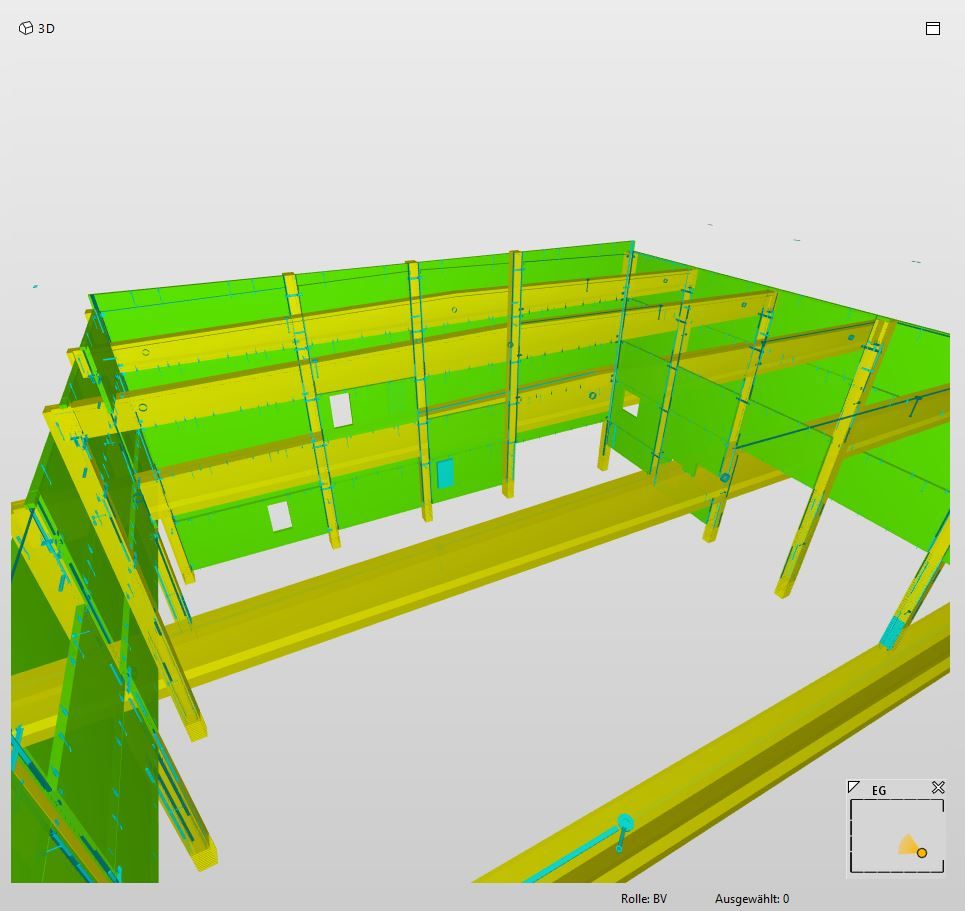
          Tips that might help:
          Use more transparent components. In that way the drawing order doesn’t matter so much.
          There is a setting for default transparency in the 3D settings.
          Also in ITO and classification you can set the transparency level for single colors.

          1 Reply Last reply
          0
          • M Offline
            M Offline
            MAN-BV
            wrote on last edited by
            #5

            @Matti-Kannala: thanks for the feedback. Unfortunately not quite the solution I expected … Is there no other way to fix it?
            @Ricardo: yep. clearly a bug…

            1 Reply Last reply
            0

            Copyright © 2025 Solibri Inc. | Powered by NodeBB

            • Login

            • Don't have an account? Register

            • Login or register to search.
            • First post
              Last post
            0
            • Categories