
Classification with unclear property names
-
Apologies if this has already been covered in some discussion, I tried to search but couldn’t find topics related to this issue.
So the problem is as follows:
I am trying to create a classification that works for a large variety of models regardless of their exact definition of the properties. Is it possible to search for a certain value from all of the properties of a property set? For example, if I want to search for “EI90” from the property set “MagiCAD Pset_Elbow” but the exact property that contains the information varies.
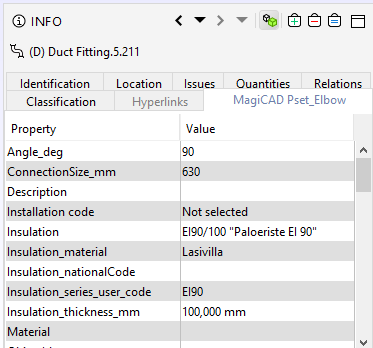
Furthermore, is it possible to search for a certain value from all of the properties regardless if they are located in the “Identification”-tab or in some external property set? Or what if there are two pieces of text that need to be included in some of the properties, for example “STAIR” and “E9” has to be found from a certain property set, but they can be in any of the properties or even both in the same property?
I already found out that it is possible to search through different property sets if the property name itself is known like this, but this doesn’t seem to work if the property name is left open:

In this example the classification works for ConnectionSize_mm for both “MagiCAD Pset_Duct” and “MagiCAD Pset_Elbow”, since the property name is identical in both property sets and the beginning of the property set name matches the inquiry.
Thanks in advance!
Cheers, Antti
-
Well one way to do this is to implement your own custom information (https://society.solibri.com/topic/563/information-api) that tries to look for the properties any way you want. You can then use this information in the classification rules.
-
“Is it possible to search for a certain value from all of the properties of a property set? For example, if I want to search for “EI90” from the property set “MagiCAD Pset_Elbow” but the exact property that contains the information varies.”
You can use the wildcard (*) for that.
So you search in all property sets and all properties:
However, I don’t know how this affects your performance, so like you found yourself already, rather use, for instance:
"MagiCAD Pset_*.Insulation*"Within the values you can also use wildcards
EI90       -->   only matches 'EI90'
*EI90      -->   matches 'Firerating EI90'
                      or 'EI90'
EI90*      -->   matches 'EI90 Firerating'
                      or 'EI90'
*EI90*     -->   matches 'Firerating EI90 minutes'
                      or 'Firerating EI90'
                      or 'EI90 Firerating'
                      or just 'EI90'
Copyright © 2025 Solibri Inc. | Powered by NodeBB