Skip to content
  • Categories
Collapse
Solibri Society Forum
  1. Home
  2. General Discussion
  3. Bespoke comparison rules

Bespoke comparison rules

Scheduled Pinned Locked Moved General Discussion
9 Posts 2 Posters 1.7k Views
  • Oldest to Newest
  • Newest to Oldest
  • Most Votes
Log in to reply
This topic has been deleted. Only users with topic management privileges can see it.
  • J Offline
    J Offline
    Jack.Allason
    wrote on last edited by
    #1

    Is it possible to compare items (in comparison function) by my own bespoke classification rather than default type that Solibri identifies?

    Lauri LuomaL 1 Reply Last reply
    0
    • Lauri LuomaL Offline
      Lauri LuomaL Offline
      Lauri Luoma Solibrians
      replied to Jack.Allason on last edited by
      #2

      hello @jack-allason ,

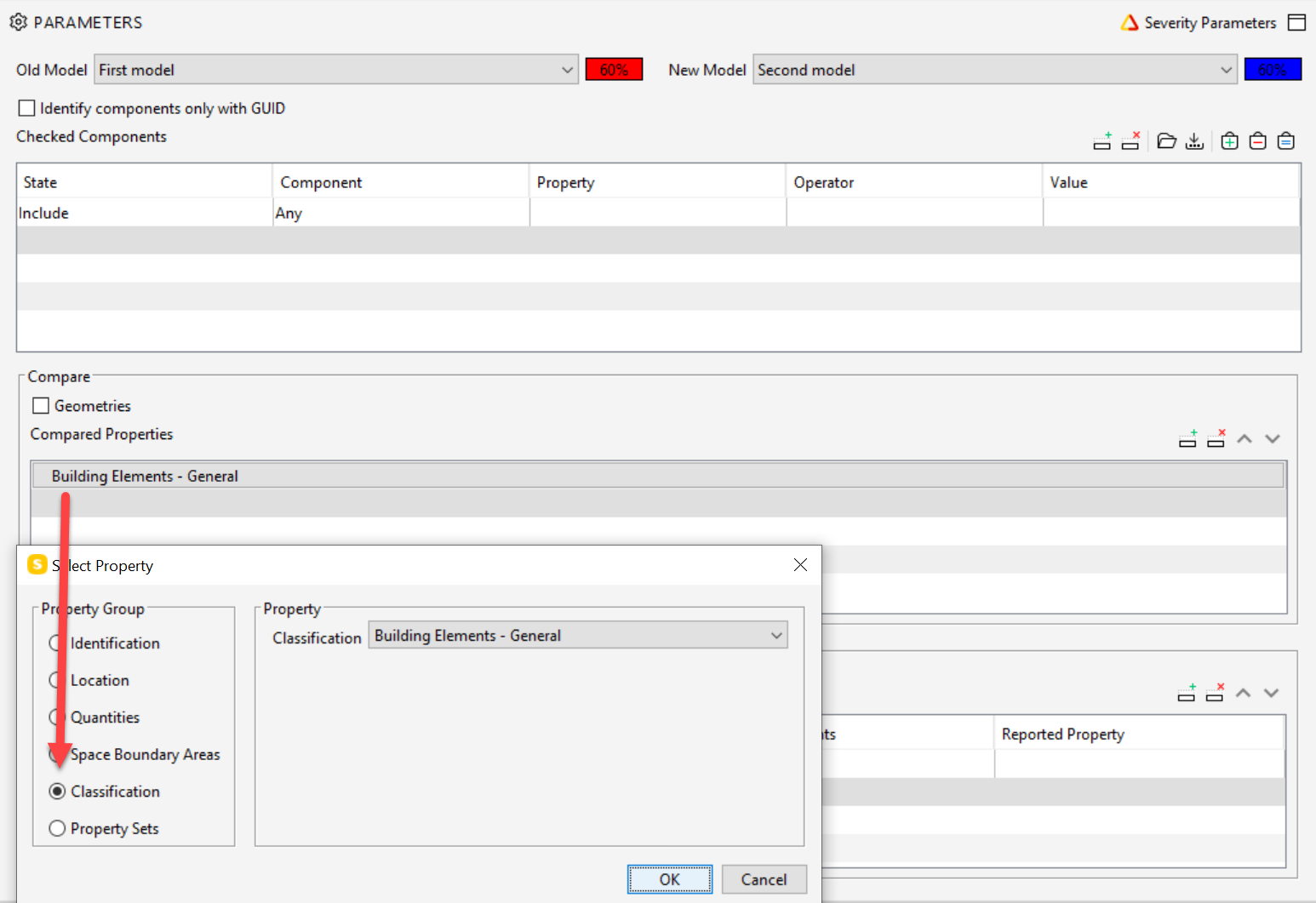
      Yes. you can check for changes in a Solibri classification or property sets with the model comparison rule (SOL/206):
      49a54a17-0e03-4a34-81ca-c1fbe8520f95-image.png

      1 Reply Last reply
      0
      • J Offline
        J Offline
        Jack.Allason
        wrote on last edited by
        #3

        Hi,

        Thanks. What I actually meant was, can the items that are listed at the sides (added/removed/modified) be based on the classification I have set?1997fa2e-3c04-4b39-8a7b-f17811601a44-image.png

        1 Reply Last reply
        0
        • Lauri LuomaL Offline
          Lauri LuomaL Offline
          Lauri Luoma Solibrians
          wrote on last edited by
          #4

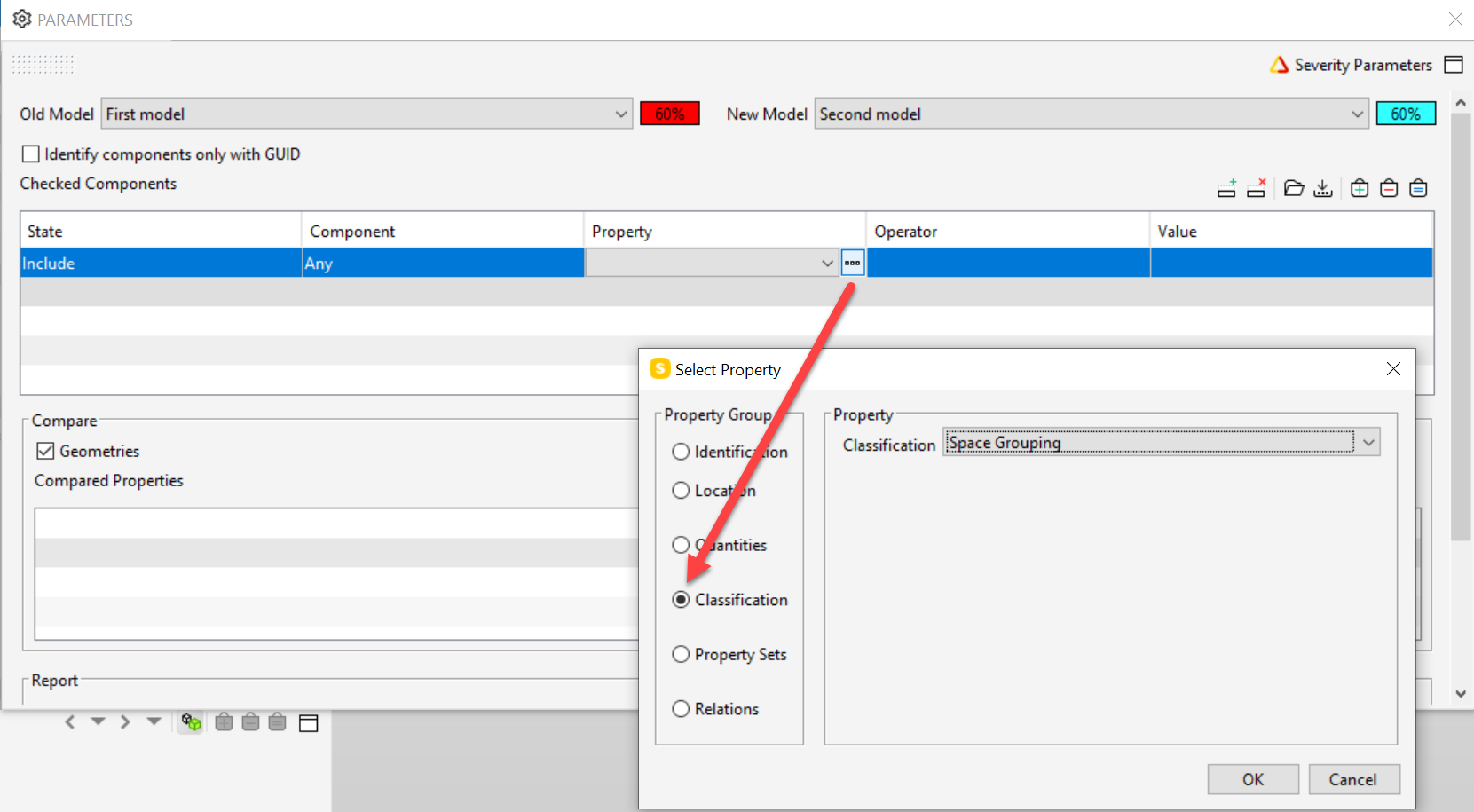
          @Jack-Allason yes, I think it is possible.

          Just add the classification in the main filter of the rule and it will check only those components:
          5d9c5eda-e8f9-4c0b-853b-35ffe6c1f44b-image.png

          1 Reply Last reply
          0
          • J Offline
            J Offline
            Jack.Allason
            wrote on last edited by Jack.Allason
            #5

            Hi Lauri,

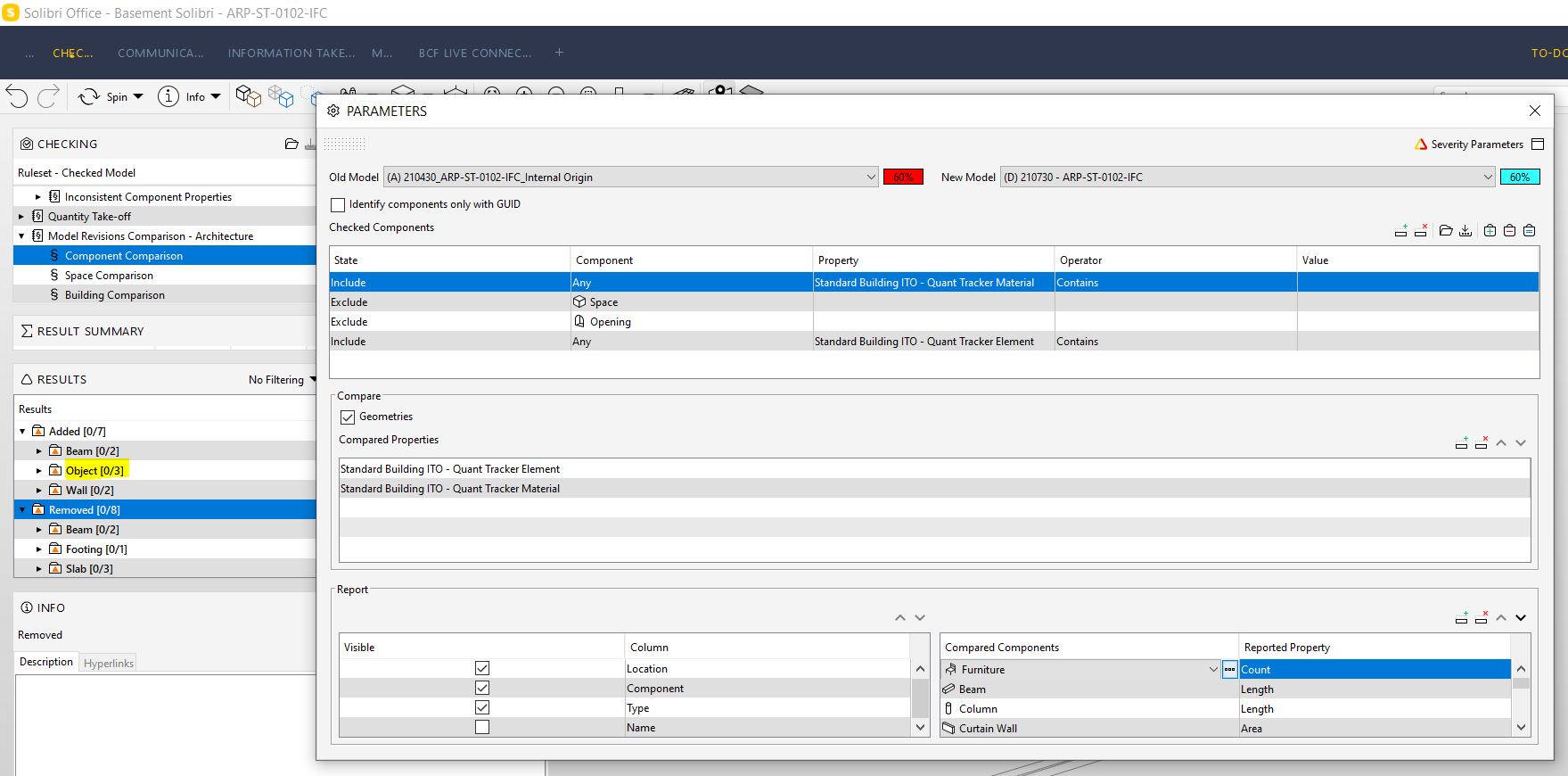
            Thanks for that. It still doesn’t seem to be working though. My classification doesn’t specify “objects” and I can see that this is still being displayed as a result. What am I doing wrong? Or is this just not possible?44d1b0e3-813a-4af7-a643-d48ce5044906-image.png

            Lauri LuomaL 1 Reply Last reply
            0
            • Lauri LuomaL Offline
              Lauri LuomaL Offline
              Lauri Luoma Solibrians
              replied to Jack.Allason on last edited by
              #6

              @jack-allason,

              If i have understood correctly, you should be able to check only the components you have classified by setting the filter of the rule like this:
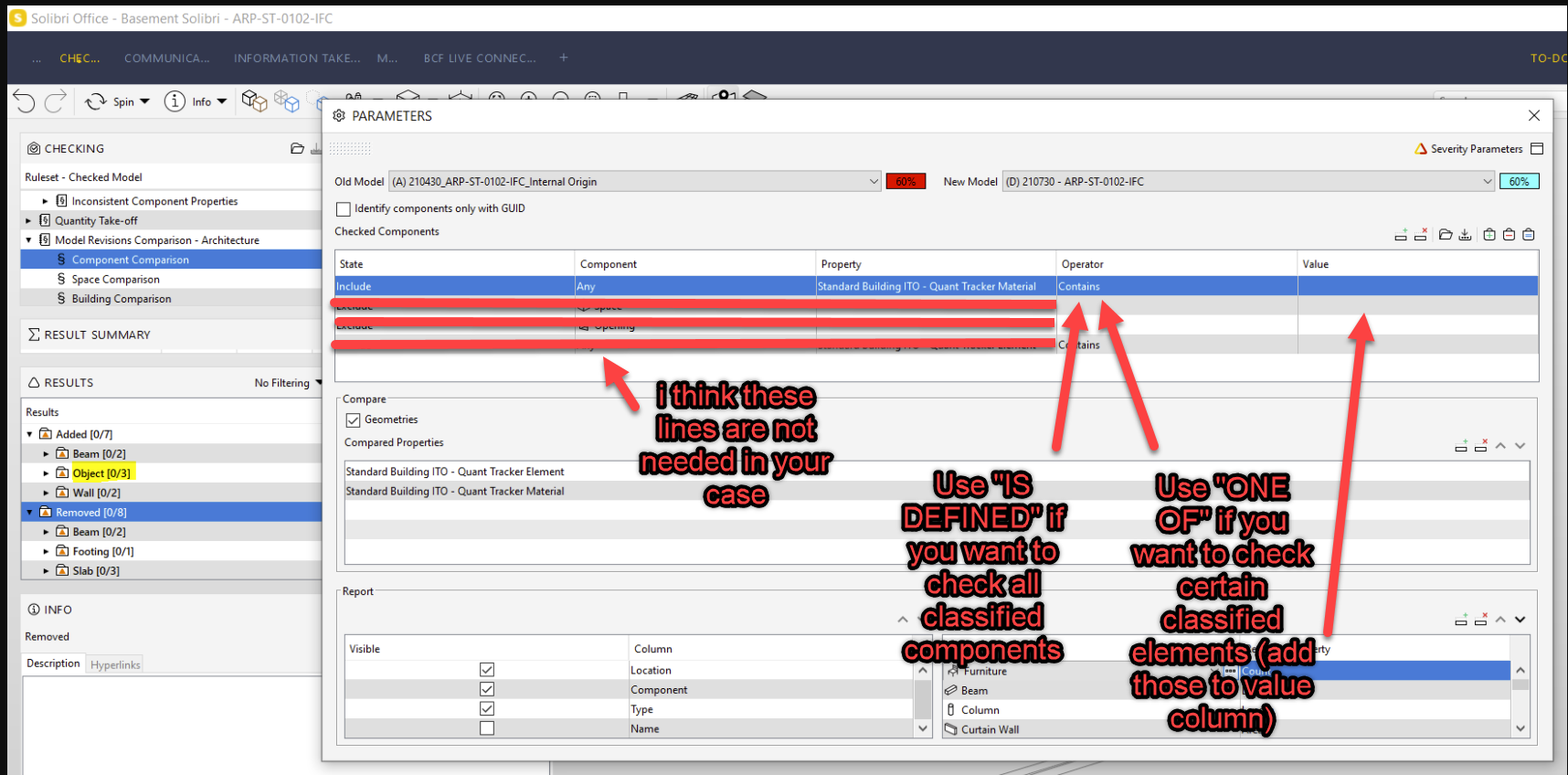
              f6635c25-96cc-4b6e-8fab-078647a0f569-image.png

              1 Reply Last reply
              0
              • J Offline
                J Offline
                Jack.Allason
                wrote on last edited by
                #7

                Hi Lauri,

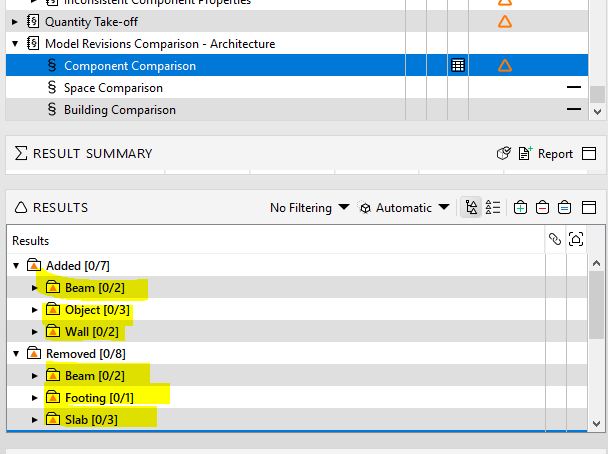
                I can get Solibri to check the items I’ve classified, but the way it “sorts” them is the issue for me. Say for instance I have use a classification that classifies all my items by uniclass codes and I want to show someone a comparison between uniclass codes, I cant do it because the items on the left are sorted by “Beam, Column, Footing, Object” etc… and not Uniclass codes. - I wonder if there’s a way to make this possible in future? Would save me a lot of time.
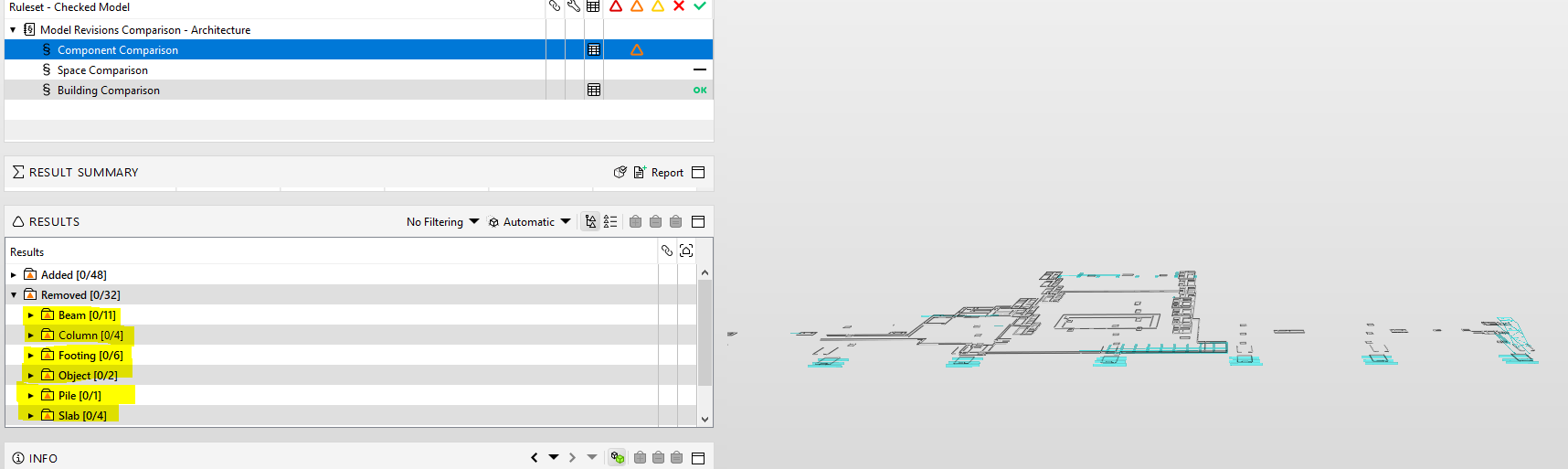
                86756e3a-e792-4e79-a769-9e5a7e1885a1-image.png

                Lauri LuomaL 1 Reply Last reply
                0
                • Lauri LuomaL Offline
                  Lauri LuomaL Offline
                  Lauri Luoma Solibrians
                  replied to Jack.Allason on last edited by
                  #8

                  Hi @jack-allason,

                  Ok, i understand now the issue. You would like to categorize the results by the classification. Unfortunately changing the categorization is currently not possible with all the rules.

                  I found this feature request from the past: https://society.solibri.com/topic/309/categories-checking-results

                  You can comment and upvote the request and hopefully there will be some improvements in the upcoming versions.

                  As a workaround you could use the selection basket and ITO (takeoff selected). E.g. choose “added” in results -> press “=” to set them to selection basket and then use “take off selected” in ITO that can show you the classification value in one of the columns.

                  1 Reply Last reply
                  0
                  • J Offline
                    J Offline
                    Jack.Allason
                    wrote on last edited by
                    #9

                    Yeah okay thanks. I actually use the comparison function at least once a day and this feature would save me a lot of time . This time saving would allow me to look at more projects each week so having this as an improvement would really increase my efficiency. Would love to see it incorporated soon! - cheers

                    1 Reply Last reply
                    1

                    Copyright © 2025 Solibri Inc. | Powered by NodeBB

                    • Login

                    • Don't have an account? Register

                    • Login or register to search.
                    • First post
                      Last post
                    0
                    • Categories