
Problems with location in Issue Description
-
Hi everyone and please help!
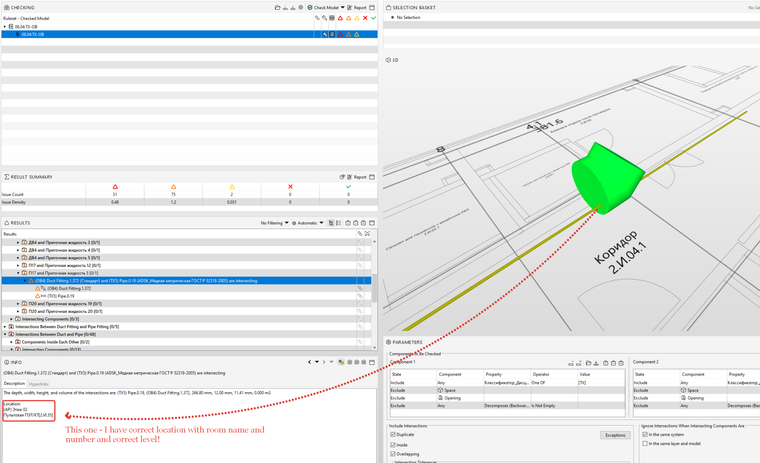
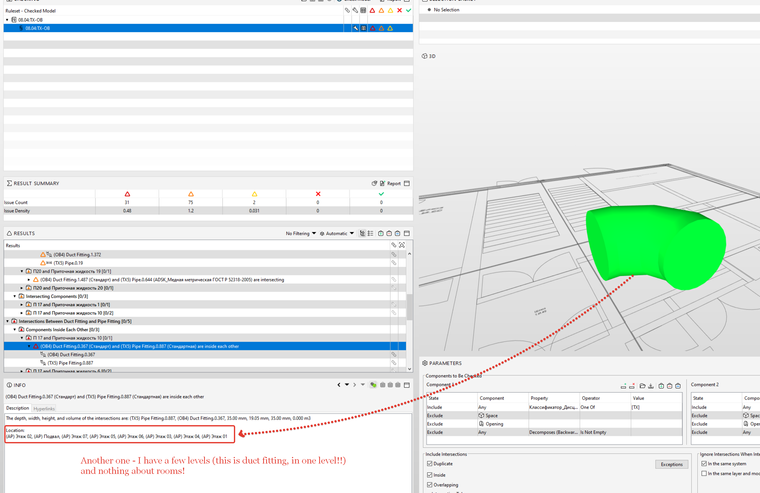
Please explain how determine the location of the components that fall into the issue!
In my model there are all rooms on all floors.
But for some reason, in some issues, the floor and the room is determined correctly, and in other issues - rooms it is not determined at all, and the floors may even be a few, although the element is small and is clearly only on the one floor!
After checking I have to manually sort out every identified issueand clarify the location manually, which is very uncomfortable!I ask for help, thanks!
-
Hi @zeraxel
I was trying to reproduce this and found some interesting anomalies.
If you run the check prior to a space existing in that location, if you add the space later on, the result still won’t report the space when you update the arch model with the space. In order to get the space in, you would need the result to dropout and recreate.
If you create a copy of your SMC to test, you could remove and open the ruleset to see if the spaces are then reported.
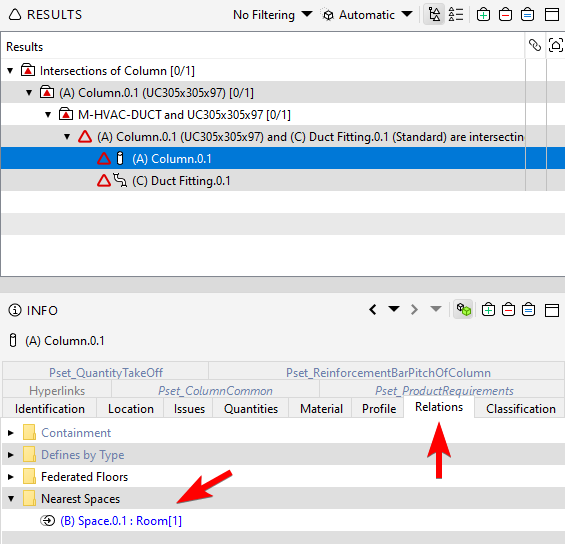
If not, maybe it is the case that those components don’t have a nearest space relation to a space.
You can check this by selecting a component, and looking at the relation tab in the Info View. I assume that relation is where the location is coming from in the result.
I’ll log the issue with the location information not updating in the results when there is a change to the spaces.

Copyright © 2025 Solibri Inc. | Powered by NodeBB