Skip to content
  • Categories
Collapse
Solibri Society Forum
  1. Home
  2. General Discussion
  3. Checking Attributes consistency based on one other attribute

Checking Attributes consistency based on one other attribute

Scheduled Pinned Locked Moved General Discussion
6 Posts 2 Posters 759 Views
  • Oldest to Newest
  • Newest to Oldest
  • Most Votes
Log in to reply
This topic has been deleted. Only users with topic management privileges can see it.
  • ? Offline
    ? Offline
    A Former User
    wrote on last edited by A Former User
    #1

    Hello there,

    I work on a project that as many IFCs.

    I would like to check the information consistency through all the project.

    My theory is that for a given Type Name I need to get all of the occurrences of the same Type in the same classification, layer, entity, etc.

    Basically a Concrete wall named “Concrete 180” (180 for the thickness) should always be a IfcWall entity, in the “LoadBearing Walls” layer, etc.

    How would you do to check every object of the project for inconsistencies in that matter?

    And to complicate the matter sometimes there are exceptions so maybe it would be interesting to be able to check pairs of attributes (Entity + Type Name --> Only one layer, predefined type, etc.).

    I hope that I have been clear enough for you to be able to help me.

    All the best!

    1 Reply Last reply
    0
    • chrisC Offline
      chrisC Offline
      chris
      wrote on last edited by
      #2

      What you mean with “layer”? Do you have layers in the autoring system?

      Maybe you can work with the classifications in Solibri. Example:

      If TypeName “Concrete 180” and LoadBearing and 180mm = Concrete 180
      etc.

      If not = “unclassified”

      And then check the unclassified components…

      1 Reply Last reply
      0
      • ? Offline
        ? Offline
        A Former User
        wrote on last edited by
        #3

        Hello,

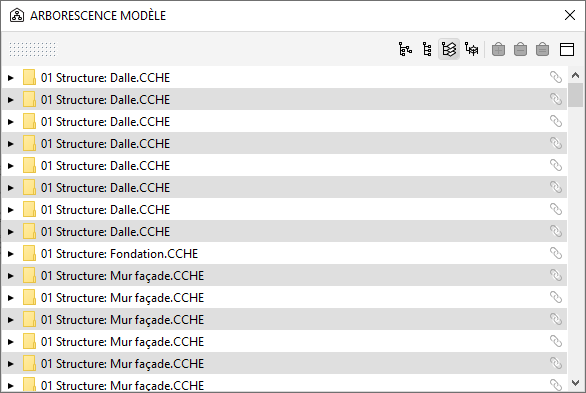
        Yes you still have layers in IFC.
        8bee6638-de4f-425b-8129-017bbd9b200d-image.png

        In Revit it is hidden but the DWG translator is still applied to IFC and in Archicad it is still used.

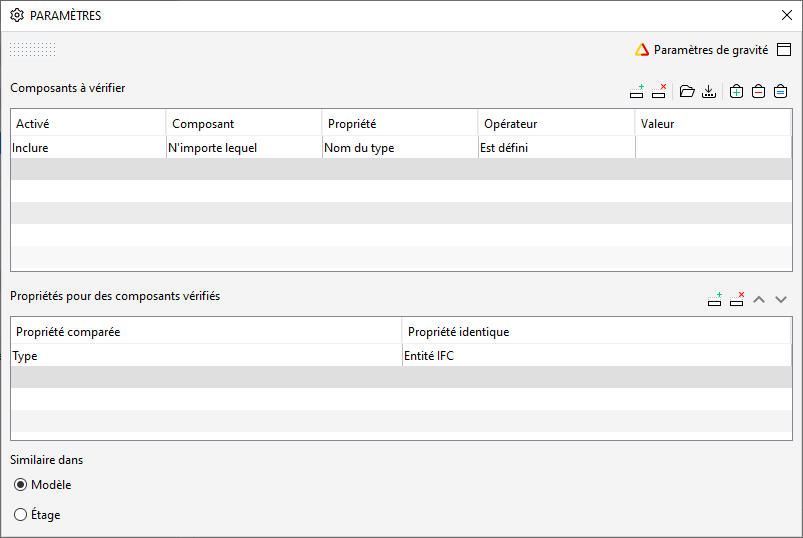
        But I have found that using SOL/171/1.4 works for that matter (see screenshot).
        I thought it was only for dimensions but no.
        f89adf6d-0ce2-4f53-87c1-9d8b4153e004-image.png

        Thanks for your insight it could be a good idea to check by Classification! 🙂
        Best regards!

        chrisC 1 Reply Last reply
        0
        • chrisC Offline
          chrisC Offline
          chris
          replied to A Former User on last edited by
          #4

          @mathieu-farine I know there are layers. But when i work with Ifc files i would never use a layer structure for model QS check, QTO or modell coordination. Even if the layers are written in the Ifc scheme. I always use IfcClassifications or Attributes in the IfcEntities.

          ? 1 Reply Last reply
          0
          • ? Offline
            ? Offline
            A Former User
            replied to chris on last edited by
            #5

            @chris indeed it is not that useful for what you said it is more for consistency in the design authoring software and to check if everyone model the same way in the team 🙂

            chrisC 1 Reply Last reply
            1
            • chrisC Offline
              chrisC Offline
              chris
              replied to A Former User on last edited by
              #6

              @mathieu-farine Okay i understand. Interesting way to check the BIM modellers work 😀

              1 Reply Last reply
              0

              Copyright © 2025 Solibri Inc. | Powered by NodeBB

              • Login

              • Don't have an account? Register

              • Login or register to search.
              • First post
                Last post
              0
              • Categories
