Skip to content
  • Categories
Collapse
Solibri Society Forum
  1. Home
  2. General Discussion
  3. RL levels compare

RL levels compare

Scheduled Pinned Locked Moved General Discussion
rl levelrule set
6 Posts 3 Posters 651 Views
  • Oldest to Newest
  • Newest to Oldest
  • Most Votes
Log in to reply
This topic has been deleted. Only users with topic management privileges can see it.
  • P Offline
    P Offline
    plauze
    wrote on last edited by plauze
    #1

    Hi there,

    Does anyone know if there is a rule set to work out if the RL of two objects are levelled?

    1 Reply Last reply
    0
    • JeroenKoomenJ Offline
      JeroenKoomenJ Offline
      JeroenKoomen
      wrote on last edited by
      #2

      What is RL?

      http://www.linkedin.com/in/koomenjeroen
      https://www.bimloket.nl/BIMbasisILS

      1 Reply Last reply
      0
      • P Offline
        P Offline
        plauze
        wrote on last edited by
        #3

        Sorry I thought it’s an international terms. It’s a relative level. Pasted a link here which explain a bit more. https://en.m.wikipedia.org/wiki/Reduced_level

        So my question is how do I determine if two objects have the same level, how do I compare their levels? Which ruleset will suit the best?

        1 Reply Last reply
        0
        • JeroenKoomenJ Offline
          JeroenKoomenJ Offline
          JeroenKoomen
          wrote on last edited by
          #4

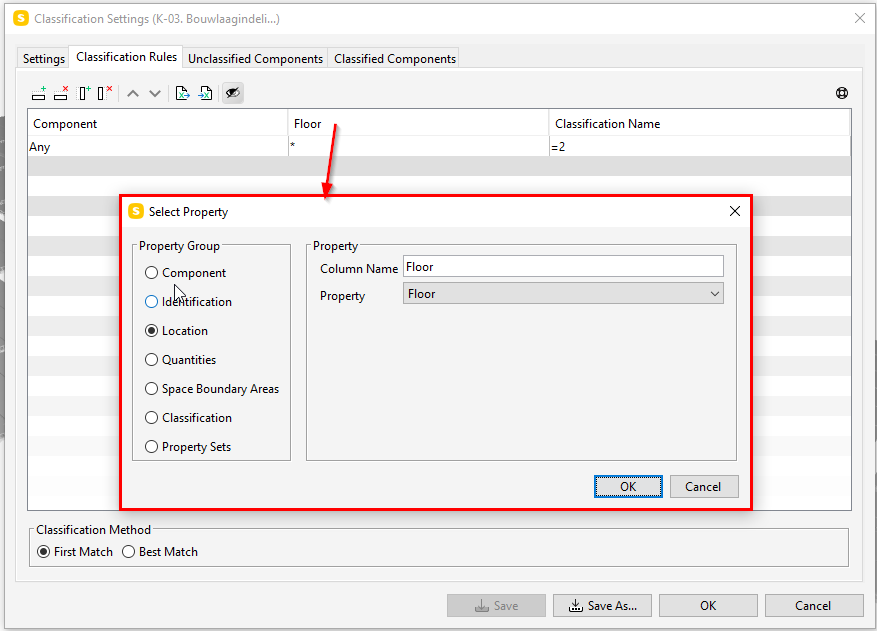
          I allways use a classification to check level name and if elements are attached to the right level.

          Try this.
          d01fc284-2a4f-4431-b6e3-b28fd56b02c7-image.png

          By the way… in IFC levels are called building storeys.

          https://standards.buildingsmart.org/IFC/DEV/IFC4_3/RC1/HTML/schema/ifcproductextension/lexical/ifcbuildingstorey.htm

          http://www.linkedin.com/in/koomenjeroen
          https://www.bimloket.nl/BIMbasisILS

          P 1 Reply Last reply
          0
          • P Offline
            P Offline
            plauze
            replied to JeroenKoomen on last edited by
            #5

            @jeroenkoomen
            That’s a great idea. I never thought to use actual value from the element itself.In my case I can just assign the elevation to the floor as a classification. Do you use a particular rule set to compare different floor levels? I.e the top elevation of my pit is xxx and top of ground level is yyy. Is there a way to find out if the pit has the equal level as the ground. Rule out any pits are higher than the ground or lower than the ground.
            Thanks again for your prompt response.

            john.lippJ 1 Reply Last reply
            0
            • john.lippJ Offline
              john.lippJ Offline
              john.lipp
              replied to plauze on last edited by john.lipp
              #6

              Hi @plauze

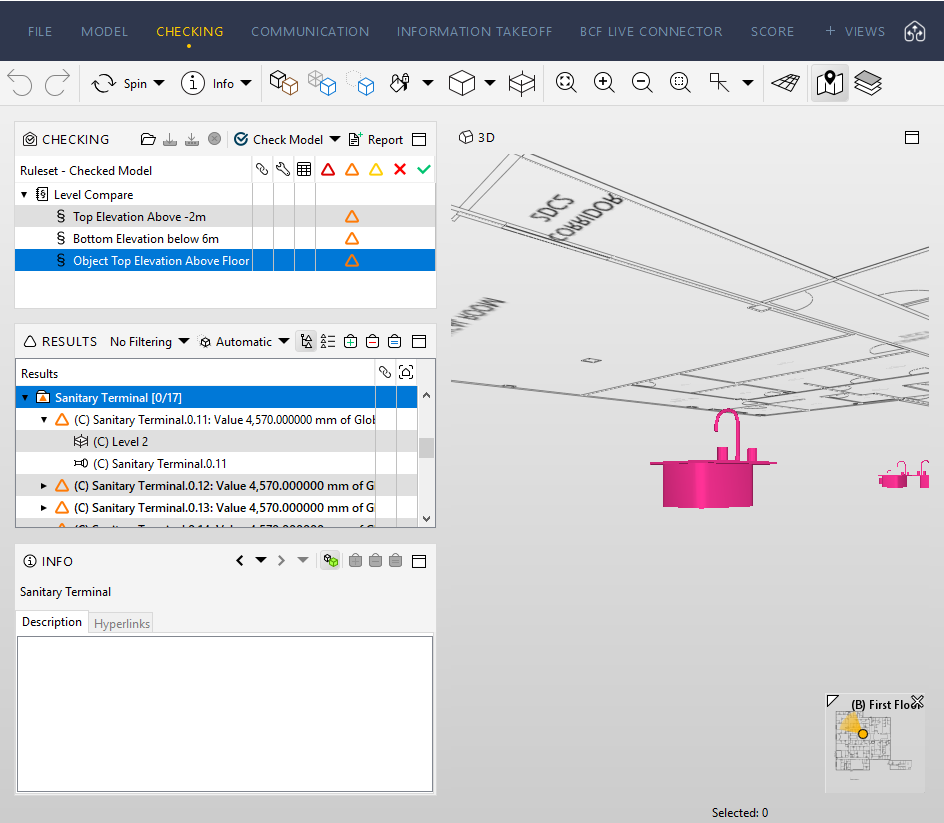
              Here is a ruleset that uses the comparison between property values rule to check for objects with top elevations lower than the elevations of the floors they reside on:

              Level Compare.cset

              You can see it finds some sinks on the wrong level:
              4d425109-58da-45d2-8d00-088e0936b6a9-image.png

              You’ll get false positives of components that are suppose to be below the elevation such as footings and maybe sunken slabs.

              1 Reply Last reply
              0

              Copyright © 2025 Solibri Inc. | Powered by NodeBB

              • Login

              • Don't have an account? Register

              • Login or register to search.
              • First post
                Last post
              0
              • Categories