
SOL 222 - Gatekeeper in "target Components" not working
-
Hi there,
if somebody had a similar experience and how to solve this matter:
I need an elaborate Checking Routine, which combines 3 Rules, all with the simple goal, to check if space boundaries of ceratin spaces have certain properties - and I need to check the space boundaries of all of the adjacent spaces (based on space classifications).
- I filter all space boundary components for later checking and the space with the desired classification, with SOL 230 (works OK)
- Gatekeeper with only passed Components (works OK)
- SOL 222 to check which of the passed Components are “touching” the passed spaces with the classification. (PROBLEM: Gatekeeper does not apply for “target Components” )
- I have noticed that not only components that should have been passed, but also unpassed are checked under “target comp.”
- Gatekeeper with only failed Components (works OK)
- check space boundary components for properties, with SOL 230 (works OK)
Example:
00. we have classified spaces: “blue” (Space A1, A2) and “yellow”(Space B1, B2)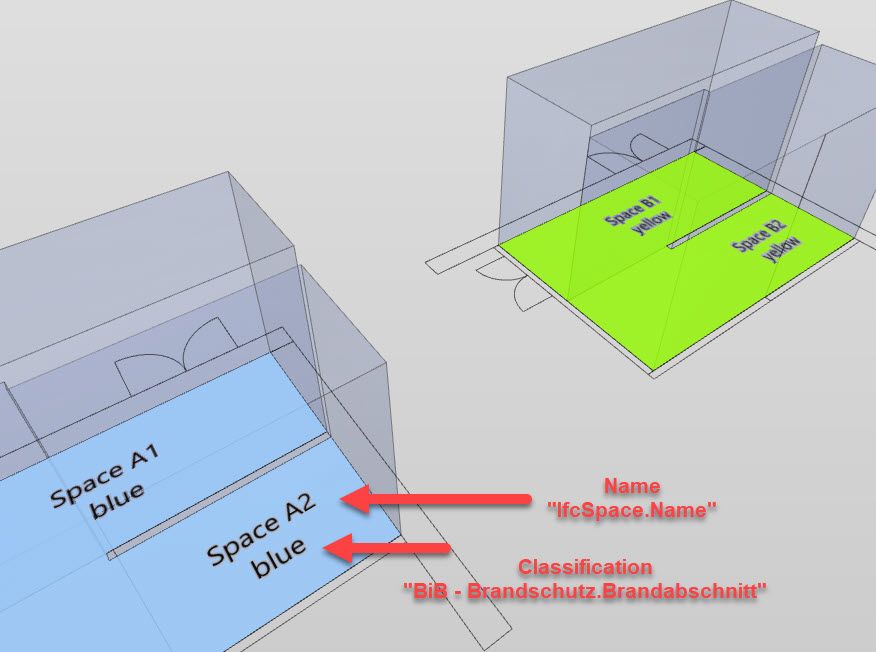
- filter all components and spaces with the desired classification, with SOL 230 (works OK)
- Gatekeeper with only passed Components (works OK)
SOL 222 to check which of the passed Components are “touching” the passed spaces with the classification. (PROBLEM: Gatekeeper does not apply for “target Components” )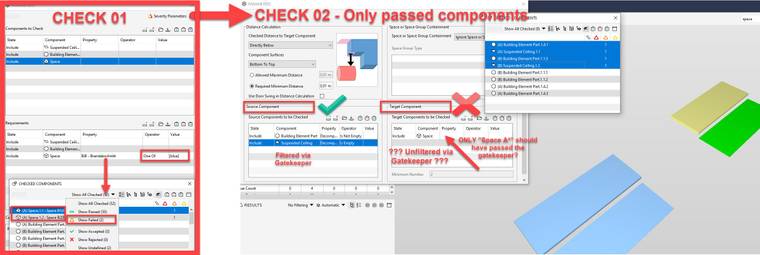
PS. I cannot filter the desired spaces with SOL 222, as this is only a small view of the larger workflow which s depicted here.
are there any other options that I am missing?
here is the file:
BIM BUG - Gatekeeper.smc -
@marchi said in SOL 222 - Gatekeeper in "target Components" not working:
I need an elaborate Checking Routine, which combines 3 Rules,
Did you find a workaround in the end? I am facing similiar issues when multiple gatekeepers are combined it’s very tricky to get what you want and you have to spin your head around multiple times …
-
I had a simalar issue.
The support in my case say that only the left side of Some rulesets react with the Gatekeeper.
It would be great to have a list of the rulesets witch only reacts with de lefrt columns



Copyright © 2025 Solibri Inc. | Powered by NodeBB