
Error in reading file
-
Hi. This happens when the file ends unexpectedly. Most often we see this when reading files from network drives, or when file copying has ended abruptly and the file is now incomplete.
-
Yes, it seems that way. Thanks a lot

-
@pedro said in Error in reading file:
Hello Solibrians. I have the same error message since 2 days ago. I have copied the file locally but it is still blocking, not letting me work with the file. Would you have any workaround to solve the problem? Thanks, have a good day
Hi. If the file is incomplete, there is no possible way to read it properly. You can try copying it again from the source file which is complete. Compare the sizes (and hashes with certutil -hashfile Example.txt MD5) after copying to make sure it is complete.
-
@pedro said in Error in reading file:
Hello Mr.Lindqvist,
Maybe I have to tell that I am not a programmer. I am a Solibri user. Could you please develop the solution please?
Thanks againHi. Sorry but if the file is incomplete, there is nothing Solibri can do. You need to find the complete file somehow. These kinds of errors happen with bigger files sometimes when using with remote drives and they are not really related to Solibri products, so there is no way for Solibri to prevent them.
-
@pedro said in Error in reading file:
Hello Lasse thanks for your quick response. Could you please clarify " if the file has not the same size"? any exemple? image?
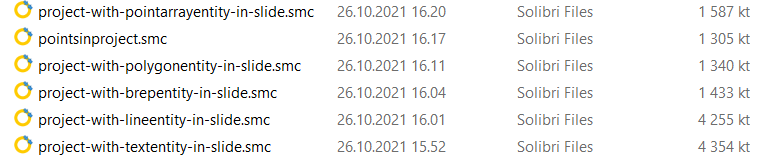
Thanks!So if you copy the file from a remote location, you can check the file size of the local file versus the remote file to make sure the whole file was copied successfully. Although in some rare cases it might be corrupted even if the file size looks the same.
-
Hello Lasse,
Thank you so much for your response. I think I understood that if the saving process for the file is broken for any reason, the file remains incomplete for future openings because it overwrittes the old version without any rollback possible.
If that is the case, I suggest to review that process… Either storing the file in a temporary bag to commit the full save once it is completed either creating a local copy as the way, for exemple, Revit does. -
@pedro said in Error in reading file:
Hello Lasse,
Thank you so much for your response. I think I understood that if the saving process for the file is broken for any reason, the file remains incomplete for future openings because it overwrittes the old version without any rollback possible.
If that is the case, I suggest to review that process… Either storing the file in a temporary bag to commit the full save once it is completed either creating a local copy as the way, for exemple, Revit does.Hi. You can also backup your data to the cloud, which can keep older versions of files stored, or use Solibris backup functionality, which keeps the chosen amount of older versions of the file on disk. The backup option is under “General” settings.
-
@jsn said in Error in reading file:
Is this one related to the EOF error - happened when a colleague tried to open the file again after updating …?
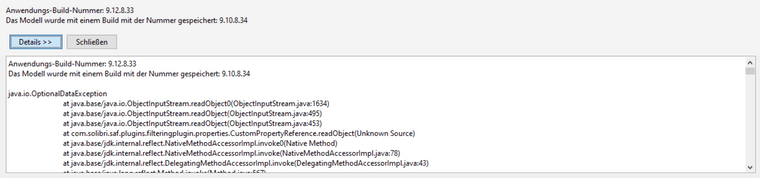
Hi. This could be such an error. But this could also be such a case that we might be able to open the file in a developer environment.
I can see that it uses the new custom informations. There might be a problem between the two versions. Even though custom informations were introduced in 9.10.6, the earlier versions might not have persisted them fully correctly. I would suggest using 9.12 only when using custom informations. -
Hi, thx for the hint however the mystery probably has been solved, but let me explain.
I have a template file last saved with 9.12 which contains ressources my colleague needed.
It seems like he has opened this file with 9.10 and saved the ruleset from there to his disk (? - not totally sure if he just took the cset and made a copy or really opened a 9.12 file with 9.10 as I guess this won’t be possible)In his project running on 9.10 he loaded the ruleset and other ressources without any problems.
The ruleset he needs does not rely on custom informations - however a custom view was not working properly and that’s where I realized that he’s not on the latest version - then he performed the update.
Once finished the surprise came in and the error showed up once he tried to open the file he just saved minutes ago twice (cause you never know …) …So, I checked the custom information as you suggested but did not really have a clue what’s the matter as I did not really make sense in this context. But as the custom view was working now and one of the previous save files of the project also opened successfully without a warning he took the pill and started over again to recreate the latest steps. Then he realized that adding the ruleset (he saved once saved with the old version, see above) brought him back the same error again as he tried to add it now …
That’s when we realized that this was probably the reason why the file got corrupt. At least I know now what happened and the it was basically our fault as he had an outdated version but it still surprises me that he could “lock himself out” without a warning. Especially as the ruleset itself has actually nothing to do with custom information here but seems like just was created with a newer version.
-
 A agroni referenced this topic on

Copyright © 2025 Solibri Inc. | Powered by NodeBB