
other than rule 223, what do you use to check if the Structural model and the architectural model are identical?
-
@anees-alomar We don’t allow our architectural models to have structural elements, because each discipline is responsible for their own aspect model.
The architect is the first party that is involved in making drawings/models, so that is why in the early stages the architect will design a project which will include structural elements, but once the structural engineer is involved the structural elements are removed from the architectural model.
If we combine these models, they should make the design without duplications. (balconies are probably one of the only exceptions where the architect still models a balcony, but only for the aesthethic shape. The structural engineer is still responsible for the structural element)
If we are talking about rulesets that we use, I guess it’s mainly the General intersection rule. However, I want to explore a lot of different rulesets in the upcoming month to expand this. So I would also like to know how other people do this!

-
@ricardo said in other than rule 223, what do you use to check if the Structural model and the architectural model are identical?:
… but once the structural engineer is involved the structural elements are removed from the architectural model.
They remove them, or they just don’t export them?
-
@jsn said in other than rule 223, what do you use to check if the Structural model and the architectural model are identical?:
@ricardo said in other than rule 223, what do you use to check if the Structural model and the architectural model are identical?:
… but once the structural engineer is involved the structural elements are removed from the architectural model.
They remove them, or they just don’t export them?
I guess for most people that use Revit they don’t export them, since it’s quite easy in Revit to setup a 3D view and export specific parts. I don’t know how this is done in Archicad or other software, but I guess it’s quite similar.
-
@anees-alomar said in other than rule 223, what do you use to check if the Structural model and the architectural model are identical?:
@ricardo Well, the structural elements in the architectural model (beams, slabs, openings) must be identical to the structural model. other than using rule 223, How do you check them?
Attached is a screenshot of one situation where I checked if the beams in both models are identical in position and geometry.
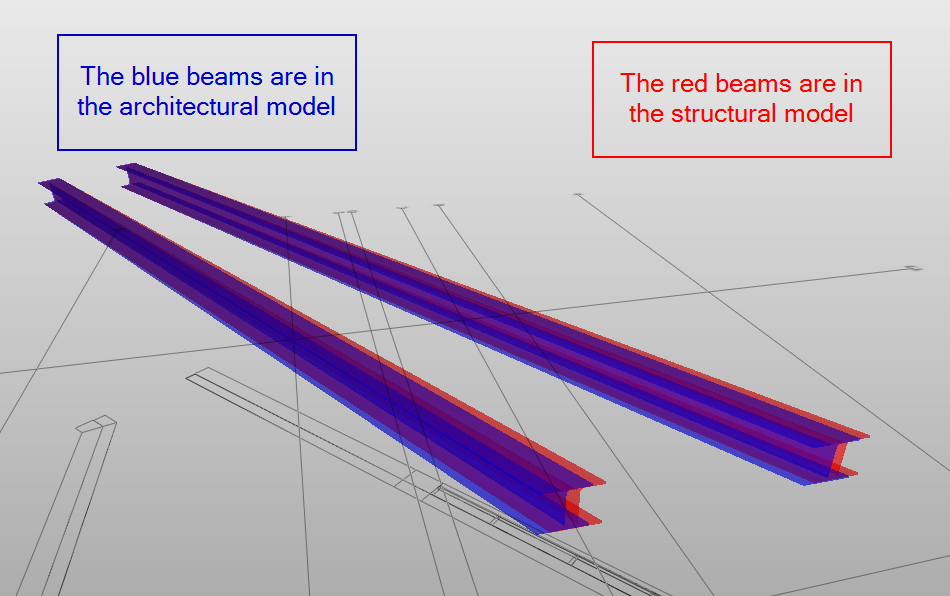
I’ve also used rule SOL/234/1.2 for this.
-
In the DACH region, it is usually common and also necessary that the structural engineer and the architect both create and export their own models. We also check whether the two models are identical with regard to the statically relevant components. For us, this is also an elementary use case.
I am also interested in how we can best proceed here. Solibri support told us some time ago not to use the SOL/224/2.1 and SOL/223/2.1 rules because they are outdated. In the training we were advised not to use rule SOL/234/2.1. Now we don’t know what to do either. Rules 224 and 223 do not find IfcBuildingElementParts. Rule 234 finds more, but unfortunately not everything.
What is the solution?
-
@jmann said in other than rule 223, what do you use to check if the Structural model and the architectural model are identical?:
In the DACH region, it is usually common and also necessary that the structural engineer and the architect both create and export their own models. We also check whether the two models are identical with regard to the statically relevant components. For us, this is also an elementary use case.
I am also interested in how we can best proceed here. Solibri support told us some time ago not to use the SOL/224/2.1 and SOL/223/2.1 rules because they are outdated. In the training we were advised not to use rule SOL/234/2.1. Now we don’t know what to do either. Rules 224 and 223 do not find IfcBuildingElementParts. Rule 234 finds more, but unfortunately not everything.
What is the solution?
Did they expand on why not to use SOL/224/2.1 and SOL/223/2.1, or even SOL/234/2.1?
Then what rulesets are left to do checks like these? -
@bim1337
Around 2020 we had a Solibri training. After we had strange results with the rules 234, we got the urgent advice from the training partner to use the rules 224 and 223, because they were specifically created for this use case.After we noticed that e.g. all exterior walls were not checked in the rules and therefore deviations could not be determined, we asked the support. Regarding rules 224 and 223, the support said that they are relatively old rules and that issues are generated when a component is outside the boundaries of the correponding component. We are supposed to try the comparable rule 234, which does a comparable check, but in a different way. We received this feedback in early 2021.
With rule 234, deviations from window lintels were not detected. Support then wrote that Rule 234 only checks the distances or overhangs from the outer edges of the components, not from the openings. It was suggested that the openings should therefore be checked using their own collision rule (opening architecture against component statics, for example), but this did not detect the deviation either.
https://help.solibri.com/hc/en-us/articles/1500004610861-234-Component-Inside-Component
The support went on to say that a wall namely has only one underside height and not two or more underside heights due to openings. We think - and also notice - that we do not find problems not only with openings, but also in other places, even if the corresponding component has no offsets or similar. We are therefore a bit perplexed after this feedback from the support two months ago and now also do not know how we should best proceed.Currently, we continue to use Rule 234 in several stages. Last but not least, a lot of deviations are found, strangely enough also in the area of openings and windows. In addition, we check openings of one discipline against the components of the other - that too in several stages. All this in the hope of not overlooking too many deviations. Of course, this has greatly increased the workload, issues sometimes duplicate each other and a component with several deviations often has several individual issues.
How do you and others do it?
-
@ricardo
I don’t get it. As an architect I need the structural components to work with. I have the responsibility for the whole planning process and have to show everything in my 2D-plans including measurements that will potentially get lost after updating the model of the structural engineer. Do you all work in a cloud model? And if not, and the architect has the statically relevant components himself in his model for the plans, how is it ensured that the architect’s planning and the structural analysis are consistent? -
@jmann Thank you for the great detailed reply, and sorry for my late reply.
I got a similar reply from Solibri support.As a summary, we found that:
Rules 223 & 224 are good for detecting deviations in the outer boundaries, for example, walls in the structural model are longer than ones in the architectural models, but that doesn’t detect the deviations in the window size or any deviation in the inner openings in the walls.
Rule 234 detects more cases but it has its drawbacks:
1- I need to detect each component of the structural model with its correspondent component in the architectural model. which means more rules to check.
2- I use it only to check the distance from the outside (überstand von Innenkomponenten überprüfen) and I use it to check components in both directions (check structural with architecture and check architecture with structural).
3- Checking the inner distance won’t get me all the results, as it is enough for a component to touch one surface from one side to pass.At the moment the ruleset we are using for that contains:
1- Rule 223
2- Rule 234 both directions for each type of the component (walls, beams, slabs, MEP openings, window & door openings)
3- Rule 1 to check ARC openings with St-Model
4- Rule 1 to check ST openings with ARC-ModelAs you already said, It is a lot of work to do, and that’s why I asked to see how others are doing it.
Thank you
If anyone has tried other solutions, please share it with us here.
-
@ricardo Thanks for your reply, I got your point. You might have a different workflow.
In our case, we need to check both architectural and structural models to make sure they are identical because the architect is responsible for the final model.
In your case, do you have the structural engineer in-house? are you both working on the same model?



Copyright © 2025 Solibri Inc. | Powered by NodeBB