
Deleted custom rules when updating to Solibri 9.12.8.33
-
Hello @Solibrians,
Our customers had an issue where all of our custom rules (inside lib folder) are deleted after updating to Solibri 9.12.8.33.
Is it an intended installer behavior from now on, and we have to deploy our custom rules again after every update, or is it just in Solibri 9.12.8.33’s installer?
Thanks and Best Regards,
ThangLV9 -
Hi. The (un)installation does blindly remove old JARs from the lib folder. This is to prevent issues where earlier versions had JARs we no longer want to provide.
There is no easy way to make it know which JARs are API resources and should be left.
One workaround is to keep the JARs in
C:\Users\user.name\APIfolder where they are also loaded from. This direcetory is not deleted in installation process.
-
Hello @lasse-lindqvist,
About the uninstallation process, doesn’t the installer keep a list of extracted file to remove in uninstallation process? So I think those that are other than these files are considered API resources.
About the path you gave, I’ve checked this path C:\Users\Public\Solibri\SOLIBRI\API and it seems to work as intended, though we will have to make some tests.
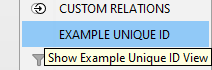
But when using Custom Views with resource bundles, it does not load the resource correctly.
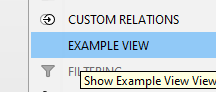
You can recreate the issue using view-template project and remove getName method of ExampleView.java to make it load from resource bundles.
Sample code: view-template.zipWhen loaded in lib folder, it loads from resource bundle:
When loaded in API folder, it defaults to view’s unique id, bypassing the resource bundle.
-
C:\Users\user.name\API
is different from
C:\Users\Public\Solibri\SOLIBRI\APInot sure that makes the difference there.
I am not sure we want to change how deleting JARs from the lib folder works really. It is anyway an admin-restricted path in most systems, so it is not the usual way for users to add API resources, even though it works.
Copyright © 2025 Solibri Inc. | Powered by NodeBB