Skip to content
  • Categories
Collapse
Solibri Society Forum
  1. Home
  2. General Discussion
  3. Layout bug - Score Layout keeps coming back

Layout bug - Score Layout keeps coming back

Scheduled Pinned Locked Moved General Discussion
6 Posts 4 Posters 1.2k Views
  • Oldest to Newest
  • Newest to Oldest
  • Most Votes
Log in to reply
This topic has been deleted. Only users with topic management privileges can see it.
  • RicardoR Offline
    RicardoR Offline
    Ricardo
    wrote on last edited by
    #1

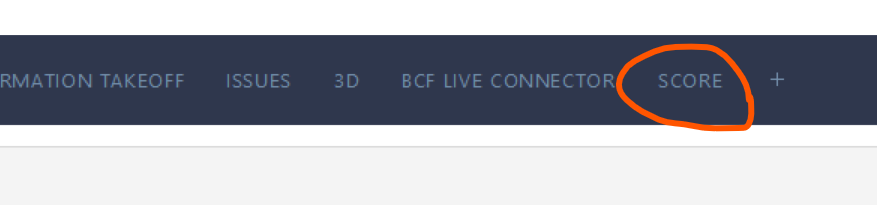
    The Score layout keeps coming back every time when I remove it and restart Solibri.

    I hope this is not intended to work like this and is a bug?

    Currentl running version 9.12.8.33

    31b71b2b-abf7-43a4-8a4f-0de9862dc679-image.png

    1 Reply Last reply
    0
    • JSNJ Offline
      JSNJ Offline
      JSN
      wrote on last edited by
      #2

      Did you save the layout?

      RicardoR 1 Reply Last reply
      0
      • RicardoR Offline
        RicardoR Offline
        Ricardo
        replied to JSN on last edited by
        #3

        @JSN said in Layout bug - Score Layout keeps coming back:

        Did you save the layout?

        I think I tried everything; restoring to the standard layout and trying from there, Saving custom Layout etc.
        In the Roles settings, there is not a layout file installed that would overwrite this.

        1 Reply Last reply
        0
        • MarioM Offline
          MarioM Offline
          Mario
          wrote on last edited by
          #4

          Yes, it is as you wrote, unfortunately. Like you I have tried everything but nothing helps, the score layout keeps coming back. It’s a pity because I don’t use the Score.

          1 Reply Last reply
          0
          • john.lippJ Offline
            john.lippJ Offline
            john.lipp
            wrote on last edited by
            #5

            @Mario

            Please try the following :

            1. Set your layout the way you’d like to have it saved
            2. Open File > Settings > Layout and click Save As to save your custom layout.
            3. Open File > Settings > Roles and click the Browse Button under Default Layout Set
            4. Save to overwrite your role OR Click Save As to save a new role with that new Default Layout.

            When you are in that role, it should use that layout. You’ll need to do this for any other roles as well that you use.

            There is another setting that can cause the layout to still revert to the “blank” default layout with Score. If you have “Show Role Selection” turned on under File > Settings > General, it will open Solibri with your role set to “New Role” and prompt you when you go to checking after loading an IFC to set your role. However, if you open an .smc you already have been working on, you’ll remain in “New Role” which has the score layout.

            Try turning that off as well it you still have issues.

            MarioM 1 Reply Last reply
            0
            • MarioM Offline
              MarioM Offline
              Mario
              replied to john.lipp on last edited by Mario
              #6

              @john-lipp Thank you for your explanation. It is possible that it works like this. But in my opinion it should not be role dependent how the layout looks like? For something I can save the layout as a layout file. That should be a basic setting in Solibri, quasi superordinate.
              Isn’t this setting meant for each employee to be able to set it up for themselves as they wish?

              • With the mentioned workflow I would have to save each role with each layout?

              • And if I have to set this for each role and make a change once, I would have to save each role again like this.

              I don’t think this is practical, am I the only one?

              1 Reply Last reply
              0
              • john.lippJ john.lipp referenced this topic on

              Copyright © 2025 Solibri Inc. | Powered by NodeBB

              • Login

              • Don't have an account? Register

              • Login or register to search.
              • First post
                Last post
              0
              • Categories