
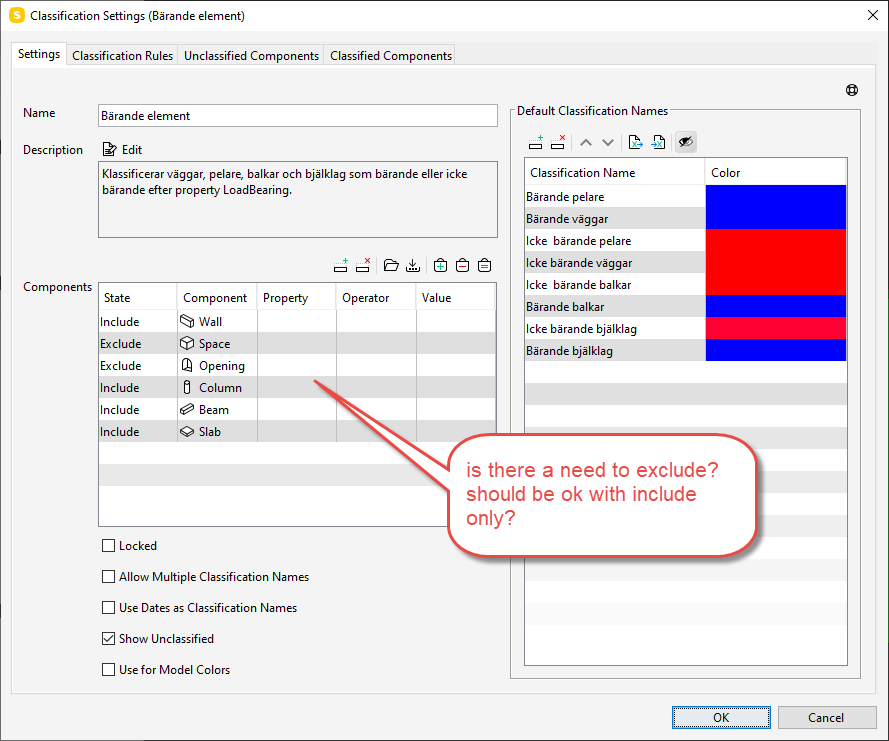
Exclude necessary in filtering elements in classi view?
-
As the subject says. I’m looking at the roles coming with the role made by our Solibri seller. For a component filtering in the classification view they have mixed include and exclude… for me this makes no sense… everything should be excluded if it’s not included…or how does it work?
Br,
Mats
-
The logic is the following:
- First take all include filters
- Apply these per-component-type with OR logic. So if you have two wall filters it finds walls that match either of them.
- Take all exclude filters. Apply these to the already-included components class-wise. So exclusion filter with component-type wall is only applied to the two wall inclusions. But if the exclusion has no component-type, it is applied to all inclusions.
Readability-wise it might help to order the filter rows so that you put the component-types in order with inclusions first and exclusions after them. I find that makes it simplest to read. It will have no effect on the logic. Although in rare cases it might affect performance since they are mostly applied in order from top to bottom. So most efficient exclusions are best put first.
-
@lasse-lindqvist said in Exclude necessary in filtering elements in classi view?:
So most efficient exclusions are best put first
Such explanations are great. In relation to optimizing ressources I have often missed a row up/down button which would ease this process. Often such filters are set up fast and on the go. To have a good template it often requires rebuilding the filters from scratch due to the lack of a proper sorting option. Would be great to see such a possiblity that in a future release.
-
@lasse-lindqvist great explanation. Thanks



Copyright © 2025 Solibri Inc. | Powered by NodeBB